# show the dimensions of the data
dim(somedata)

# show a summary of the data
summary(somedata)

# factorise and show the "somevariable" variable in the "somedata" dataframe
as.factor(somedata$somevariable)Connect operations with the pipe |>
The combination of symbols |> is called the “pipe”. The pipe is a crucial bit of R code.
Why? A bit of backstory first.
We have seen already seen a few examples of R code such as:
And we can actually wrap functions inside functions:
# factorise the "somevariable" variable in the "somedata" dataframe,
# then show a summary of it
summary(as.factor(somedata$somevariable))
R evaluates code from the inside-out!
You can end up with functions inside functions inside functions …
# Don't worry about what all these functions do,
# it's just an example -
round(mean(log(cumsum(diff(1:10)))))
[1] 1We can write in a different style, however, and this may help to keep code tidy and easily readable - we can write sequentially:
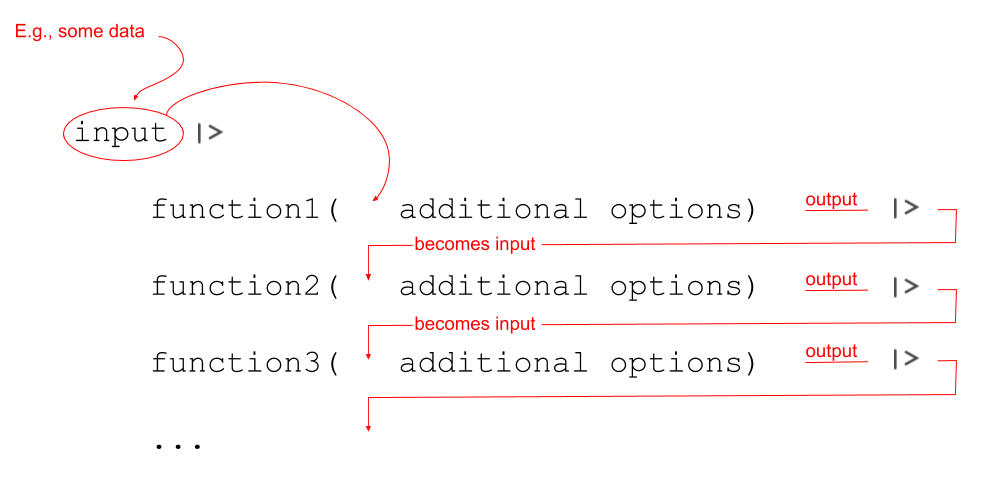
Notice that what we are doing is using a new symbol: |>
This symbol takes the output of whatever is on it’s left-hand side, and uses it as an input for whatever is on the right-hand side. The |> symbol gets called a “pipe”.
Let’s see it in action with the starwars2 dataset. The data contains information on various characteristics of characters from Star Wars. Before we can use the pipe operator, |>, we need to load the tidyverse packages, because that is where |> is found.
library(tidyverse)

starwars2 <- read_csv("https://uoepsy.github.io/data/starwars2.csv")
starwars2 |>
    head()
# A tibble: 6 × 6
name height hair_color eye_color homeworld species
<chr> <dbl> <chr> <chr> <chr> <chr>
1 Luke Skywalker 172 blond blue Tatooine Human
2 C-3PO 167 <NA> yellow Tatooine Human
3 R2-D2 96 <NA> red Naboo Droid
4 Darth Vader 202 none yellow Tatooine Human
5 Leia Organa 150 brown brown Alderaan Human
6 Owen Lars 178 brown, grey blue Tatooine Human starwars2 |>
summary() name height hair_color eye_color
Length:75 Min. : 79 Length:75 Length:75
Class :character 1st Qu.:168 Class :character Class :character
Mode :character Median :180 Mode :character Mode :character
Mean :176
3rd Qu.:191
Max. :264
homeworld species
Length:75 Length:75
Class :character Class :character
Mode :character Mode :character
We can now write code that requires reading it from the inside-out:
summary(as.factor(starwars2$homeworld))or which requires reading it from left to right:
starwars2$homeworld |>
    as.factor() |>
    summary()
Alderaan Aleen Minor Bespin Bestine IV Cato Neimoidia
3 1 1 1 1
Cerea Champala Chandrila Concord Dawn Corellia
1 1 1 1 2
Coruscant Dathomir Dorin Endor Eriadu
3 1 1 1 1
Geonosis Glee Anselm Haruun Kal Iktotch Iridonia
1 1 1 1 1
Kalee Kamino Kashyyyk Malastare Mirial
1 3 2 1 2
Mon Cala Muunilinst Naboo Nal Hutta Ojom
1 1 8 1 1
Quermia Rodia Ryloth Serenno Shili
1 1 2 1 1
Skako Socorro Springfield Stewjon Sullust
1 1 2 1 1
Tatooine Toydaria Trandosha Troiken Tund
10 1 1 1 1
Utapau Vulpter Zolan
1 1 1 And that long line of code from above:
# again, don't worry about all these functions,
# just notice the difference in the two styles.
round(mean(log(cumsum(diff(1:10)))))
becomes:
1:10 |>
    diff() |>
    cumsum() |>
    log() |>
    mean() |>
    round()
We’re going to use this way of writing a lot throughout the course, and it pairs really well with a group of functions in the tidyverse packages, which were designed to be used in conjunction with |>.