library(cowsay)Use R Packages
A “package” in R is a collection of code that someone out there in the R community wrote. Packages are usually designed for specific purposes.
For example:
tidyverse: designed for wrangling dataskimr: designed for previewing datacowsay: a silly little package that prints out an ASCII cartoon (see below!)
We install a package only once. But each time we start writing in a new R script, we have to load the packages we need.
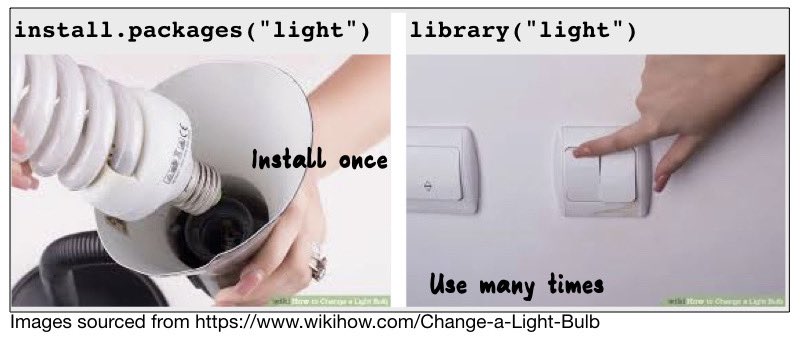
To install a package
In the console (not in your R script), type install.packages("cowsay") and hit Enter.
Lots of red text will come up, and it will take a bit of time.
When it has finished, and R is ready for you to use again, you will see the blue sign >.
To load a package
In your R script (not in the console), type library(cowsay) and run the line. This loads the package for us to use it.
(Why do we load the script in the R script and not the console? We include all library() lines in our R script (rather than running them in the console) so that anyone else who tries to run our code knows what R packages we have used in this specific script.)
To use a package
After running library(cowsay), you have access to all the contents of the package cowsay. Here’s an example.
In the next line of your R script, type say("hello world", by = "cow") and run the line. Hopefully you got a similar result to ours:
say("hey there!", by = "cow")
 ____________
< hey there! >
 ------------
      \
       \

        ^__^
        (oo)\ ________
        (__)\         )\ /\
             ||------w|
             ||      ||
Then why not try this in the next line?
say("what's up?", by = 'grumpycat')
 ____________
< what's up? >
 ------------
     \
      \

      ハ _ ハ
      ಠ X ಠ
Errors if package not loaded
If you tried to run that line of code without running library(cowsay) first, R would give you an error message:
Error in say("what's up?", by = "grumpycat") :
  could not find function "say"
If you think your code should work and the error says something like “could not find function”, then chances are that you’ve either left out or forgotten to run the line that loads that package.