| education | income | seniority | gender | male | party |
|---|---|---|---|---|---|
| 8 | 37.449 | 7 | male | 1 | Democrat |
| 8 | 26.430 | 9 | female | 0 | Independent |
| 10 | 47.034 | 14 | male | 1 | Democrat |
| 10 | 34.182 | 16 | female | 0 | Independent |
| 10 | 25.479 | 1 | female | 0 | Republican |
| 12 | 46.488 | 11 | female | 0 | Democrat |
Simple Linear Regression
Learning Objectives
At the end of this lab, you will:
- Be able to specify a simple linear model.
- Understand what fitted values and residuals are.
- Be able to interpret the coefficients of a fitted model.
Requirements
- Be up to date with lectures from Weeks 1 & 2
- Have completed Week 1 lab exercises
Required R Packages
Remember to load all packages within a code chunk at the start of your RMarkdown file using library(). If you do not have a package and need to install, do so within the console using install.packages(" "). For further guidance on installing/updating packages, see Section C here.
For this lab, you will need to load the following package(s):
- tidyverse
- sjPlot
Lab Data
You can download the data required for this lab here or read it in via this link https://uoepsy.github.io/data/riverview.csv.
Study Overview
Research Question
Is there an association between income and education level in the city of Riverview?
Let’s imagine a study into income disparity for workers in a local authority. We might carry out interviews and find that there is an association between the level of education and an employee’s income. Those with more formal education seem to be better paid.
In this lab, we will use the riverview data (see below codebook) to examine whether education level is related to income among the employees working for the city of Riverview, a hypothetical midwestern city in the US.
Setup
Setup
- Create a new RMarkdown file
- Load the required package(s)
- Read the riverview dataset into R, assigning it to an object named
riverview
Exercises
Data Exploration
The common first port of call for almost any statistical analysis is to explore the data, and we can do this visually and/or numerically.
| ================ Description |
Marginal DistributionsThe distribution of each variable (e.g., employee incomes and education levels) without reference to the values of the other variables |
Bivariate AssociationsDescribing the relationship between two numeric variables |
|
|
Visually |
Plot each variable individually. You could use, for example, geom_density() for a density plot or geom_histogram() for a histogram to comment on and/or examine:
|
Plot associations among two variables. | | | You could use, for example, geom_point() for a scatterplot to comment on and/or examine: | | |
|
|
Numerically |
Compute and report summary statistics e.g., mean, standard deviation, median, min, max, etc. You could, for example, calculate summary statistics such as the mean ( mean()) and standard deviation (sd()), etc. within summarize()
|
Compute and report the correlation coefficient. You can use the cor() function to calculate this |
|
Marginal Distributions
Question 2
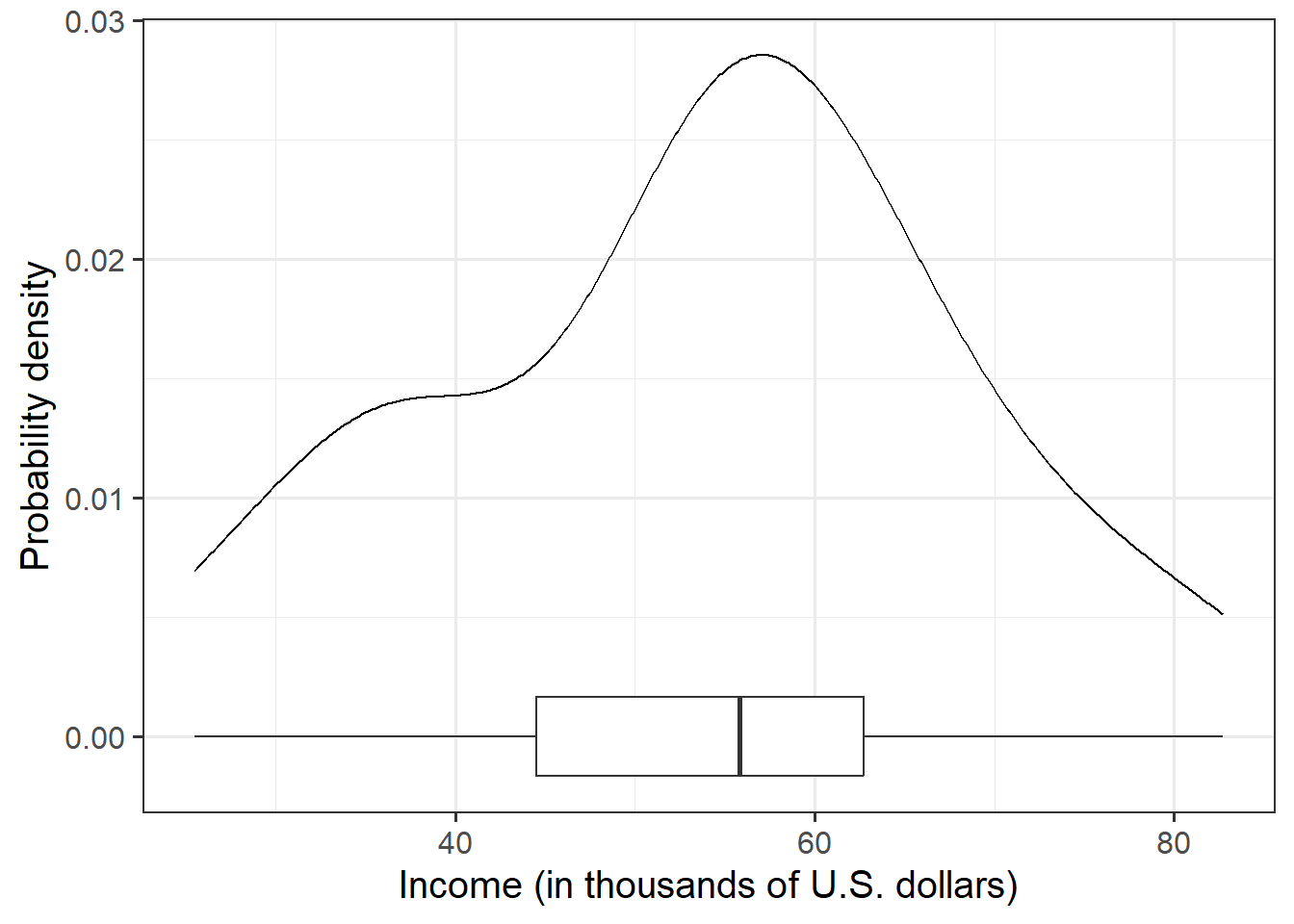
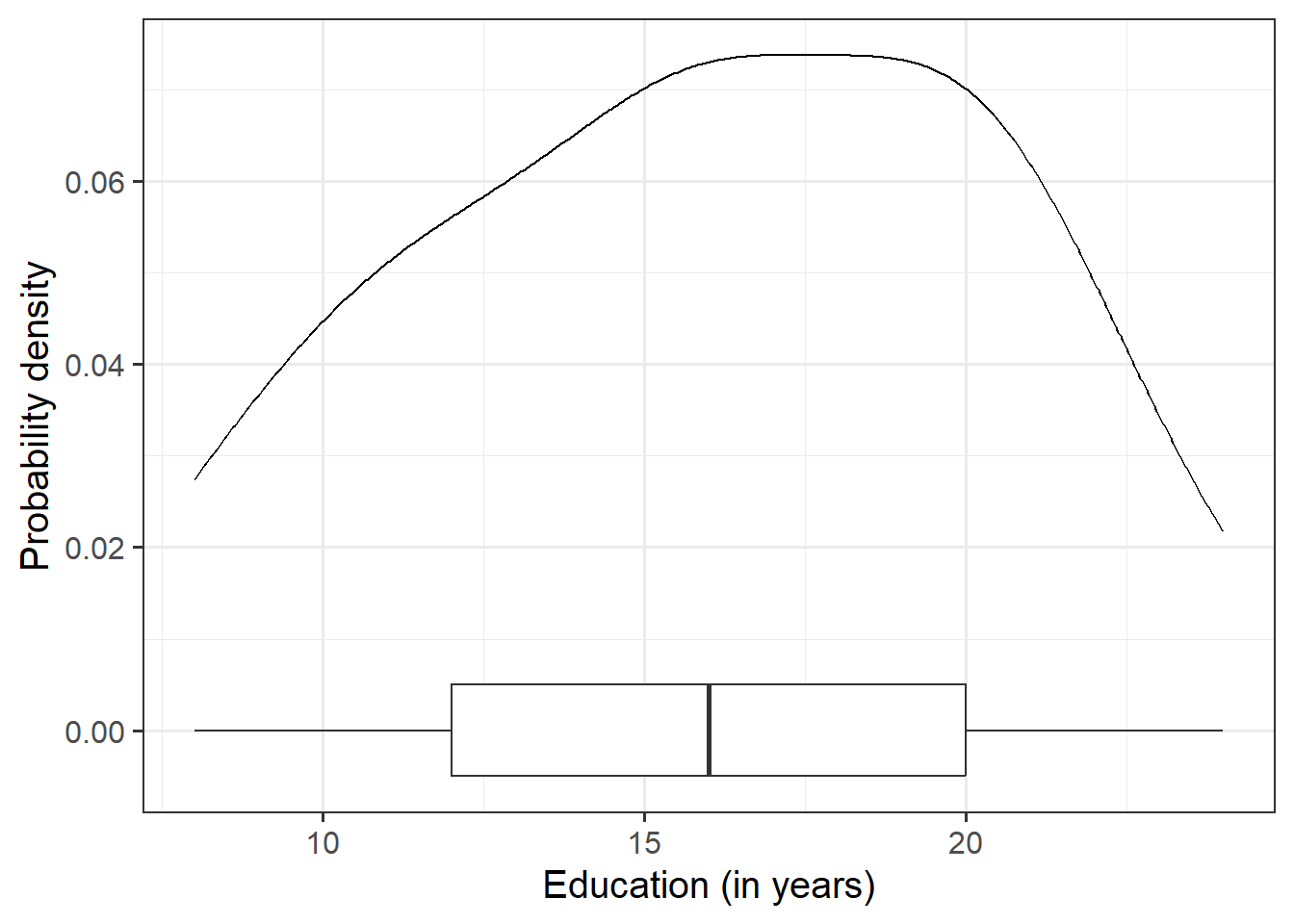
Visualise and describe the marginal distributions of employee incomes and education level.
Associations among Variables
Question 3
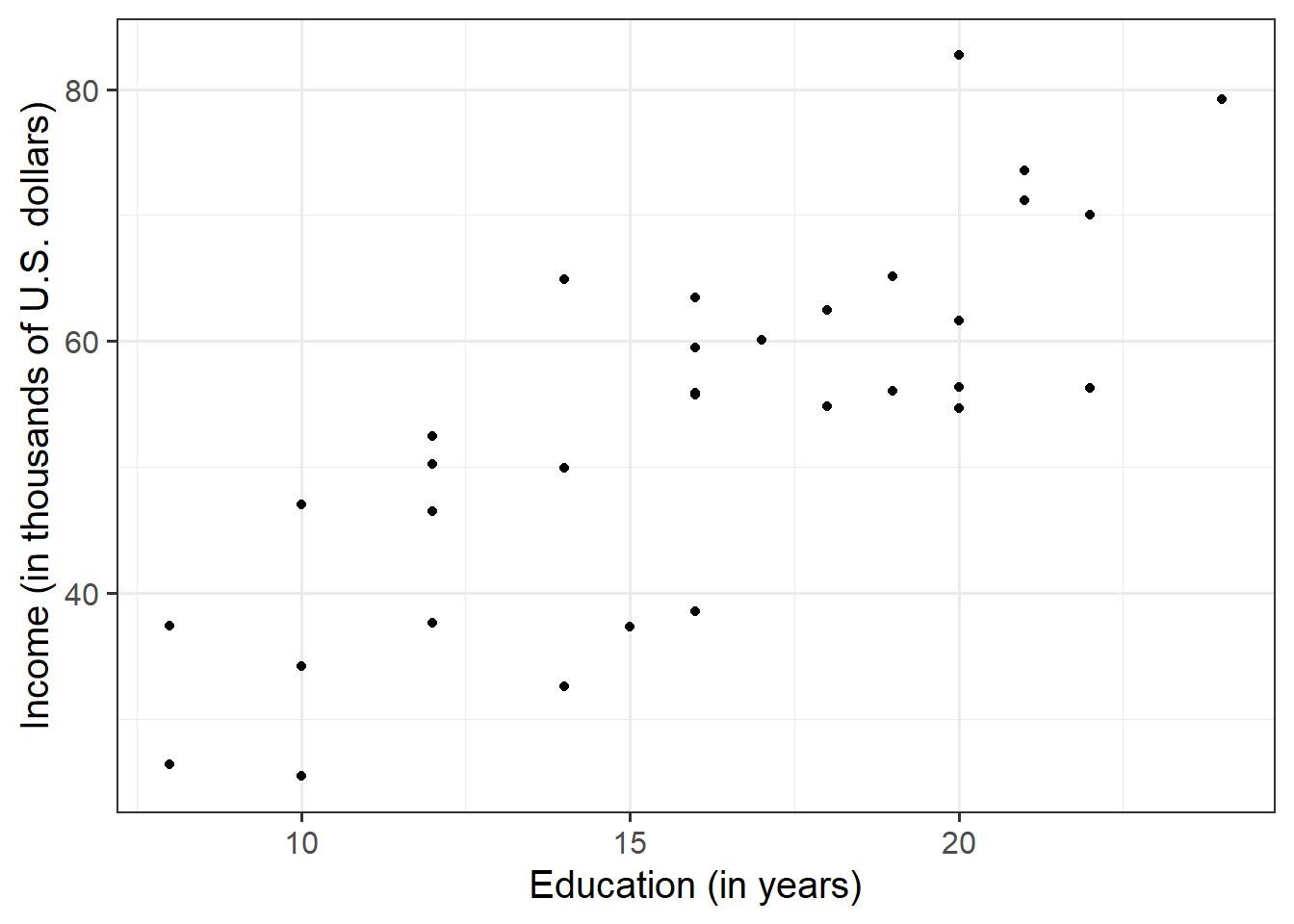
Create a scatterplot of income and education level before calculating the correlation between income and education level.
Making reference to both the plot and correlation coefficient, describe the association between income and level of education among the employees in the sample.
Hint
We are trying to investigate how income varies when varying years of formal education. Hence, income is the dependent variable (on the y-axis), and education is the independent variable (on the x-axis).
Model Specification and Fitting
The scatterplot highlighted a linear relationship, where the data points were scattered around an underlying linear pattern with a roughly-constant spread as x varied.
Hence, we will try to fit a simple (i.e., one x variable only) linear regression model:
\[ y_i = \beta_0 + \beta_1 x_i + \epsilon_i \\ \quad \text{where} \quad \epsilon_i \sim N(0, \sigma) \text{ independently} \]
Question 4
First, write the equation of the fitted line.
Next, using the lm() function, fit a simple linear model to predict income (DV) by Education (IV), naming the output mdl.
Lastly, add update your equation of the fitted line to include the estimated coefficients.
Hint
The syntax of the lm() function is:
[model name] <- lm([response variable i.e., dependent variable] ~ [explanatory variable i.e., independent variable], data = [dataframe])
Question 5
Explore the following equivalent ways to obtain the estimated regression coefficients — that is, \(\hat \beta_0\) and \(\hat \beta_1\) — from the fitted model:
mdlmdl$coefficientscoef(mdl)coefficients(mdl)summary(mdl)
Question 6
Explore the following equivalent ways to obtain the estimated standard deviation of the errors — that is, \(\hat \sigma\) — from the fitted model mdl:
sigma(mdl)summary(mdl)
Question 7
Interpret the estimated intercept, slope, and standard deviation of the errors in the context of the research question.
Hint
To interpret the estimated standard deviation of the errors we can use the fact that about 95% of values from a normal distribution fall within two standard deviations of the centre.
Question 8
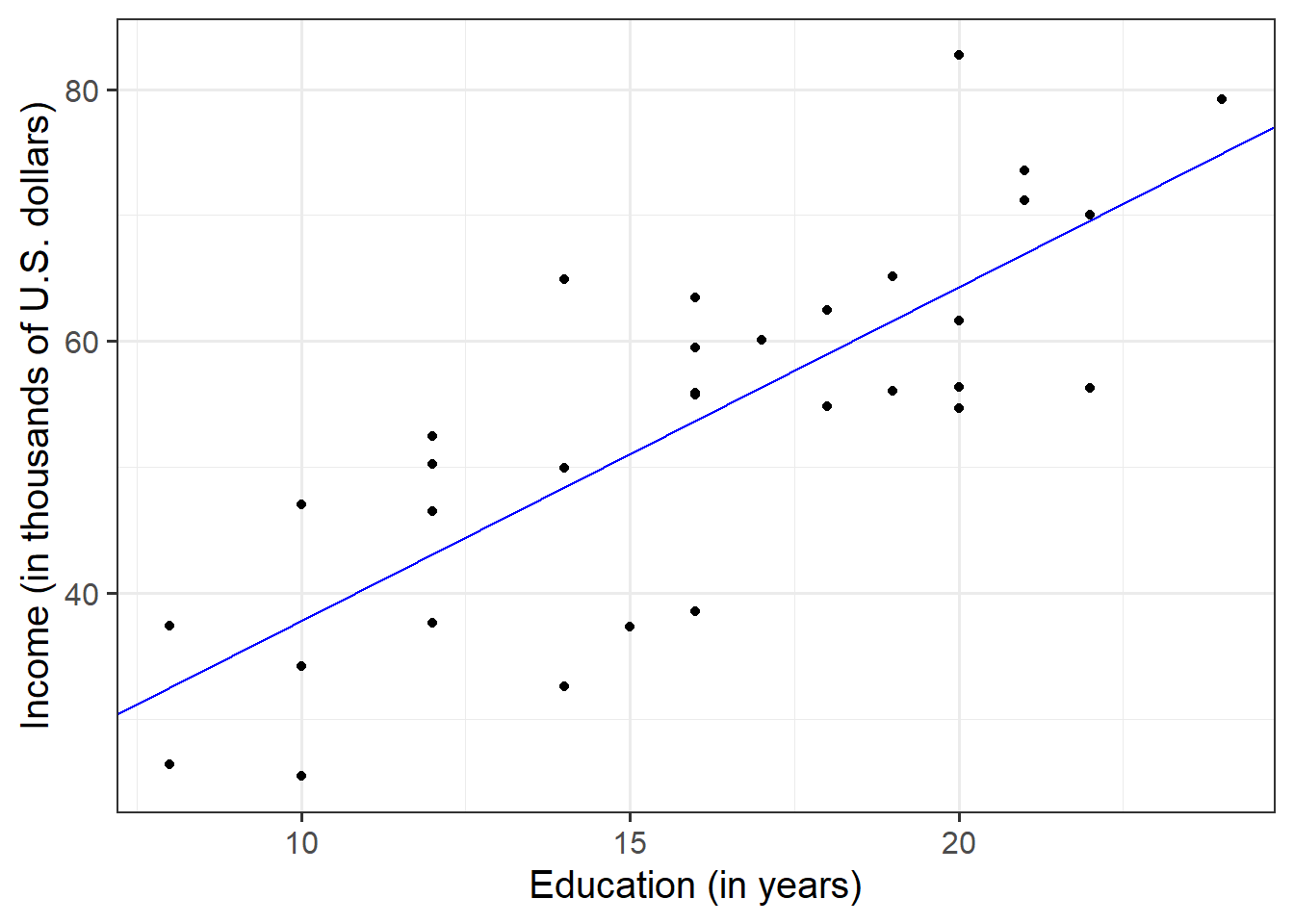
Plot the data and the fitted regression line. To do so:
- Extract the estimated regression coefficients e.g., via
betas <- coef(mdl) - Extract the first entry of
betas(i.e., the intercept) viabetas[1] - Extract the second entry of
betas(i.e., the slope) viabetas[2] - Provide the intercept and slope to the function
Hint
Extracting values: The function coef(mdl) returns a vector: that is, a sequence of numbers all of the same type. To get the first element of the sequence you append [1], and [2] for the second.
Plotting: In your ggplot(), you will need to specify geom_abline(). This might help get you started:
geom_abline(intercept = <intercept>, slope = <slope>)
Predicted Values & Residuals
Predicted Values
Model predicted values for sample data:
We can get out the model predicted values for \(y\), the “y hats” (\(\hat y\)), for the data in the sample using various functions:
predict(<fitted model>)fitted(<fitted model>)fitted.values(<fitted model>)mdl$fitted.values
For example, this will give us the estimated income (point on our regression line) for each observed value of education level.
predict(mdl) 1 2 3 4 5 6 7 8
32.53175 32.53175 37.83435 37.83435 37.83435 43.13694 43.13694 43.13694
9 10 11 12 13 14 15 16
43.13694 48.43953 48.43953 48.43953 51.09083 53.74212 53.74212 53.74212
17 18 19 20 21 22 23 24
53.74212 53.74212 56.39342 59.04472 59.04472 61.69601 61.69601 64.34731
25 26 27 28 29 30 31 32
64.34731 64.34731 64.34731 66.99861 66.99861 69.64990 69.64990 74.95250 Model predicted values for other (unobserved) data:
To compute the model-predicted values for unobserved data (i.e., data not contained in the sample), we can use the following function:
predict(<fitted model>, newdata = <dataframe>)
For this example, we first need to remember that the model predicts income using the independent variable education. Hence, if we want predictions for new (unobserved) data, we first need to create a tibble with a column called education containing the years of education for which we want the prediction, and store this as a dataframe.
#Create dataframe 'newdata' containing education years of 7, 11 and 25
newdata <- tibble(education = c(7, 11, 25))
newdata
# A tibble: 3 × 1
education
<dbl>
1 7
2 11
3 25Then we take newdata and add a new column called income_hat, computed as the prediction from the fitted mdl using the newdata above:
Residuals
The residuals represent the deviations between the actual responses and the predicted responses and can be obtained either as
mdl$residualsresid(mdl)residuals(mdl)- computing them as the difference between the response (\(y_i\)) and the predicted response (\(\hat y_i\))
Question 9
Use predict(mdl) to compute the fitted values and residuals. Mutate the riverview dataframe to include the fitted values and residuals as extra columns.
Assign to the following symbols the corresponding numerical values:
- \(y_{3}\) (response variable for unit \(i = 3\) in the sample data)
- \(\hat y_{3}\) (fitted value for the third unit)
- \(\hat \epsilon_{5}\) (the residual corresponding to the 5th unit, i.e., \(y_{5} - \hat y_{5}\))
Question 10
Describe the design of the study, and the analyses that you undertook. Interpret your results in the context of the research question and report your model results in full.
Provide key model results in a formatted table.
Hint
Use tab_model() from the sjPlot package.
Remember that you can rename your DV and IV labels by specifying dv.labels and pred.labels.
Make sure to write your results up following APA guidelines
References
Lewis-Beck, Colin, and Michael Lewis-Beck. 2015. Applied Regression: An Introduction. Vol. 22. Sage publications.