| Variable Name | Description |
|---|---|
| Bill | Size of the bill (in dollars) |
| Tip | Size of the tip (in dollars) |
| Credit | Paid with a credit card? n or y |
| Guests | Number of people in the group |
| Day | Day of the week: m=Monday, t=Tuesday, w=Wednesday, th=Thursday, or f=Friday |
| Server | Code for specific waiter/waitress: A, B, or C |
| PctTip | Tip as a percentage of the bill |
Formative report A
Semester 1 - Week 5
1 Formative Report A
Instructions and data were released in week 1.
This week: Submission of Formative Report A
- Your group must submit one PDF file for formative report A by 12 noon on Friday 17th of October 2025.
- No extensions are possible for this formative/practice report, see “Assessment Information” page on LEARN.
- To submit, go to the course Learn page > click “Assessment” > click “Submit Formative Report A (PDF file only)”.
- Only one person per group is required to submit on behalf of the entire group. Once submitted, let your group know on the Group Discussion Space. The other members in the group don’t have to do anything else.
- Ensure that everyone in the group has joined the group on LEARN. Otherwise, you won’t see the feedback when it is released.
- If more than one submission is made per group, only the most recent one will be considered.
- The submitted report must be a PDF file of max 6 sides of A4 paper.
- Keep the default settings in terms of Rmd knitting font and page margins.
- Ensure your report title includes the group name: Group NAME.LETTER
- In the author section, ensure the report lists the exam numbers of all group members: B000001, B000002, …
- At the end of the file, you will place the appendices and these will not count towards the six-page limit.
You can include an optional appendix for additional tables and figures which you can’t fit in the main part of the report;
-
You must include a compulsory appendix listing all of the R code used in the report. This is done automatically if you end your file with the following section, which is already included in the template Rmd file:
# Appendix: R code

```{r ref.label=knitr::all_labels(), echo=TRUE, eval=FALSE}

```
Excluding the Appendix, the report should not include any reference to R code or functions, but be written for a generic reader who is only assumed to have a basic statistical understanding without any R knowledge.
- In Week 6 (next week)
- There will be no lectures
- There will be no labs
- There will be no weekly quiz
- Solutions to Formative Report A will be posted on LEARN as study material.
- At the end of Week 6, we will send an announcement when we will have finished providing feedback on your submissions. Please review your feedback when we announce it is ready.
- Lectures, labs, and weekly quizzes will resume in Week 7 as normal.
Formatting resources
At this page you can find resources to help you with your report formatting.
1.1 This week’s task
Task A5
A5) Finish the report write-up, knit to PDF, and submit the PDF for formative feedback
Sub-steps
Below there are sub-steps you need to consider to complete this week’s task.
Tip
To see the hints, hover your cursor on the superscript numbers.
Ensure all group members have joined the group on LEARN. If you have not done so yet, go to the course LEARN page, click “Groups” from the top menu bar, click “Labs_1_2_3_4”, and join the group with the same name as your table label.
Reopen last week’s Rmd file, as you will continue last week’s work and build on it.1
Formatting Resources
Use the Formatting Resources page to help you with the formatting of your report. For example:
- To save space by placing figures side by side, or change figure height/width.
- To reference figures or tables in the text.
- To knit the Rmd file to PDF.
- Organise the Rmd file to have the following structure:
---
title: "Formative Report A (Group NUMBER.LETTER)"
author: "insert exam numbers here, e.g. B001, B002, B003, B004, B005"
date: "insert date here"
output: bookdown::pdf_document2
toc: false
---
This is the metadata block. It includes the:
- document title
- author names
- date (to leave empty, use an empty string
"") - the output type, for PDF use
bookdown::pdf_document2as in the template Rmd file provided - whether or not to display the Table of Contents (TOC)
The output type could be html_document, pdf_document, etc. We use bookdown::pdf_document2 so that we can reference figures, which pdf_document doesn’t let you do. The code bookdown::pdf_document2 simply means to use the pdf_document2 type from the bookdown package.
```{r setup, include=FALSE}
knitr::opts_chunk$set(echo = FALSE, message = FALSE, warning = FALSE)
```
This is the setup chunk and should always be included in your Rmd document. It sets the global options for all code chunks that will follow.
In your knitted file:
- If
echo=FALSE, the R code in chunks is not displayed. If TRUE, it is. - If
message=FALSE, information messages are not displayed. If TRUE, they are. - If
warning=FALSE, warning messages are not printed. If TRUE, they are.
If you want to change the setting in a specific code chunk, you can do so via:
```{r, echo=TRUE}
# A code chunk
```
```{r, include=FALSE}
# Week 1 code below
library(tidyverse)
# Week 2 code below
pltEye <- ggplot(starwars, aes(x = eye_color)) +
geom_bar()
# Week 3 code below
# week 4 code below
```This code chunks contains your rough work from each week. Give names to plots and tables, so that you can reference those later on. The option include=FALSE hides both code and output.
To run each line of code while you are working, put your cursor on the line and press Control + Enter on Windows or Command + Enter on a macOS.
# Introduction

Write here a concise introduction to the data, the variables, and their types.
Comment on ranges (where applicable) and anything worth noticing in the dataset.
Don't forget to provide a link to the data source.


# Analysis

Present here your tables, plots, and results. Provide interpretations for the reader.
In the code chunk below, you do not need to put the chunk option `echo=FALSE` as you
set this option globally in the setup chunk.

```{r}
pltEye
```

If you didn't set it globally, you would need to put it in the chunk options:

```{r, echo=FALSE}
pltEye
```

More interpretation text...


# Discussion

Write your key take-home messages here about the main findings. Do not include
too much statistical detail, as readers should refer to the Analysis section for that.
This contains your actual textual reporting, as well as tables and figures. To show in place a plot previously created, just include the plot name in a code chunk with the option echo=FALSE to hide the code but display the output.
# Appendix A: Additional figures and tables

Include here additional tables and figures, with captions, and properly
referenced. These should be used somewhere in the text, do not include tables or
figures which are not referenced anywhere in your writing.
If you don’t need Appendix A, because all your figures and tables fit in the page limit, you can delete it.
# Appendix B: R code

Do not edit the code chunk below, but remove this paragraph of text before submitting.

```{r ref.label=knitr::all_labels(), echo=TRUE, eval=FALSE}

```
This special code chunk (do not edit it) takes all code above and places it here into Appendix B for you. As such, it allows the marker to see the code you used to obtain your results. Please note that only the code should be visible in the appendix, no output. Hence why the options are echo=TRUE (show the code), but eval=FALSE (do not evaluate/run the code).
The appendices do not count towards the 6-page limit.
- Knit the document to PDF: click File > Knit Document. Ensure the page limit is met, see instructions at the top.
Successful knitting checklist
If you encounter errors when knitting the Rmd file, go through the following checklist to try finding the source of the errors.
- Submit the PDF file on Learn by 12 noon on Friday 17th of October 2025:
- Go to the Learn page of the course
- Click Assessments
- Click Submit Formative Report A (PDF file only)
- Follow the instructions
2 Worked example (on Lecture content, not on Lab content)
Consider the dataset available at https://uoepsy.github.io/data/RestaurantTips.csv, containing 157 observations on the following 7 variables:
These data were collected by the owner of a bistro in the US, who was interested in understanding the tipping patterns of their customers. The data are adapted from Lock et al. (2020).
# A tibble: 6 × 7
   Bill   Tip Credit Guests Day   Server PctTip
  <dbl> <dbl> <chr>   <dbl> <chr> <chr>   <dbl>
1  23.7 10    n           2 f     A        42.2
2  36.1  7    n           3 f     B        19.4
3  32.0  5.01 y           2 f     A        15.7
4  17.4  3.61 y           2 f     B        20.8
5  15.4  3    n           2 f     B        19.5
6  18.6  2.5  n           2 f     A        13.4
We can replace each factor level with a clearer label:
The percentage of total bill has a maximum value of 221, which seems very strange. Someone is very unlikely to tip more than their bill total. In this case 221% of their bill value seems unlikely.
Let’s inspect the row where PctTip is greater than 100:
tips |>
    filter(PctTip > 100)
# A tibble: 1 × 7
Bill Tip Credit Guests Day Server PctTip
<dbl> <dbl> <fct> <dbl> <fct> <fct> <dbl>
1 49.6 NA Yes 4 Thursday C 221This code means: take the data tips and then filter it to only keep the rows where PctTip is larger than 100. You can also provide a condition using other comparison operators such as ==, >=, <=, >, <, …
With a bill of 49.59, the tip would be 109.59 dollars:
49.59 * 221 / 100[1] 109.5939Furthermore, we also notice that the tipping amount is not available (NA). The corresponding value in the percentage of total tip seems likely an inputting error, perhaps due to double typing the leading 2 when recording the data. We will set that value to not available (NA) with the following code:
tips$PctTip[tips$PctTip > 100] <- NAConsider, for example, the relationship between bill and tip size. As these are two numerical variables, we visualise the relationship with a scatterplot:
ggplot(tips, aes(x = Bill, y = Tip)) +
    geom_point() +
    labs(x = "Bill size (in US dollars)",
         y = "Tip size (in US dollars)")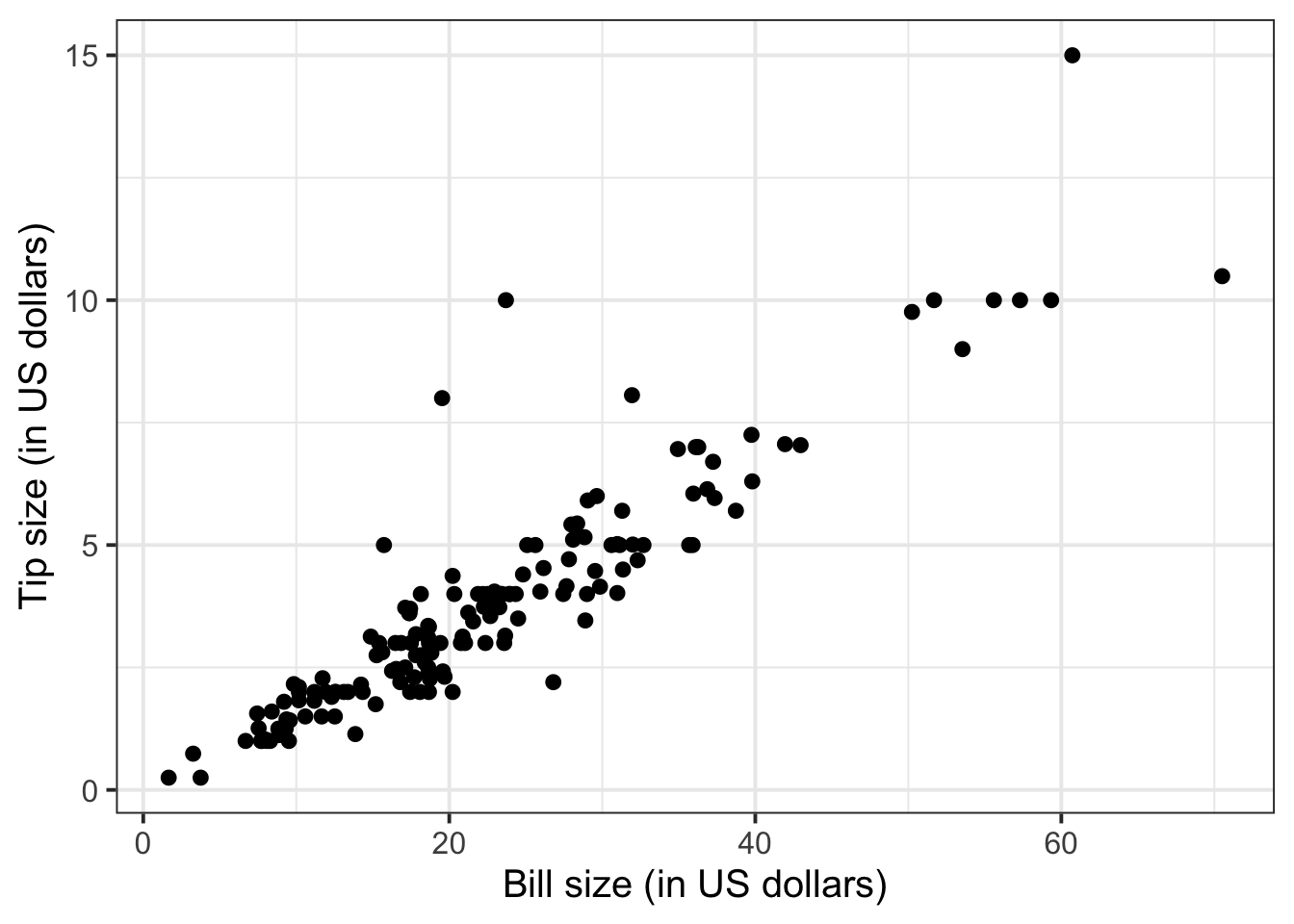
We can numerically summarise this relationship with the covariance between the two variables:
The relationship looks roughly like a line. You can superimpose a “best-fit” line with the function geom_smooth(method = lm, se = FALSE). The argument method = lm tells to fit a line (in R this is called a linar model, lm), and se = FALSE tells R to not plot the uncertainty bands.
ggplot(tips, aes(x = Bill, y = Tip)) +
    geom_point() +
    labs(x = "Bill size (in US dollars)",
         y = "Tip size (in US dollars)") +
    geom_smooth(method = lm, se = FALSE)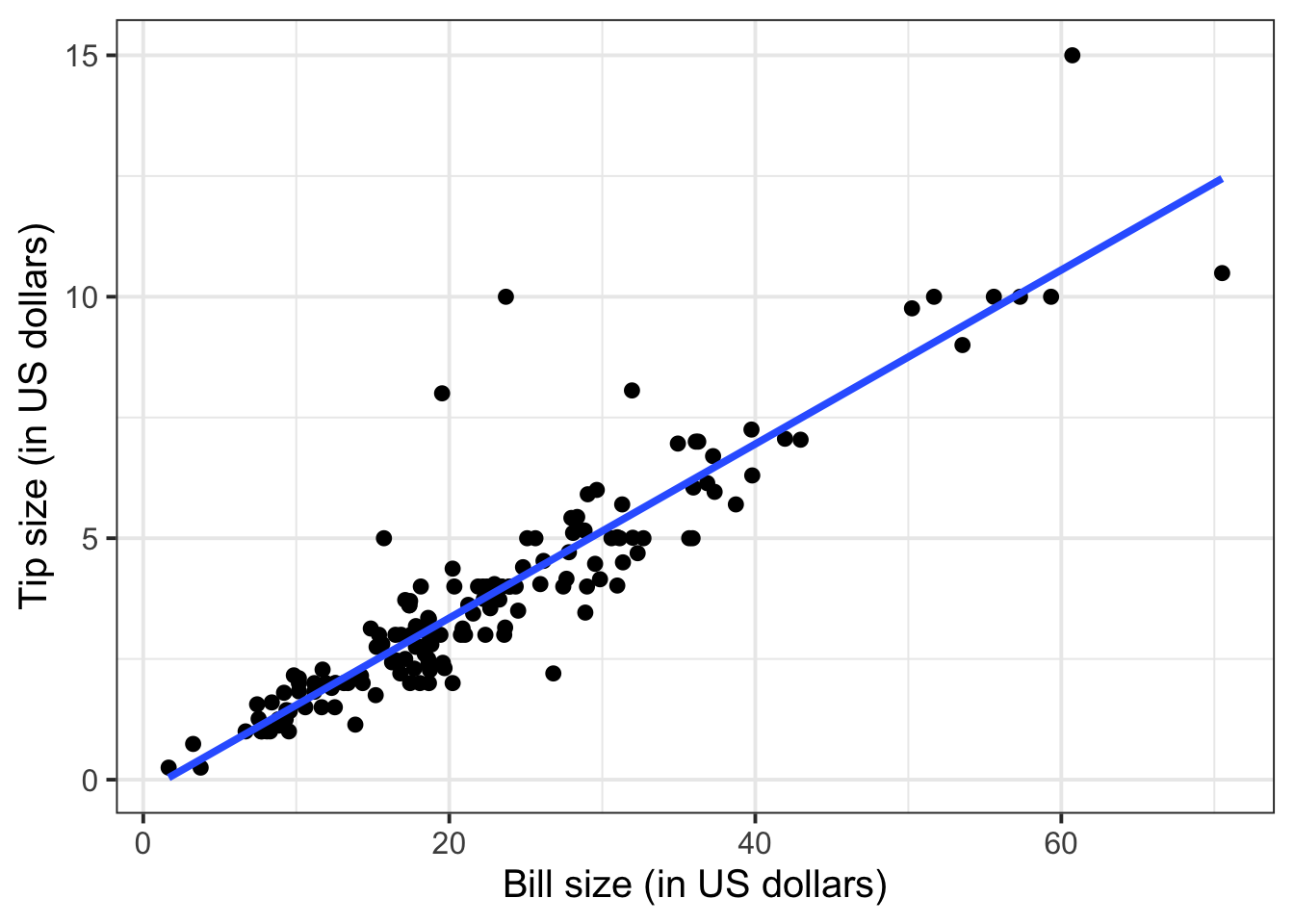
You will only learn how to find the functional relationship between two variables in the second-year course DAPR2, so for now I will give it to you:
\[ y = -0.26 + 0.18 * x \qquad \text{where} \qquad \begin{cases} x = \text{Bill} \\ y = \text{Tip} \end{cases} \]
What is the predicted tip for a bill of 50 US dollars? Let’s do the computation:
-0.26 + 0.18 * 50[1] 8.74From the plot above, a tip of 8.74 US dollars seems roughly right!
Let’s find the tips for bills of size 20, 40, 60.
# A tibble: 3 × 2
  bills  tips
  <dbl> <dbl>
1    20  3.34
2    40  6.94
3    60 10.5
To investigate the relationship between bill and tip size for those who paid by credit card and those who didn’t we can create faceted scatterplots:
ggplot(tips, aes(x = Bill, y = Tip)) +
    geom_point() +
    labs(x = "Bill size (in US dollars)",
         y = "Tip size (in US dollars)") +
    facet_wrap(~Credit, labeller = "label_both")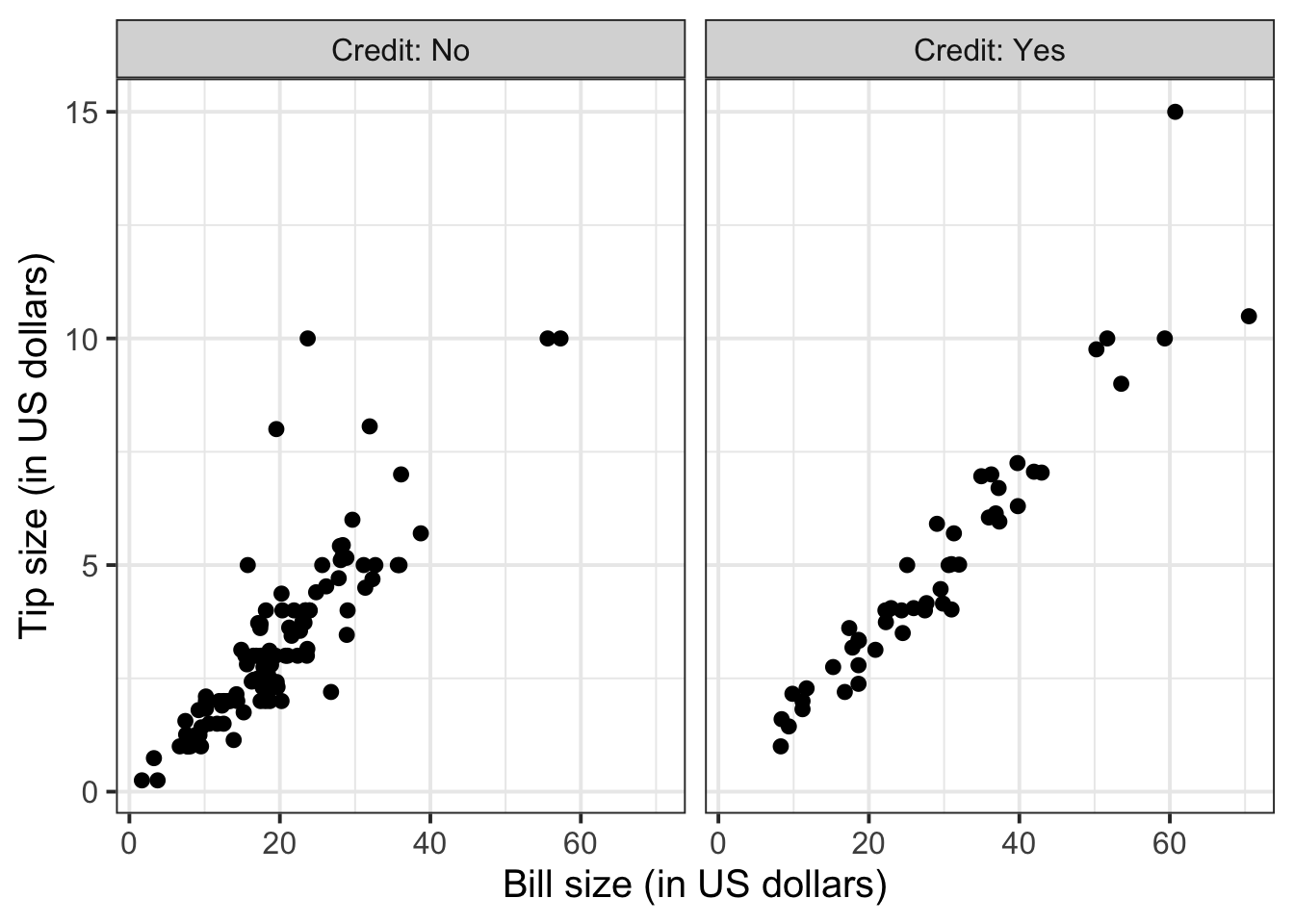
You can also fit a best-fit line by payment method:
ggplot(tips, aes(x = Bill, y = Tip)) +
    geom_point() +
    labs(x = "Bill size (in US dollars)",
         y = "Tip size (in US dollars)") +
    facet_wrap(~Credit, labeller = "label_both") +
    geom_smooth(method = lm, se = FALSE)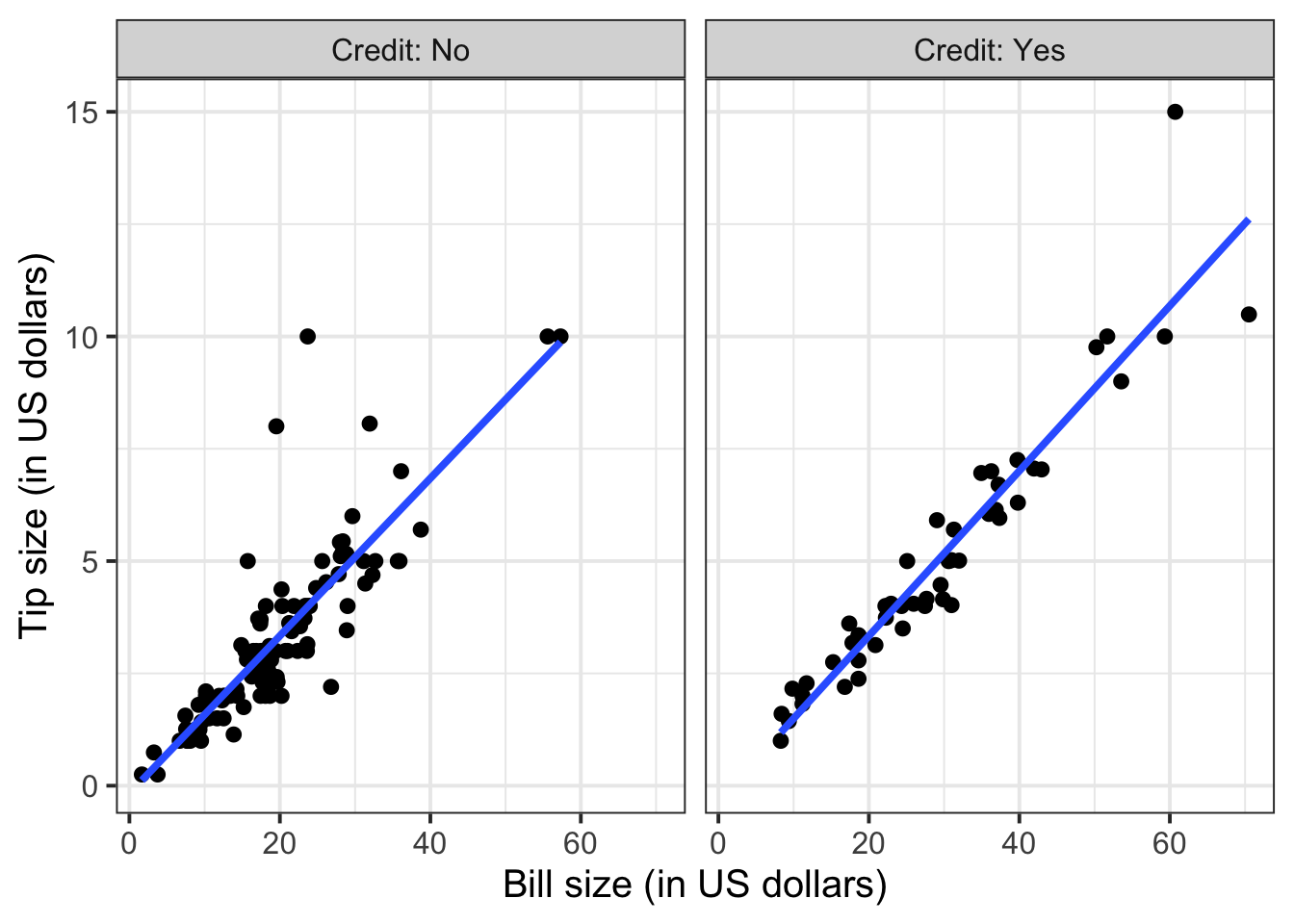
To extend the lins for the full range of the x-axis, you can use the option fullrange = TRUE:
ggplot(tips, aes(x = Bill, y = Tip)) +
    geom_point() +
    labs(x = "Bill size (in US dollars)",
         y = "Tip size (in US dollars)") +
    facet_wrap(~Credit, labeller = "label_both") +
    geom_smooth(method = lm, se = FALSE, fullrange = TRUE)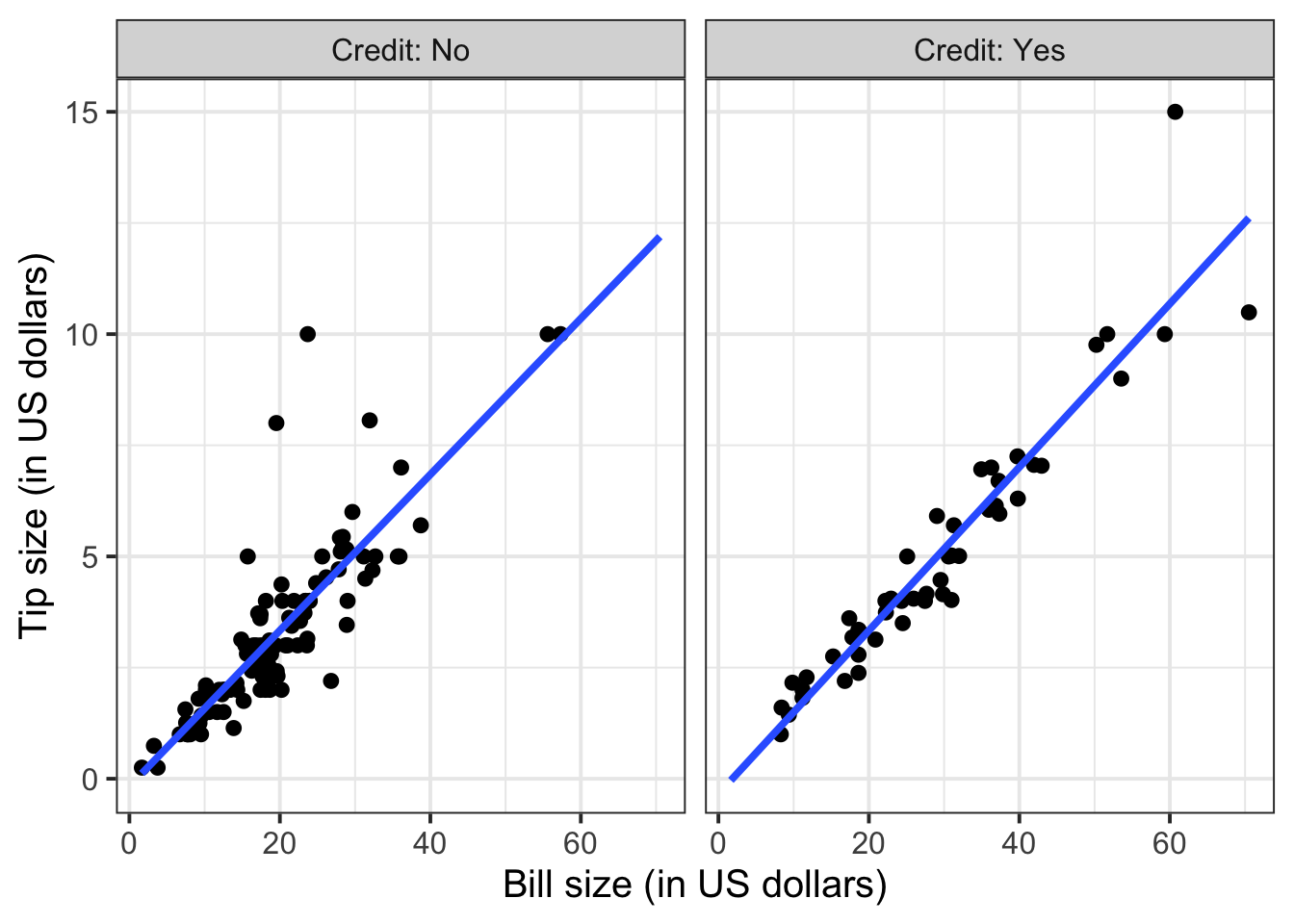
Again, you will not know how to find out the functional relationship between the variables within each group until the course DAPR2 in 2nd year, so I will give it to you.
For those who did not pay by credit card:
\[ y = -0.17 + 0.18 * x \qquad \text{where} \qquad \begin{cases} x = \text{Bill} \\ y = \text{Tip} \end{cases} \]
For those who paid by credit card:
\[ y = -0.34 + 0.18 * x \qquad \text{where} \qquad \begin{cases} x = \text{Bill} \\ y = \text{Tip} \end{cases} \]
References
Lock, Robin H, Patti Frazer Lock, Kari Lock Morgan, Eric F Lock, and Dennis F Lock. 2020. Statistics: Unlocking the Power of Data. John Wiley & Sons.
Footnotes
Hint: access the Rmd file from the Group Discussion Space.
If last week’s driver hasn’t uploaded it yet, please ask them to share it with the group via the Group Discussion Space, email, or Teams.
To download the file from the server, go to the RStudio Files pane, tick the box next to the Rmd file, and select More > Export.↩︎