| Item | Statement |
|---|---|
| Item_1 | I often felt an inability to concentrate |
| Item_2 | I frequently forgot things |
| Item_3 | I found thinking clearly required a lot of effort |
| Item_4 | I often felt happy |
| Item_5 | I had lots of energy |
| Item_6 | I worked efficiently |
| Item_7 | I often felt irritable |
| Item_8 | I often felt stressed |
| Item_9 | I often felt sleepy |
| Item_10 | I often felt fatigued |
W5: Covariance, Correlation & Linear Regression
Covariance & Correlation
Question 1
Go to http://guessthecorrelation.com/ and play the “guess the correlation” game for a little while to get an idea of what different strengths and directions of \(r\) can look like.
Sleepy time
Data: Sleep levels and daytime functioning
A researcher is interested in the relationship between hours slept per night and self-rated effects of sleep on daytime functioning. She recruited 50 healthy adults, and collected data on the Total Sleep Time (TST) over the course of a seven day period via sleep-tracking devices.
At the end of the seven day period, participants completed a Daytime Functioning (DTF) questionnaire. This involved participants rating their agreement with ten statements (see Table 1). Agreement was measured on a scale from 1-5. An overall score of daytime functioning can be calculated by:
- reversing the scores for items 4,5 and 6 (because those items reflect agreement with positive statements, whereas the other ones are agreement with negative statement);
- summing the scores on each item; and
- subtracting the sum score from 50 (the max possible score). This will make higher scores reflect better perceived daytime functioning.
The data is available at https://uoepsy.github.io/data/sleepdtf.csv
Question 2
Load the required libraries (probably just tidyverse for now), and read in the data.
Calculate the overall daytime functioning score, following the criteria outlined above, and make this a new column in your dataset.
Hints
To reverse items 4, 5 and 6, we we need to make all the scores of 1 become 5, scores of 2 become 4, and so on… What number satisfies all of these equations: ? - 5 = 1, ? - 4 = 2, ? - 3 = 3?
To quickly sum across rows, you might find the rowSums() function useful (you don’t have to use it though)
If my items were in columns between 4 to 15:
dataframe$sumscore <- rowSums(dataframe[, 4:15])
Question 3
We can use cor() to calculate the correlation between the total sleep time (TST) and the overall daytime functioning score calculated in the previous question.
Use to cor.test() to conduct a test to establish the probability of observing a correlation this strong in a sample of this size assuming the true correlation to be 0.
Write a sentence or two summarising the results.
Hints
You can do this all with one function, see Chapter 9 #correlation-test.
Question 4 (open-ended)
Think about this relationship in terms of causation.
Claim: Less sleep causes poorer daytime functioning.
Why might it be inappropriate to make the claim above based on these data alone? Think about what sort of study could provide stronger evidence for such a claim.
Things to think about:
- comparison groups.
- random allocation.
- measures of daytime functioning.
- measures of sleep time.
- other (unmeasured) explanatory variables.
Attendance and Attainment
Data: Education SIMD Indicators
The Scottish Government regularly collates data across a wide range of societal, geographic, and health indicators for every “datazone” (small area) in Scotland.
The dataset at https://uoepsy.github.io/data/simd20_educ.csv contains some of the education indicators (see Table 2).
| variable | description |
|---|---|
| intermediate_zone | Areas of scotland containing populations of between 2.5k-6k household residents |
| attendance | Average School pupil attendance |
| attainment | Average attainment score of School leavers (based on Scottish Credit and Qualifications Framework (SCQF)) |
| university | Proportion of 17-21 year olds entering university |
Question 5
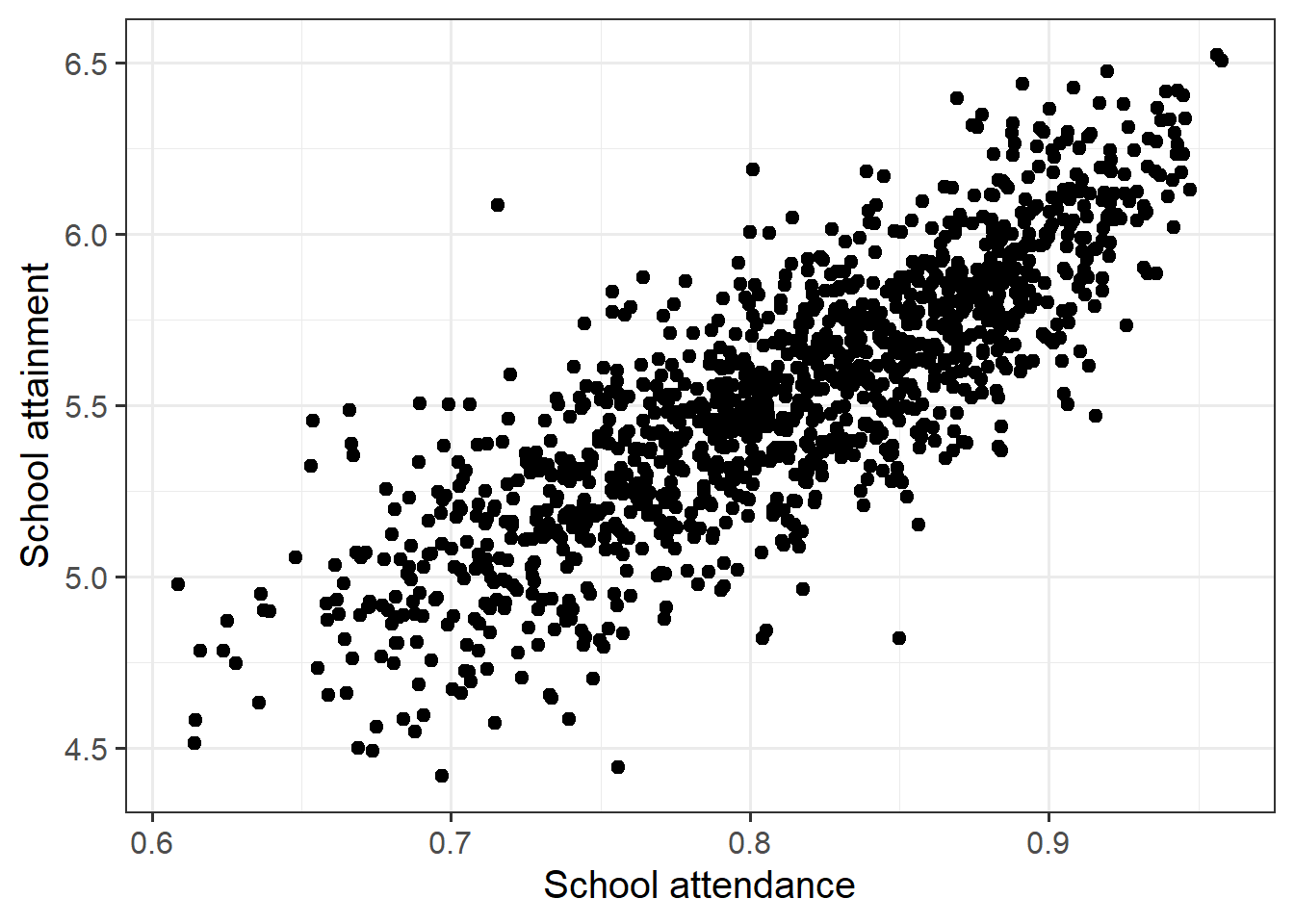
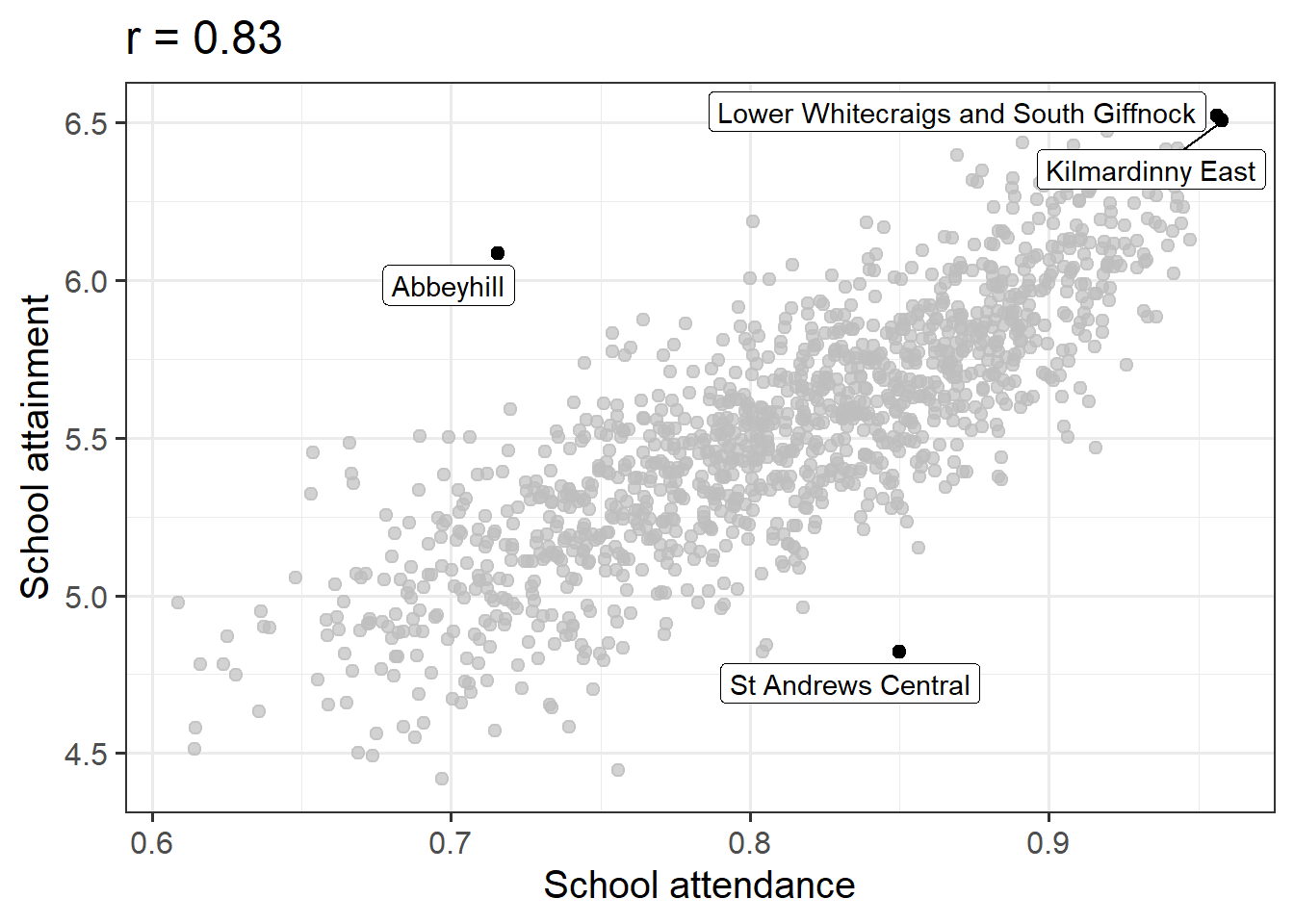
Conduct a test of whether there is a correlation between school attendance and school attainment in Scotland.
Present and write up the results.
Hints
The readings have not included an example write-up for you to follow. Try to follow the logic of those for t-tests and \(\chi^2\)-tests.
- describe the relevant data
- explain what test was conducted and why
- present the relevant statistic, degrees of freedom (if applicable), statement on p-value, etc.
- state the conclusion.
Be careful figuring out how many observations your test is conducted on. cor.test() includes only the complete observations.
Simple Linear Regression
Monkey Exploration
Data: monkeyexplorers.csv
A team of researchers, Kelly-Iturriaga, Michaelides, Bolton & Crocker (2026)1 have conducted a study on monkeys! They were interested in whether younger monkeys tend to be more inquisitive about new things than older monkeys do. They sampled 108 monkeys ranging from 1 to 24 years old. Each monkey was given a novel object, the researchers recorded the time (in minutes) that each monkey spent exploring the object.
For this week, we’re going to be investigating the research question:
Do older monkeys spend more/less time exploring novel objects?
The data is available at https://uoepsy.github.io/data/monkeyexplorers.csv and contains the variables described in Table 3
| variable | description |
|---|---|
| name | Monkey Name |
| age | Age of monkey in years |
| exploration_time | Time (in minutes) spent exploring the object |
Question 6
For this week, we’re going to be investigating the following research question:
Do older monkeys spend more/less time exploring novel objects?
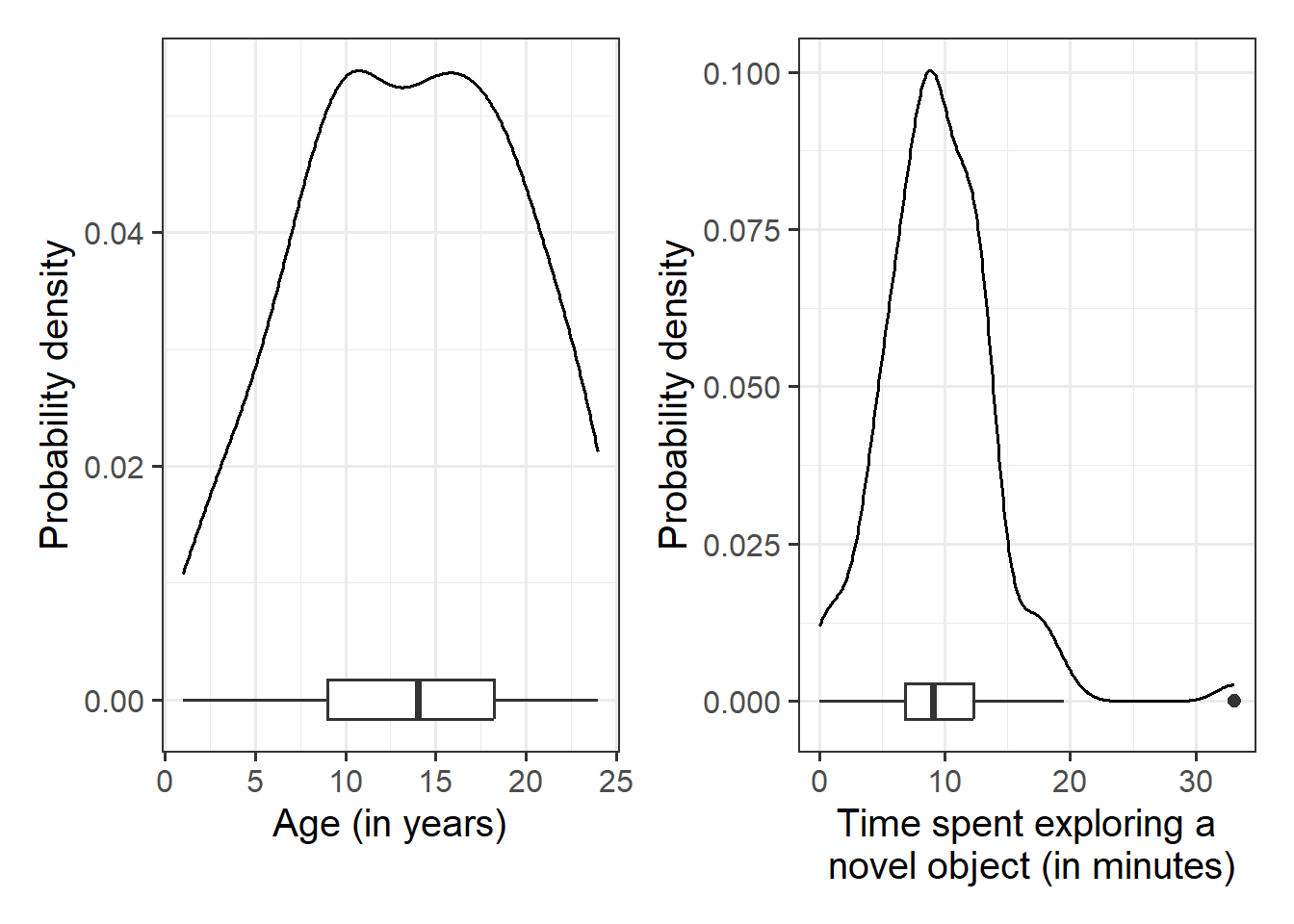
Read in the data to your R session. The very first thing to do is always “take a look around the data”. This means looking at summary() etc, and plotting your variables. Make sure to make visualisations of all the distributions for each variables that is of interest to us (they can be quick plots, they don’t have to be fancy plots!).
Hints
- You could use, for example,
geom_density()for a density plot orgeom_histogram()for a histogram. - Look at the shape, center and spread of the distribution. Is it symmetric or skewed? Is it unimodal or bimodal?
- Do you notice any extreme observations?
Question 7
A first good step when you get data is to just plot the variables separately, to get a sense of if any immediately weird looking things jump out. Next, we can look at visuals of the patterns between the variables.
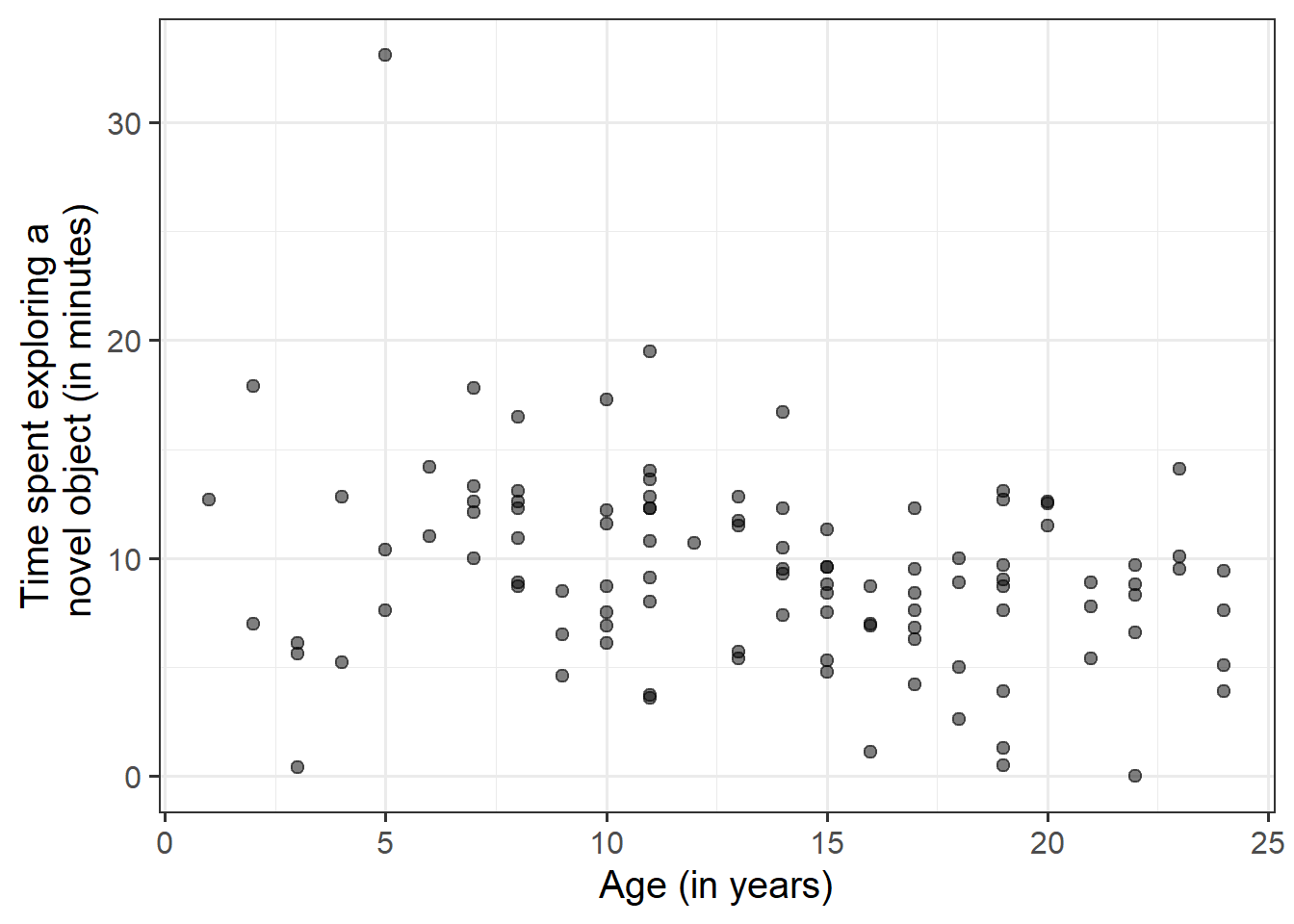
Visualise and describe the relationship between age and exploration-time among the monkeys in the sample.
Hints
Think about:
- Direction of association
- Form of association (can it be summarised well with a straight line?)
- Strength of association (how closely do points fall to a recognizable pattern such as a line?)
- Unusual observations that do not fit the pattern of the rest of the observations and which are worth examining in more detail.
Question 8
Using the lm() function, fit a linear model to the sample data, in which time that monkeys spend exploring novel objects is explained by age.
Make sure to assign a name to your model to ensure it is stored in your R environment.
Hints
You can see how to fit linear models in R using lm() in Chapter 10 #fitting-linear-models-in-r
Yes:
mod1 <- lm(y ~ x, data = somedata)No:
mod1 <- lm(somedata$y ~ somedata$x)
Question 9
Interpret the estimated intercept and slope in the context of the question of interest.
Hints
We saw how to extract lots of information on our model using summary() (see Chapter 10 #model-summary), but there are lots of other functions too.
If we called our linear model object “model1” in the environment, then we can use:
- type
model1, i.e. simply invoke the name of the fitted model; - type
model1$coefficients; - use the
coef(model1)function; - use the
coefficients(model1)function; - use the
summary(model1)$coefficientsto extract just that part of the summary.
Question 10
What do you conclude about the null hypothesis that there is no linear association between exploration time and age in the population.
Hints
You don’t need to do anything for this, you can find all the necessary information in summary() of your model.
See Chapter 10 #inference-for-regression-coefficients.
Question 11
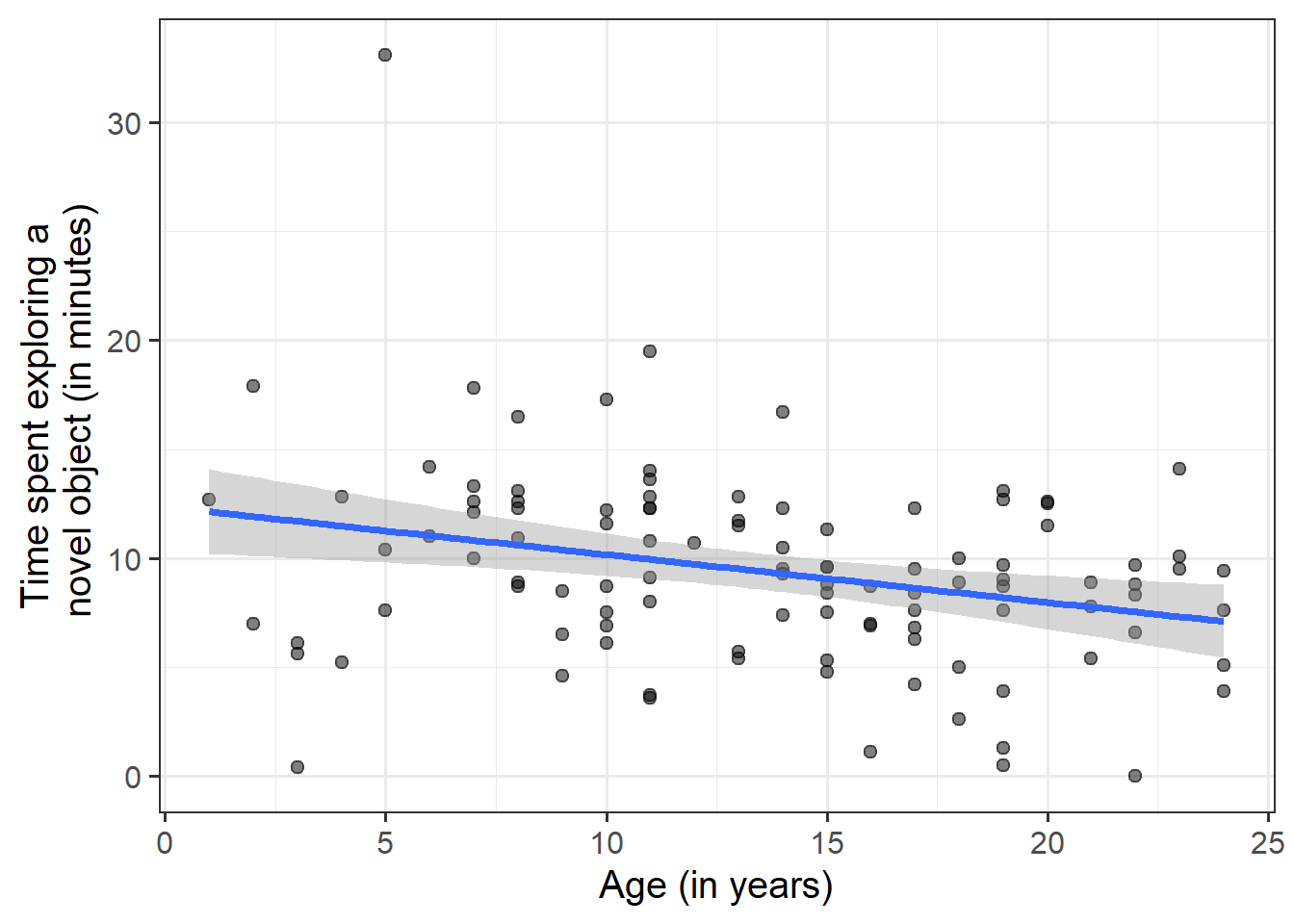
Create a visualisation of the estimated association between age and exploration time.
You’ve kind of already done this with the plot earlier, but we want to add our model line to it.
Hints
For our simple regression model, there is a really easy way to do this with geom_smooth(). Check Chapter 10 #example, which shows an example.
Question 12 - Optional
Consider the following:
- In fitting a linear regression model, we make the assumption that the errors around the line are normally distributed around zero (this is the \(\epsilon \sim N(0, \sigma)\) bit.)
- About 95% of values from a normal distribution fall within two standard deviations of the centre.
We can obtain the estimated standard deviation of the errors (\(\hat \sigma\)) from the fitted model using sigma(my_model).
From this, can you work out within what range 95% of observations differ from the model predictions?
Hints
Question 13 - Optional
Compute the model-predicted exploration-time for a monkey that is 1 year old.
Hints
Given that you know the intercept and slope, you can calculate this algebraically. However, try to also use the predict() function (see Chapter 10 #model-predictions).
Influential Monkeys
Question 14
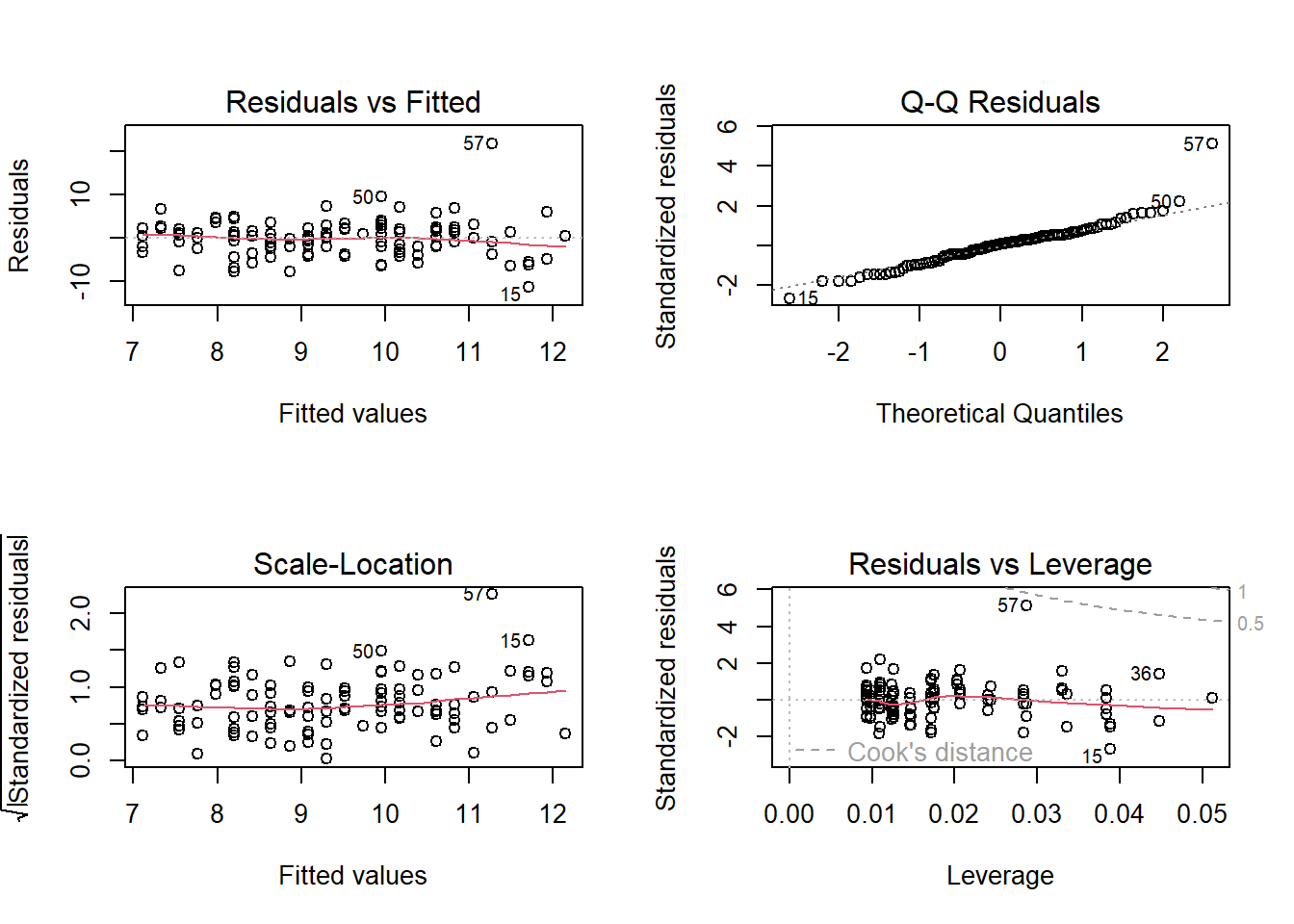
Take a look at the assumption plots (see Chapter 10 #assumptions) for your model.
We’ll see more about assumptions (and these plots) in the lectures and readings in the coming weeks, but for now, let’s just have a first look at them. The trick to looking at assumption plots in linear regression is to look for “things that don’t look random”.
What does ‘random’ look like?
In order to get a sense of what ‘randomness’ looks like, hit the “run code” button below lots and lots of times and look at how the plots change. The code below creates a predictor, x, and then creates an outcome y, based on the following model: \[
\begin{align}
\color{red}{y} &= \color{blue}{\underset{\underset{\text{intercept}}{\uparrow}}{1} + \underset{\underset{\text{slope}}{\uparrow}}{1} \cdot x} + \color{black}{\varepsilon}
\quad \\
\quad \\
\varepsilon &\sim N(0, \underset{\underset{\text{residual sd}}{\uparrow}}{1}) \\
\end{align}
\] It then fits a regression model, and runs plot(model) to show the assumption plots.
Because we are fitting a model that perfectly matches how the data are generated, our we know our model is correctly specified, and so we know our residuals contain only randomness.
Run it a few times to see how the plots vary:
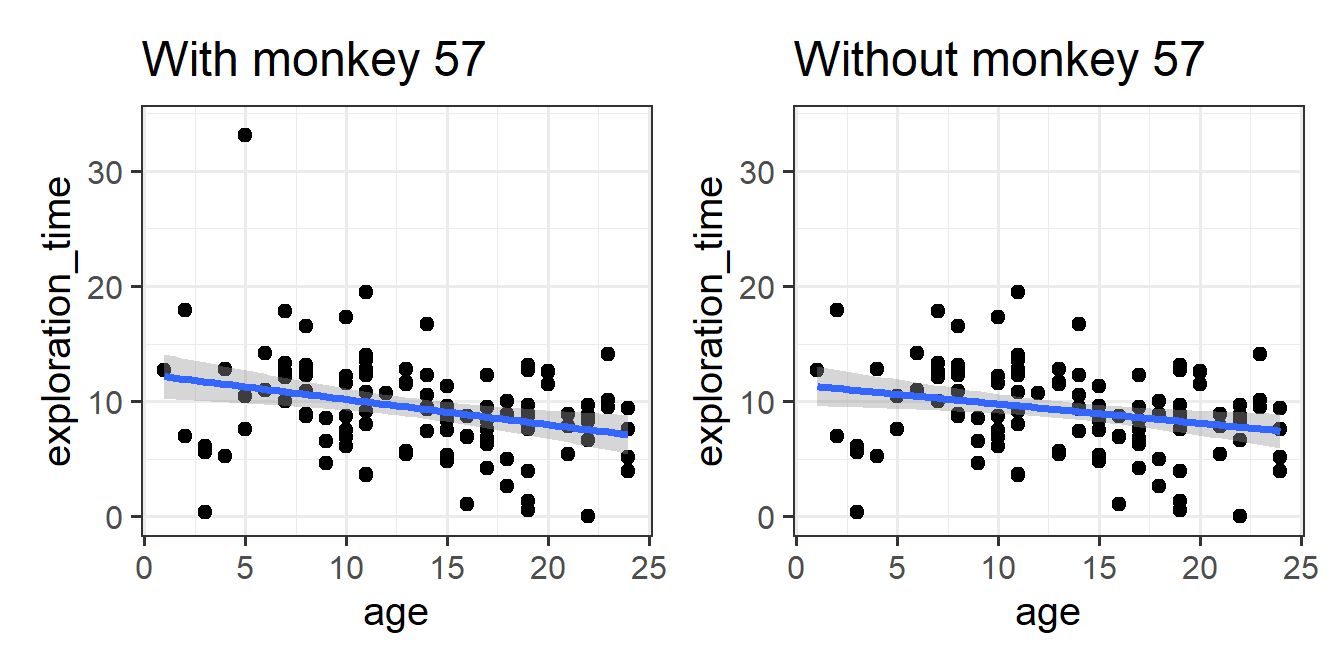
As well as looking for patterns, these plots can also highlight individual datapoints that might be skewing the results. Can you figure out if there are any unusual monkeys in our dataset? Can you re-fit the model without that monkey? When you do so, do your conclusions change?
Monkey Exploration in Adulthood
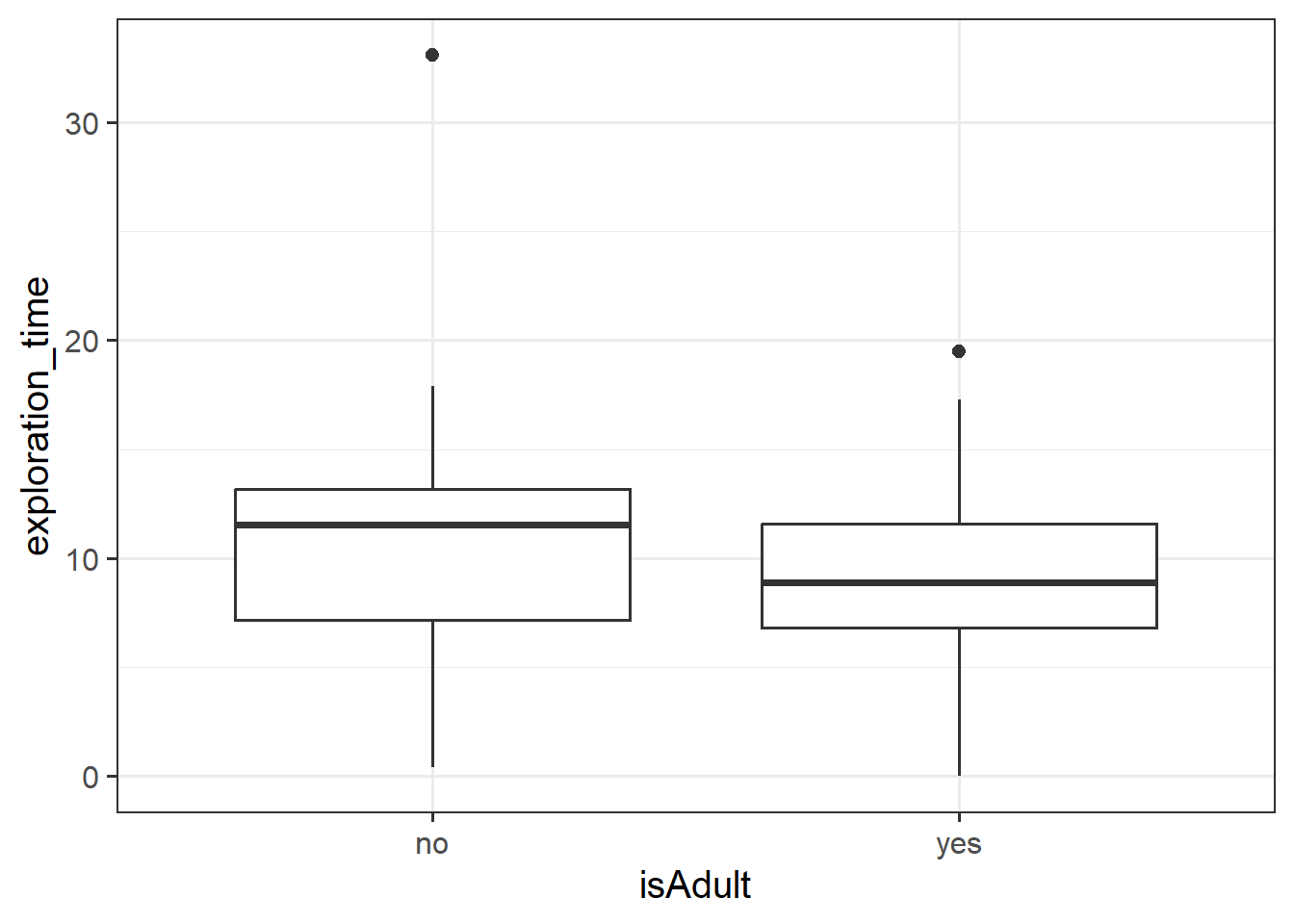
Let’s suppose instead of having measured monkeys’ ages in years, researchers simply recorded whether each monkey was an adult or a juvenile (species like Capuchins and Rhesus Macaques reach adulthood at about 8 years old).
The code below creates a this new variable for us:
monkeyexp <- monkeyexp |>
  mutate(
    isAdult = ifelse(age >= 8, "yes","no")
  )
Question 15
Fit the following model, and interpret the coefficients.
\[ \text{ExplorationTime} = b_0 + b_1 \cdot \text{isAdult} + \varepsilon \]
Hints
For help interpreting the coefficients, see Chapter 10 #binary-predictors.
Question 16
We’ve actually already seen a way to analyse questions of this sort (“is the average exploration-time different between juveniles and adults?”)
Run the following t-test, and consider the statistic, p value etc. How does it compare to the model in the previous question?
t.test(exploration_time ~ isAdult, data = monkeyexp, var.equal = TRUE)
Extra: some silliness
EXTRA!
Feel free to do this in groups if you like (if you do, just one of you needs to submit).
Step 1 - Create your plot: Using the USMR 2026 survey data ( https://uoepsy.github.io/data/usmr2026.csv ), make the ugliest plot you can, while preserving the clarity of the patterns/message you are trying to conveyed with your plot.
Step 2 - Submission: Submit your plot! Go to the Learn page > Week 5 > Ugly Plot Competition, and upload your plot. This can be either a screenshot, or look up the
ggsave()function, or just the code to reproduce the plot.- Deadline: Friday 30th October 12:00
Step 3 - Reviewing & Rating: After the submission deadline, go back to the Learn page > Week 5 > Ugly Plot Competition, and rate the other submissions.
- Deadline: Friday 6th November 12:00
When the results are in, prizes (made of chocolate) will be awarded to the authors of ugliest plot.
Footnotes
Not a real study! These are just our tutor’s names!↩︎