class: center, middle, inverse, title-slide .title[ # <b> Introduction to the Linear Model </b> ] .subtitle[ ## DPUK Spring Academy<br><br> ] .author[ ### Tom Booth, Josiah King, Umberto Noe ] .institute[ ### Department of Psychology<br>The University of Edinburgh ] .date[ ### April 2024 ] --- # Overview - Day 1: What is a linear model? - Day 2: But I have more variables, what now? - Day 3: Interactions - Day 4: Is my model any good? --- class: center, middle # Day 1 **What is a linear model?** --- class: inverse, center, middle <h2>Part 1: What is the linear model?</h2> <h2 style="text-align: left;opacity:0.3;">Part 2: Best line </h2> <h2 style="text-align: left;opacity:0.3;">Part 3: Single continuous predictor = correlation</h2> <h2 style="text-align: left;opacity:0.3;">Part 4: Single binary predictor = t-test</h2> --- # What is a model? + Pretty much all statistics is about models. + A model is an idea about the way the world is. + A formal representation of a system or relationships + Typically we represent models as functions. + We input data + Specify a set of relationships + We output a prediction --- # An Example + To think through these relations, we can use a simple example. + Suppose I have a model for growth of babies.<sup>1</sup> $$ Length = 55 + 4 * Month $$ .footnote[ [1] Length is measured in cm. ] --- # Visualizing a model .pull-left[ 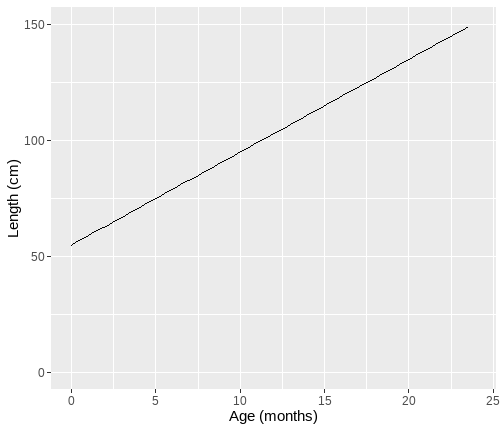<!-- --> ] .pull-right[ {{content}} ] -- + The black line represents our model {{content}} -- + The x-axis shows `Age` `\((x)\)` {{content}} -- + The y-axis values for `Length` our model predicts {{content}} --- # Models as "a state of the world" + Let's suppose my model is true. + That is, it is a perfect representation of how babies grow. + My models creates predictions. + **IF** my model is a true representation of the world, **THEN** data from the world should closely match my predictions. --- # Predictions and data .pull-left[ 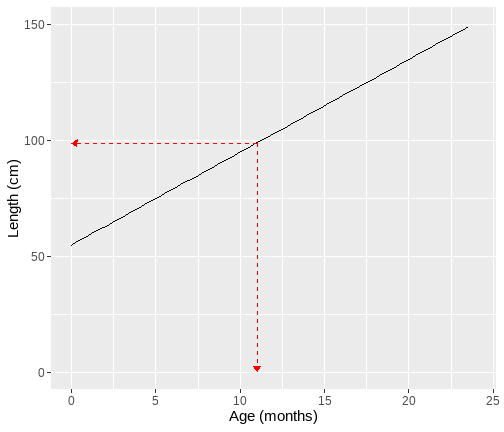<!-- --> ] .pull-right[ <table class="table table-striped" style="width: auto !important; margin-left: auto; margin-right: auto;"> <thead> <tr> <th style="text-align:right;"> Age </th> <th style="text-align:right;"> Prediction </th> </tr> </thead> <tbody> <tr> <td style="text-align:right;"> 10.00 </td> <td style="text-align:right;"> 95 </td> </tr> <tr> <td style="text-align:right;"> 10.25 </td> <td style="text-align:right;"> 96 </td> </tr> <tr> <td style="text-align:right;"> 10.50 </td> <td style="text-align:right;"> 97 </td> </tr> <tr> <td style="text-align:right;"> 10.75 </td> <td style="text-align:right;"> 98 </td> </tr> <tr> <td style="text-align:right;"> 11.00 </td> <td style="text-align:right;"> 99 </td> </tr> <tr> <td style="text-align:right;"> 11.25 </td> <td style="text-align:right;"> 100 </td> </tr> <tr> <td style="text-align:right;"> 11.50 </td> <td style="text-align:right;"> 101 </td> </tr> <tr> <td style="text-align:right;"> 11.75 </td> <td style="text-align:right;"> 102 </td> </tr> <tr> <td style="text-align:right;"> 12.00 </td> <td style="text-align:right;"> 103 </td> </tr> </tbody> </table> ] ??? + Our predictions are points which fall on our line (representing the model, as a function) + Here the arrows are showing how we can use the model to find a predicted value. + we find the value of the input on the x-axis (here 11), read up to the line, then across to the y-axis --- # Predictions and data .pull-left[ + Consider the predictions when the children get a lot older... {{content}} ] .pull-right[ <table class="table table-striped" style="width: auto !important; margin-left: auto; margin-right: auto;"> <thead> <tr> <th style="text-align:right;"> Age </th> <th style="text-align:right;"> Year </th> <th style="text-align:right;"> Prediction </th> <th style="text-align:right;"> Prediction_M </th> </tr> </thead> <tbody> <tr> <td style="text-align:right;"> 216 </td> <td style="text-align:right;"> 18 </td> <td style="text-align:right;"> 919 </td> <td style="text-align:right;"> 9.19 </td> </tr> <tr> <td style="text-align:right;"> 228 </td> <td style="text-align:right;"> 19 </td> <td style="text-align:right;"> 967 </td> <td style="text-align:right;"> 9.67 </td> </tr> <tr> <td style="text-align:right;"> 240 </td> <td style="text-align:right;"> 20 </td> <td style="text-align:right;"> 1015 </td> <td style="text-align:right;"> 10.15 </td> </tr> <tr> <td style="text-align:right;"> 252 </td> <td style="text-align:right;"> 21 </td> <td style="text-align:right;"> 1063 </td> <td style="text-align:right;"> 10.63 </td> </tr> <tr> <td style="text-align:right;"> 264 </td> <td style="text-align:right;"> 22 </td> <td style="text-align:right;"> 1111 </td> <td style="text-align:right;"> 11.11 </td> </tr> <tr> <td style="text-align:right;"> 276 </td> <td style="text-align:right;"> 23 </td> <td style="text-align:right;"> 1159 </td> <td style="text-align:right;"> 11.59 </td> </tr> <tr> <td style="text-align:right;"> 288 </td> <td style="text-align:right;"> 24 </td> <td style="text-align:right;"> 1207 </td> <td style="text-align:right;"> 12.07 </td> </tr> <tr> <td style="text-align:right;"> 300 </td> <td style="text-align:right;"> 25 </td> <td style="text-align:right;"> 1255 </td> <td style="text-align:right;"> 12.55 </td> </tr> </tbody> </table> ] -- + What do you think this would mean for our actual data? {{content}} -- + Will the data fall on the line? {{content}} --- # How good is my model? + How might we judge how good our model is? 1. Model is represented as a function 2. We see that as a line (or surface if we have more things to consider) 3. That yields predictions (or values we expect if our model is true) 4. We can collect data 5. If the predictions do not match the data (points deviate from our line), that says something about our model. --- # Linear model + The linear model is the workhorse of statistics. + When using a linear model, we are typically trying to explain variation in an **outcome** (Y, dependent, response) variable, using one or more **predictor** (x, independent, explanatory) variable(s). --- # Example .pull-left[ <table> <thead> <tr> <th style="text-align:left;"> student </th> <th style="text-align:right;"> hours </th> <th style="text-align:right;"> score </th> </tr> </thead> <tbody> <tr> <td style="text-align:left;"> ID1 </td> <td style="text-align:right;"> 0.5 </td> <td style="text-align:right;"> 1 </td> </tr> <tr> <td style="text-align:left;"> ID2 </td> <td style="text-align:right;"> 1.0 </td> <td style="text-align:right;"> 3 </td> </tr> <tr> <td style="text-align:left;"> ID3 </td> <td style="text-align:right;"> 1.5 </td> <td style="text-align:right;"> 1 </td> </tr> <tr> <td style="text-align:left;"> ID4 </td> <td style="text-align:right;"> 2.0 </td> <td style="text-align:right;"> 2 </td> </tr> <tr> <td style="text-align:left;"> ID5 </td> <td style="text-align:right;"> 2.5 </td> <td style="text-align:right;"> 2 </td> </tr> <tr> <td style="text-align:left;"> ID6 </td> <td style="text-align:right;"> 3.0 </td> <td style="text-align:right;"> 6 </td> </tr> <tr> <td style="text-align:left;"> ID7 </td> <td style="text-align:right;"> 3.5 </td> <td style="text-align:right;"> 3 </td> </tr> <tr> <td style="text-align:left;"> ID8 </td> <td style="text-align:right;"> 4.0 </td> <td style="text-align:right;"> 3 </td> </tr> <tr> <td style="text-align:left;"> ID9 </td> <td style="text-align:right;"> 4.5 </td> <td style="text-align:right;"> 4 </td> </tr> <tr> <td style="text-align:left;"> ID10 </td> <td style="text-align:right;"> 5.0 </td> <td style="text-align:right;"> 8 </td> </tr> </tbody> </table> ] .pull-right[ **Simple data** + `student` = ID variable unique to each respondent + `hours` = the number of hours spent studying. This will be our predictor ( `\(x\)` ) + `score` = test score ( `\(y\)` ) **Question: Do students who study more get higher scores on the test?** ] --- # Scatterplot of our data .pull-left[ 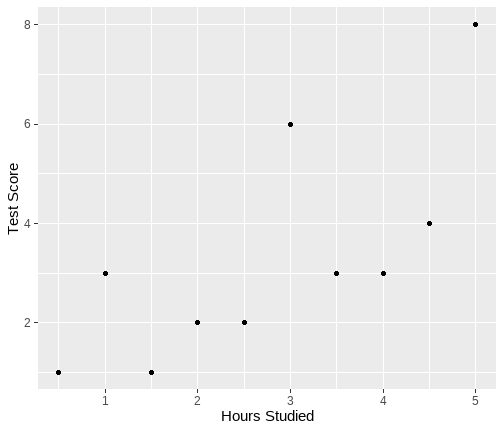<!-- --> ] .pull-right[ {{content}} ] -- 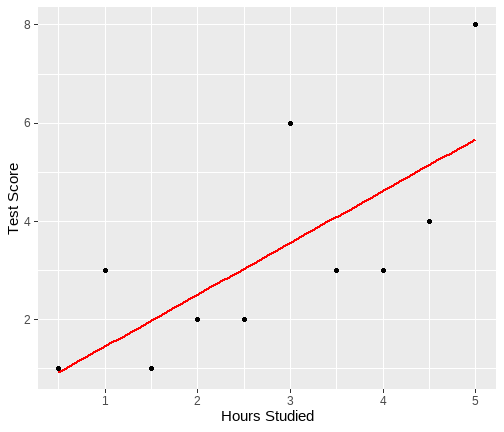<!-- --> {{content}} ??? + we can visualize our data. We can see points moving bottom left to top right + so association looks positive + Now let's add a line that represents the best model --- # Definition of the line + The line can be described by two values: + **Intercept**: the point where the line crosses `\(y\)`, and `\(x\)` = 0 + **Slope**: the gradient of the line, or rate of change ??? + In our example, intercept = for someone who doesn't study, what score will they get? + Slope = for every hour of study, how much will my score change --- # Intercept and slope .pull-left[ 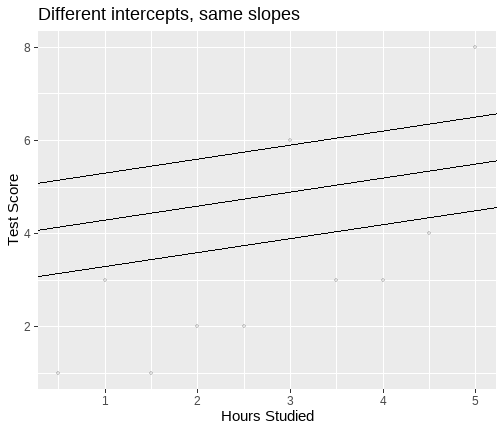<!-- --> ] .pull-right[ 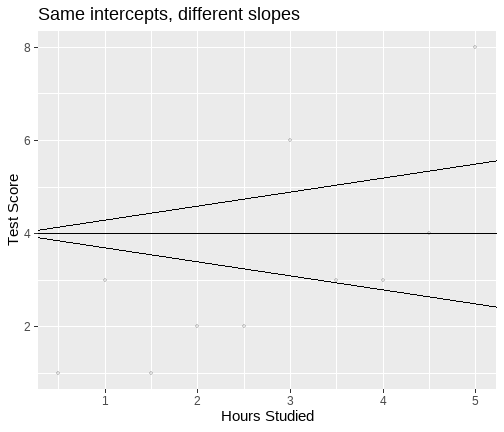<!-- --> ] --- # How to find a line? + The line represents a model of our data. + In our example, the model that best characterizes the relationship between hours of study and test score. + In the scatterplot, the data is represented by points. + So a good line, is a line that is "close" to all points. --- # Linear Model `$$y_i = \beta_0 + \beta_1 x_{i} + \epsilon_i$$` + `\(y_i\)` = the outcome variable (e.g. `score`) + `\(x_i\)` = the predictor variable, (e.g. `hours`) + `\(\beta_0\)` = intercept + `\(\beta_1\)` = slope + `\(\epsilon_i\)` = residual (we will come to this shortly) where `\(\epsilon_i \sim N(0, \sigma)\)` independently. + `\(\sigma\)` = standard deviation (spread) of the errors + The standard deviation of the errors, `\(\sigma\)`, is constant --- # Linear Model `$$y_i = \beta_0 + \beta_1 x_{i} + \epsilon_i$$` + **Why do we have `\(i\)` in some places and not others?** -- + `\(i\)` is a subscript to indicate that each participant has their own value. + So each participant has their own: + score on the test ( `\(y_i\)` ) + number of hours studied ( `\(x_i\)` ) and + residual term ( `\(\epsilon_i\)` ) -- + **What does it mean that the intercept ( `\(\beta_0\)` ) and slope ( `\(\beta_1\)` ) do not have the subscript `\(i\)`?** -- + It means there is one value for all observations. + Remember the model is for **all of our data** --- # What is `\(\epsilon_i\)`? .pull-left[ + `\(\epsilon_i\)`, or the residual, is a measure of how well the model fits each data point. + It is the distance between the model line (on `\(y\)`-axis) and a data point. + `\(\epsilon_i\)` is positive if the point is above the line (red in plot) + `\(\epsilon_i\)` is negative if the point is below the line (blue in plot) ] .pull-right[ 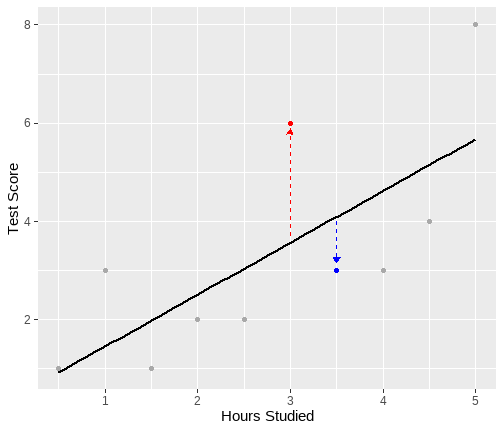<!-- --> ] ??? + comment red = positive and bigger (longer arrow) model is worse + blue is negative, and smaller (shorter arrow) model is better + key point to link here is the importance of residuals for knowing how good the model is + Link to last lecture in that they are the variability + that is the link into least squares --- class: inverse, center, middle <h2 style="text-align: left;opacity:0.3;">Part 1: What is the linear model?</h2> <h2>Part 2: Best line </h2> <h2 style="text-align: left;opacity:0.3;">Part 3: Single continuous predictor = correlation</h2> <h2 style="text-align: left;opacity:0.3;">Part 4: Single binary predictor = t-test</h2> --- # Principle of least squares + The numbers `\(\beta_0\)` and `\(\beta_1\)` are typically **unknown** and need to be estimated in order to fit a line through the point cloud. + We denote the "best" values as `\(\hat \beta_0\)` and `\(\hat \beta_1\)` + The best fitting line is found using **least squares** + Minimizes the distances between the actual values of `\(y\)` and the model-predicted values of `\(\hat y\)` + Specifically minimizes the sum of the *squared* deviations --- # Principle of least squares + Actual value = `\(y_i\)` + Model-predicted value = `\(\hat y_i = \hat \beta_0 + \hat \beta_1 x_i\)` + Deviation or residual = `\(y_i - \hat y_i\)` + Minimize the **residual sum of squares**, `\(SS_{Residual}\)`, which is `$$SS_{Residual} = \sum_{i=1}^{n} [y_i - (\hat \beta_0 + \hat \beta_1 x_{i})]^2 = \sum_{i=1}^n (y_i - \hat{y}_i)^2$$` --- # Data, predicted values and residuals + Data = `\(y_i\)` + This is what we have measured in our study. + For us, the test scores. + Predicted value = `\(\hat{y}_i = \hat \beta_0 + \hat \beta_1 x_i\)` = the y-value on the line at specific values of `\(x\)` + Or, the value of the outcome our model predicts given someone's values for predictors. + In our example, given you study for 4 hrs, what test score does our model predict you will get. + Residual = Difference between `\(y_i\)` and `\(\hat{y}_i\)`. So; `$$SS_{Residual} = \sum_{i=1}^{n}(y_i - \hat{y}_i)^2$$` ??? + these are important distinctions for understanding linear models + return to them a lot. --- # Data, predicted values and residuals .pull-left[ `$$SS_{Residual} = \sum_{i=1}^{n}(y_i - \hat{y}_i)^2$$` + Squared distance of each point from the predicted value. ] .pull-right[ 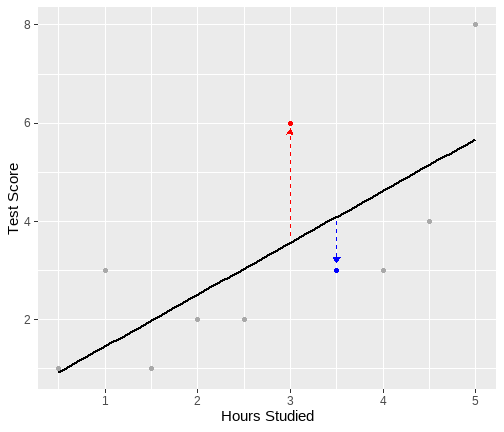<!-- --> ] --- class: inverse, center, middle <h2 style="text-align: left;opacity:0.3;">Part 1: What is the linear model?</h2> <h2 style="text-align: left;opacity:0.3;">Part 2: Best line </h2> <h2>Part 3: Single continuous predictor = correlation</h2> <h2 style="text-align: left;opacity:0.3;">Part 4: Single binary predictor = t-test</h2> --- # `lm` in R ```r res <- lm(score ~ hours, data = test) summary(res) ``` ``` ## ## Call: ## lm(formula = score ~ hours, data = test) ## ## Residuals: ## Min 1Q Median 3Q Max ## -1.6182 -1.0773 -0.7454 1.1773 2.4364 ## ## Coefficients: ## Estimate Std. Error t value Pr(>|t|) ## (Intercept) 0.4000 1.1111 0.360 0.7282 ## hours 1.0545 0.3581 2.945 0.0186 * ## --- ## Signif. codes: 0 '***' 0.001 '**' 0.01 '*' 0.05 '.' 0.1 ' ' 1 ## ## Residual standard error: 1.626 on 8 degrees of freedom ## Multiple R-squared: 0.5201, Adjusted R-squared: 0.4601 ## F-statistic: 8.67 on 1 and 8 DF, p-value: 0.01858 ``` --- # Interpretation + **Slope is the number of units by which Y increases, on average, for a unit increase in X.** -- + Unit of Y = 1 point on the test + Unit of X = 1 hour of study -- + So, for every hour of study, test score increases on average by 1.055 points. -- + **Intercept is the expected value of Y when X is 0.** -- + X = 0 is a student who does not study. -- + So, a student who does no study would be expected to score 0.40 on the test. ??? + So we know in a general sense what the intercept and slope are, but what do they mean with respect to our data and question? --- # Note of caution on intercepts + In our example, 0 has a meaning. + It is a student who has studied for 0 hours. + But it is not always the case that 0 is meaningful. + Suppose our predictor variable was not hours of study, but age. + **A person of 0 age has a test score of 0.40.** --- # Unstandardized vs standardized coefficients - In this example, we have unstandardized `\(\hat \beta_1\)`. + We interpreted the slope as the change in `\(y\)` units for a unit change in `\(x\)` + Where the unit is determined by how we have measured our variables. + However, sometimes we may want to represent our results in standard units. + If the scales of our variables are arbitrary. + If we want to compare the effects of variables on different scales. --- # Standardized results + We can either... + Standardized coefficients: `$$\hat{\beta_1^*} = \hat \beta_1 \frac{s_x}{s_y}$$` + where; + `\(\hat{\beta_1^*}\)` = standardized beta coefficient + `\(\hat \beta_1\)` = unstandardized beta coefficient + `\(s_x\)` = standard deviation of `\(x\)` + `\(s_y\)` = standard deviation of `\(y\)` --- # Standardizing the variables + Alternatively, for continuous variables, transforming both the IV and DV to `\(z\)`-scores (mean=0, SD=1) prior to fitting the model yields standardised betas. + `\(z\)`-score for `\(x\)`: `$$z_{x_i} = \frac{x_i - \bar{x}}{s_x}$$` + and the `\(z\)`-score for `\(y\)`: `$$z_{y_i} = \frac{y_i - \bar{y}}{s_y}$$` + That is, we divide the individual deviations from the mean by the standard deviation --- # `lm()` using z-scores ```r test <- test %>% mutate( z_score = scale(score, center = T, scale = T), z_hours = scale(hours, center = T, scale = T) ) res_z <- lm(z_score ~ z_hours, data = test) round(summary(res_z)$coefficients, 3) ``` ``` ## Estimate Std. Error t value Pr(>|t|) ## (Intercept) 0.000 0.232 0.000 1.000 ## z_hours 0.721 0.245 2.945 0.019 ``` --- # Interpreting standardized regression coefficients + `\(b_0\)` (intercept) = zero when all variables are standardized: + The interpretation of the coefficients becomes the increase in `\(y\)` in standard deviation units for every standard deviation increase in `\(x\)` + So, in our example: >**For every standard deviation increase in hours of study, test score increases by 0.72 standard deviations** --- # Relationship to r + Standardized slope ( `\(\hat \beta_1^*\)` ) = correlation coefficient ( `\(r\)` ) for a linear model with a single continuous predictor. + In our example, `\(\hat \beta_{hours}^*\)` = 0.72 ```r round(cor(test$hours, test$score),3) ``` ``` ## [1] 0.721 ``` + `\(r\)` is a standardized measure of linear association + `\(\hat \beta_1^*\)` is a standardized measure of the linear slope. --- class: inverse, center, middle <h2 style="text-align: left;opacity:0.3;">Part 1: What is the linear model?</h2> <h2 style="text-align: left;opacity:0.3;">Part 2: Best line </h2> <h2 style="text-align: left;opacity:0.3;">Part 3: Single continuous predictor = correlation</h2> <h2>Part 4: Single binary predictor = t-test</h2> --- # Binary variable + Binary variable is a categorical variable with two levels. + Traditionally coded with a 0 and 1 + Referred to as dummy coding + We will come back to this for categorical variables with 2+ levels -- + Why 0 and 1? + Quick version: It has some nice properties when it comes to interpretation. --- # Extending our example .pull-left[ + Our in class example so far has used test scores and revision time for 10 students. + Let's say we collect this data on 150 students. + We also collected data on who they studied with; + 0 = alone + 1 = with others + So our variable `study` is a binary ] .pull-right[ ``` ## # A tibble: 10 × 4 ## ID score hours study ## <chr> <dbl> <dbl> <dbl> ## 1 ID1 5 3.3 0 ## 2 ID2 6 2.6 0 ## 3 ID3 5 3.7 1 ## 4 ID4 6 3.6 0 ## 5 ID5 6 3.7 1 ## 6 ID6 7 4.4 1 ## 7 ID7 6 3.6 1 ## 8 ID8 6 4.1 1 ## 9 ID9 5 3.6 0 ## 10 ID10 5 3.9 0 ``` ] --- # LM with binary predictors + Now we can ask the question: + **Do students who study with others score better than students who study alone?** `$$score_i = \beta_0 + \beta_1 study_{i} + \epsilon_i$$` --- # In `R` ```r res2 <- lm(score ~ study, data = df) summary(res2) ``` ``` ## ## Call: ## lm(formula = score ~ study, data = df) ## ## Residuals: ## Min 1Q Median 3Q Max ## -2.8333 -0.8333 0.1667 0.7778 2.1667 ## ## Coefficients: ## Estimate Std. Error t value Pr(>|t|) ## (Intercept) 5.2222 0.1076 48.552 < 2e-16 *** ## study 0.6111 0.1492 4.097 6.87e-05 *** ## --- ## Signif. codes: 0 '***' 0.001 '**' 0.01 '*' 0.05 '.' 0.1 ' ' 1 ## ## Residual standard error: 0.9127 on 148 degrees of freedom ## Multiple R-squared: 0.1019, Adjusted R-squared: 0.0958 ## F-statistic: 16.79 on 1 and 148 DF, p-value: 6.866e-05 ``` --- # Interpretation .pull-left[ + As before, the intercept `\(\hat \beta_0\)` is the expected value of `\(y\)` when `\(x=0\)` + What is `\(x=0\)` here? + It is the students who study alone. + So what about `\(\hat \beta_1\)`? + **Look at the output on the right hand side.** + What do you notice about the difference in averages? ] .pull-right[ ```r df %>% * group_by(., study) %>% summarise( * Average = round(mean(score),4) ) ``` ``` ## # A tibble: 2 × 2 ## study Average ## <dbl> <dbl> ## 1 0 5.22 ## 2 1 5.83 ``` ] --- # Interpretation + `\(\hat \beta_0\)` = predicted expected value of `\(y\)` when `\(x = 0\)` + Or, the mean of group coded 0 (those who study alone) + `\(\hat \beta_1\)` = predicted difference between the means of the two groups. + Group 1 - Group 0 (Mean `score` for those who study with others - mean `score` of those who study alone) + Notice how this maps to our question. + Do students who study with others score better than students who study alone? --- # Visualize the model 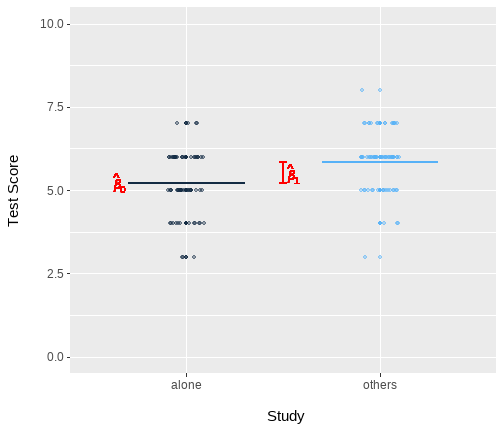<!-- --> --- # Hold on... it's a t-test ```r df %>% t.test(score ~ study, .) ``` ``` ## ## Welch Two Sample t-test ## ## data: score by study ## t = -4.0883, df = 145.39, p-value = 7.163e-05 ## alternative hypothesis: true difference in means between group 0 and group 1 is not equal to 0 ## 95 percent confidence interval: ## -0.9065440 -0.3156782 ## sample estimates: ## mean in group 0 mean in group 1 ## 5.222222 5.833333 ``` ??? Yup! --- class: center, middle # Thanks all! --- class: center, middle # Day 2 **But I have more variables, now what?** --- class: inverse, center, middle <h2>Part 1: Adding more predictors </h2> <h2 style="text-align: left;opacity:0.3;">Part 2: Evaluating predictors </h2> <h2 style="text-align: left;opacity:0.3;">Part 3: Evaluating my model </h2> <h2 style="text-align: left;opacity:0.3;">Part 4: Comparing models </h2> --- # Linear model with more predictors (multiple regression) + The aim of a linear model is to explain variance in an outcome. + In simple linear models, we have a single predictor, but the model can accommodate (in principle) any number of predictors. + However, when we include multiple predictors, those predictors are likely to correlate + Thus, a linear model with multiple predictors finds the optimal prediction of the outcome from several predictors, **taking into account their redundancy with one another** --- # Uses of multiple regression + **For prediction:** multiple predictors may lead to improved prediction. + **For theory testing:** often our theories suggest that multiple variables together contribute to variation in an outcome + **For covariate control:** we might want to assess the effect of a specific predictor, controlling for the influence of others. + E.g., effects of personality on health after removing the effects of age and sex --- # Extending the regression model + Our model for a single predictor: `$$y_i = \beta_0 + \beta_1 x_{1i} + \epsilon_i$$` + is extended to include additional `\(x\)`'s: `$$y_i = \beta_0 + \beta_1 x_{1i} + \beta_2 x_{2i} + \beta_3 x_{3i} + \epsilon_i$$` + For each `\(x\)`, we have an additional `\(\beta\)` + `\(\beta_1\)` is the coefficient for the 1st predictor + `\(\beta_2\)` for the second etc. --- # Interpreting coefficients in multiple regression `$$y_i = \beta_0 + \beta_1 x_{1i} + \beta_2 x_{2i} + \beta_j x_{ji} + \epsilon_i$$` + Given that we have additional variables, our interpretation of the regression coefficients changes a little + `\(\beta_0\)` = the predicted value for `\(y\)` **all** `\(x\)` are 0. + Each `\(\beta_j\)` is now a **partial regression coefficient** + It captures the change in `\(y\)` for a one unit change in , `\(x\)` **when all other x's are held constant** + What does holding constant mean? + Refers to finding the effect of the predictor when the values of the other predictors are fixed + It may also be expressed as the effect of **controlling for**, or **partialling out**, or **residualizing for** the other `\(x\)`'s + With multiple predictors `lm` isolates the effects and estimates the unique contributions of predictors. --- # Example with interpretations .pull-left[ + Suppose I am conducting a study on work place factors that predict salary. + `\(y\)` = salary (unit = thousands of pounds) + `\(x_1\)` = years of service + `\(x_2\)` = Department (0 = Store managers, 1 = Accounts) + `\(x_3\)` = Location (0 = Birmingham, 1 = London) ] .pull-right[ ```r salary3 %>% slice(1:10) ``` ``` ## # A tibble: 10 × 5 ## ID salary department location serv ## <chr> <dbl> <fct> <fct> <dbl> ## 1 ID101 45 Accounts London 2.2 ## 2 ID102 47 Manager London 4.5 ## 3 ID103 40 Manager London 2.4 ## 4 ID104 49 Accounts London 4.6 ## 5 ID105 55 Accounts London 4.8 ## 6 ID106 40 Manager Birmingham 4.4 ## 7 ID107 51 Accounts Birmingham 4.3 ## 8 ID108 49 Manager London 5 ## 9 ID109 44 Accounts London 2.4 ## 10 ID110 50 Accounts Birmingham 4.6 ``` ] --- # Our model ```r res_multi <- lm(salary ~ serv + department + location, data = salary3) ``` --- # Our model ```r summary(res_multi) ``` ``` ## ## Call: ## lm(formula = salary ~ serv + department + location, data = salary3) ## ## Residuals: ## Min 1Q Median 3Q Max ## -7.4895 -2.5605 -0.5627 2.7387 9.4569 ## ## Coefficients: ## Estimate Std. Error t value Pr(>|t|) ## (Intercept) 41.6839 1.0966 38.011 < 2e-16 *** ## serv 2.9531 0.2922 10.105 < 2e-16 *** ## departmentManager -6.9522 0.8113 -8.570 1.75e-13 *** ## locationBirmingham -6.2827 0.8446 -7.439 4.30e-11 *** ## --- ## Signif. codes: 0 '***' 0.001 '**' 0.01 '*' 0.05 '.' 0.1 ' ' 1 ## ## Residual standard error: 3.776 on 96 degrees of freedom ## Multiple R-squared: 0.7099, Adjusted R-squared: 0.7008 ## F-statistic: 78.31 on 3 and 96 DF, p-value: < 2.2e-16 ``` --- # Our model .pull-left[ + `\(b_0\)`: The predicted salary for member of accounts, in London, with 0 years service is £41,684 + `\(b_1\)`: For each year of service, salary increases by £2953, holding deparment and location constant. + `\(b_2\)`: Holding years of service and location constant, store managers earn £6952 pounds less than accounts. + `\(b_3\)`: Holding years of service and department constant, those in Birmingham earn £6283 pounds less than those in London. ] .pull-right[ ``` ## Estimate Std. Error t value ## (Intercept) 41.684 1.097 38.011 ## serv 2.953 0.292 10.105 ## departmentManager -6.952 0.811 -8.570 ## locationBirmingham -6.283 0.845 -7.439 ``` ] --- # Categorical predictors with 2+ levels + When we have a categorical variable with 2+ levels, we will typically assign integers + For example: What city do you live in? + 1 = Edinburgh; 2 = Glasgow, 3 = Birmingham etc. + Note these numbers are not meaningful, they just denote groups + When analysing a categorical predictor with `\(k\)` levels, we need to take an additional step. + This step involves applying a coding scheme, where by each regressor = a difference in means between levels, or sets of levels. + There are lots of coding schemes. + We will just look at dummy coding (R default) --- # Dummy coding + Dummy coding uses 0's and 1's to represent group membership + One level is chosen as a baseline + All other levels are compared against that baseline + Notice, this is identical to binary variables already discussed. + Dummy coding is simply the process of producing a set of binary coded variables + For any categorical variable, we will create `\(k\)`-1 dummy variables + `\(k\)` = number of levels --- # Dummy coding + Imagine 100 students took an exam and were each assigned to use one of three `study methods` + 1 = Notes re-reading + 2 = Notes summarising + 3 = Self-testing ([see here](https://www.psychologicalscience.org/publications/journals/pspi/learning-techniques.html)) <table class="table" style="width: auto !important; margin-left: auto; margin-right: auto;"> <thead> <tr> <th style="text-align:left;"> Level </th> <th style="text-align:right;"> D1 </th> <th style="text-align:right;"> D2 </th> </tr> </thead> <tbody> <tr> <td style="text-align:left;"> Notes re-reading </td> <td style="text-align:right;"> 0 </td> <td style="text-align:right;"> 0 </td> </tr> <tr> <td style="text-align:left;"> Notes summarising </td> <td style="text-align:right;"> 1 </td> <td style="text-align:right;"> 0 </td> </tr> <tr> <td style="text-align:left;"> Self-testing </td> <td style="text-align:right;"> 0 </td> <td style="text-align:right;"> 1 </td> </tr> </tbody> </table> --- # Dummy coding with `lm` + `lm` automatically applies dummy coding when you include a variable of class `factor` in a model. + It selects the first group as the baseline group + We write: ```r dummy1 <- lm(exam ~ method, data = dum_dat) ``` + And `lm` does all the dummy coding work for us --- # Dummy coding with `lm` .pull-left[ ``` ## # A tibble: 3 × 2 ## method Mean ## <fct> <dbl> ## 1 1 51.7 ## 2 2 53.6 ## 3 3 56.0 ``` + The intercept is the mean of the baseline group (notes re-reading) + The coefficient for `method2` is the mean difference between the notes summarising group and the baseline group + The coefficient for `method3` is the mean difference between the self-test group and the baseline group ] .pull-right[ ```r dummy1 <- lm(exam ~ method, data = dum_dat) dummy1 ``` ``` ## ## Call: ## lm(formula = exam ~ method, data = dum_dat) ## ## Coefficients: ## (Intercept) method2 method3 ## 51.696 1.878 4.348 ``` ] --- # Dummy coding with `lm` (full results) ```r summary(dummy1) ``` ``` ## ## Call: ## lm(formula = exam ~ method, data = dum_dat) ## ## Residuals: ## Min 1Q Median 3Q Max ## -4.5741 -1.5741 0.3651 1.4259 5.3043 ## ## Coefficients: ## Estimate Std. Error t value Pr(>|t|) ## (Intercept) 51.6957 0.4261 121.328 < 2e-16 *** ## method2 1.8784 0.5088 3.692 0.000368 *** ## method3 4.3478 0.6026 7.215 1.2e-10 *** ## --- ## Signif. codes: 0 '***' 0.001 '**' 0.01 '*' 0.05 '.' 0.1 ' ' 1 ## ## Residual standard error: 2.043 on 97 degrees of freedom ## Multiple R-squared: 0.3515, Adjusted R-squared: 0.3382 ## F-statistic: 26.29 on 2 and 97 DF, p-value: 7.529e-10 ``` --- class: inverse, center, middle <h2 style="text-align: left;opacity:0.3;">Part 1: Adding more predictors </h2> <h2>Part 2: Evaluating predictors </h2> <h2 style="text-align: left;opacity:0.3;">Part 3: Evaluating my model </h2> <h2 style="text-align: left;opacity:0.3;">Part 4: Comparing models </h2> --- # Evaluating individual predictors + Steps in hypothesis testing: -- + Research questions -- + Statistical hypothesis -- + Define the null -- + Calculate an estimate of effect of interest. -- + Calculate an appropriate test statistic. -- + Evaluate the test statistic against the null. --- # Research question and hypotheses + **Statistical hypotheses** are testable mathematical statements. + In typical testing in Psychology, we define have a **null ( `\(H_0\)` )** and an **alternative ( `\(H_1\)` )** hypothesis. + `\(H_0\)` is precise, and states a specific value for the effect of interest. + `\(H_1\)` is not specific, and simply says "something else other than the null is more likely" --- # Defining null + Conceptually: + If `\(x\)` yields no information on `\(y\)`, then `\(\beta_1 = 0\)` + **Why would this be the case?** -- + `\(\beta\)` gives the predicted change in `\(y\)` for a unit change in `\(x\)`. + If `\(x\)` and `\(y\)` are unrelated, then a change in `\(x\)` will not result in any change to the predicted value of `\(y\)` + So for a unit change in `\(x\)`, there is no (=0) change in `\(y\)`. + We can state this formally as a null and alternative: `$$H_0: \beta_1 = 0$$` `$$H_1: \beta_1 \neq 0$$` --- # Point estimate and test statistic + We have already discussed `\(\hat \beta_1\)`. + The associated test statistic to for `\(\beta\)` coefficients is a `\(t\)`-statistic `$$t = \frac{\hat \beta}{SE(\hat \beta)}$$` + where + `\(\hat \beta\)` = any beta coefficient we have calculated + `\(SE(\hat \beta)\)` = standard error of `\(\beta\)` + The standard error (SE) provides a measure of sampling variability + Smaller SE's suggest more precise estimate (=good) + For details on the calculation of `\(SE(\hat \beta)\)` , see linked material. --- # Back to the example ```r summary(res_multi) ``` ``` ## ## Call: ## lm(formula = salary ~ serv + department + location, data = salary3) ## ## Residuals: ## Min 1Q Median 3Q Max ## -7.4895 -2.5605 -0.5627 2.7387 9.4569 ## ## Coefficients: ## Estimate Std. Error t value Pr(>|t|) ## (Intercept) 41.6839 1.0966 38.011 < 2e-16 *** ## serv 2.9531 0.2922 10.105 < 2e-16 *** ## departmentManager -6.9522 0.8113 -8.570 1.75e-13 *** ## locationBirmingham -6.2827 0.8446 -7.439 4.30e-11 *** ## --- ## Signif. codes: 0 '***' 0.001 '**' 0.01 '*' 0.05 '.' 0.1 ' ' 1 ## ## Residual standard error: 3.776 on 96 degrees of freedom ## Multiple R-squared: 0.7099, Adjusted R-squared: 0.7008 ## F-statistic: 78.31 on 3 and 96 DF, p-value: < 2.2e-16 ``` --- # Sampling distribution for the null + Now we have our `\(t\)`-statistic, we need to evaluate it. + For that, we need sampling distribution for the null. + For `\(\beta\)`, this is a `\(t\)`-distribution with `\(n-k-1\)` degrees of freedom. + Where `\(k\)` is the number of predictors, and the additional -1 represents the intercept. -- + So for our model above, we have 3 predictors, and n = 100 + this is `\(n-k-1\)` = `\(100-3-1\)` + 96 --- # Visualize our result: service 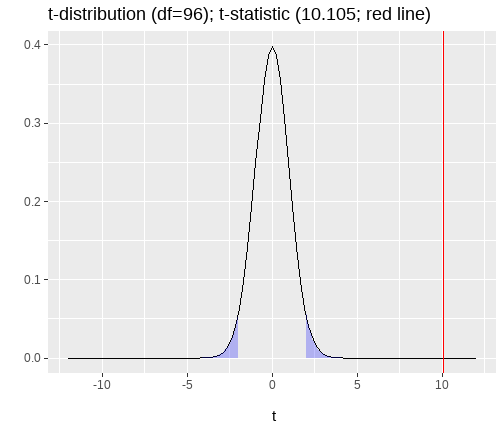<!-- --> ??? + discuss this plot. + remind them of 2-tailed + areas + % underneath each end + comment on how it would be different one tailed + remind about what X is, thus where the line is --- class: inverse, center, middle <h2 style="text-align: left;opacity:0.3;">Part 1: Adding more predictors </h2> <h2 style="text-align: left;opacity:0.3;">Part 2: Evaluating predictors </h2> <h2>Part 3: Evaluating my model </h2> <h2 style="text-align: left;opacity:0.3;">Part 4: Comparing models </h2> --- # Quality of the overall model + When we measure an outcome ( `\(y\)` ) in some data, the scores will vary (we hope). + Variation in `\(y\)` = total variation of interest. -- + The aim of our linear model is to build a model which describes `\(y\)` as a function of `\(x\)`. + That is we are trying to explain variation in `\(y\)` using `\(x\)`. -- + But it won't explain it all. + What is left unexplained is called the residual variance. -- + So we can breakdown variation in our data based on sums of squares as; `$$SS_{Total} = SS_{Model} + SS_{Residual}$$` --- # Coefficient of determination + One way to consider how good our model is, would be to consider the proportion of total variance our model accounts for. `$$R^2 = \frac{SS_{Model}}{SS_{Total}} = 1 - \frac{SS_{Residual}}{SS_{Total}}$$` + `\(R^2\)` = coefficient of determination -- + Quantifies the amount of variability in the outcome accounted for by the predictors. + More variance accounted for, the better. + Represents the extent to which the prediction of `\(y\)` is improved when predictions are based on the linear relation between `\(x\)` and `\(y\)`. --- # Total Sum of Squares .pull-left[ + Sums of squares quantify difference sources of variation. `$$SS_{Total} = \sum_{i=1}^{n}(y_i - \bar{y})^2$$` + Squared distance of each data point from the mean of `\(y\)`. + Mean is our baseline. + Without any other information, our best guess at the value of `\(y\)` for any person is the mean. ] .pull-right[ 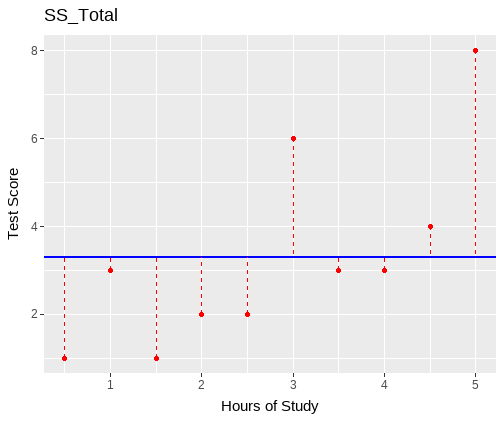<!-- --> ] --- # Residual sum of squares .pull-left[ + Sums of squares quantify difference sources of variation. `$$SS_{Residual} = \sum_{i=1}^{n}(y_i - \hat{y}_i)^2$$` + Which you may recognise. + Squared distance of each point from the predicted value. ] .pull-right[ 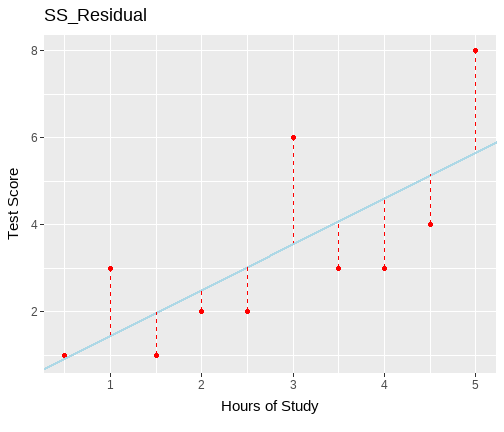<!-- --> ] --- # Model sums of squares .pull-left[ + Sums of squares quantify difference sources of variation. `$$SS_{Model} = \sum_{i=1}^{n}(\hat{y}_i - \bar{y})^2$$` + That is, it is the deviance of the predicted scores from the mean of `\(y\)`. + But it is easier to simply take: `$$SS_{Model} = SS_{Total} - SS_{Residual}$$` ] .pull-right[ 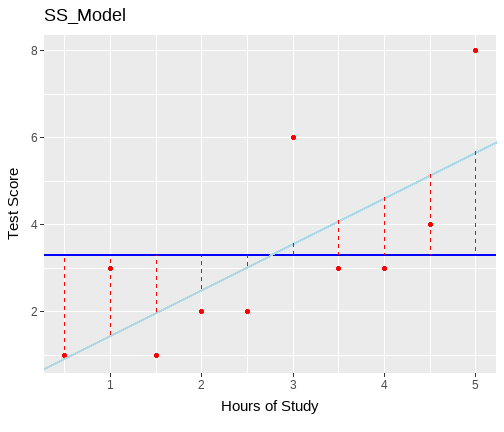<!-- --> ] --- # Coefficient of determination: Our example ```r summary(res_multi) ``` ``` ## ## Call: ## lm(formula = salary ~ serv + department + location, data = salary3) ## ## Residuals: ## Min 1Q Median 3Q Max ## -7.4895 -2.5605 -0.5627 2.7387 9.4569 ## ## Coefficients: ## Estimate Std. Error t value Pr(>|t|) ## (Intercept) 41.6839 1.0966 38.011 < 2e-16 *** ## serv 2.9531 0.2922 10.105 < 2e-16 *** ## departmentManager -6.9522 0.8113 -8.570 1.75e-13 *** ## locationBirmingham -6.2827 0.8446 -7.439 4.30e-11 *** ## --- ## Signif. codes: 0 '***' 0.001 '**' 0.01 '*' 0.05 '.' 0.1 ' ' 1 ## ## Residual standard error: 3.776 on 96 degrees of freedom ## Multiple R-squared: 0.7099, Adjusted R-squared: 0.7008 ## F-statistic: 78.31 on 3 and 96 DF, p-value: < 2.2e-16 ``` --- # Adjusted `\(R^2\)` + We can also compute an adjusted `\(R^2\)` when our lm has 2+ predictors. + `\(R^2\)` is an inflated estimate of the corresponding population value + Due to random sampling fluctuation, even when `\(R^2 = 0\)` in the population, it's value in the sample may `\(\neq 0\)` + In **smaller samples** , the fluctuations from zero will be larger on average + With **more IVs** , there are more opportunities to add to the positive fluctuation `$$\hat R^2 = 1 - (1 - R^2)\frac{N-1}{N-k-1}$$` + Adjusted `\(R^2\)` adjusts for both sample size ( `\(N\)` ) and number of predictors ( `\(k\)` ) --- # Adjusted R-square: Our example ```r summary(res_multi) ``` ``` ## ## Call: ## lm(formula = salary ~ serv + department + location, data = salary3) ## ## Residuals: ## Min 1Q Median 3Q Max ## -7.4895 -2.5605 -0.5627 2.7387 9.4569 ## ## Coefficients: ## Estimate Std. Error t value Pr(>|t|) ## (Intercept) 41.6839 1.0966 38.011 < 2e-16 *** ## serv 2.9531 0.2922 10.105 < 2e-16 *** ## departmentManager -6.9522 0.8113 -8.570 1.75e-13 *** ## locationBirmingham -6.2827 0.8446 -7.439 4.30e-11 *** ## --- ## Signif. codes: 0 '***' 0.001 '**' 0.01 '*' 0.05 '.' 0.1 ' ' 1 ## ## Residual standard error: 3.776 on 96 degrees of freedom ## Multiple R-squared: 0.7099, Adjusted R-squared: 0.7008 ## F-statistic: 78.31 on 3 and 96 DF, p-value: < 2.2e-16 ``` --- # Significance of the overall model + The test of the individual predictors (IVs, or `\(x\)`'s) does not tell us if the overall model is significant or not. + Neither does R-square + But both are indicative + To test the significance of the model as a whole, we conduct an `\(F\)`-test. --- # F-ratio + `\(F\)`-ratio tests the null hypothesis that all the regression slopes in a model are all zero + `\(F\)`-ratio is a ratio of the explained to unexplained variance: `$$F = \frac{MS_{Model}}{MS_{Residual}}$$` + Where MS = mean squares -- + **What are mean squares?** + Mean squares are sums of squares calculations divided by the associated degrees of freedom. + The degrees of freedom are defined by the number of "independent" values associated with the different calculations. --- # F-ratio + Bigger `\(F\)`-ratios indicate better models. + It means the model variance is big compared to the residual variance. -- + The null hypothesis for the model says that the best guess of any individuals `\(y\)` value is the mean of `\(y\)` plus error. + Or, that the `\(x\)` variables carry no information collectively about `\(y\)`. -- + `\(F\)`-ratio will be close to 1 when the null hypothesis is true + If there is equivalent residual to model variation, `\(F\)`=1 + If there is more model than residual `\(F\)` > 1 -- + `\(F\)`-ratio is then evaluated against an `\(F\)`-distribution with `\(df_{Model}\)` and `\(df_{Residual}\)` and a pre-defined `\(\alpha\)` -- + Testing the `\(F\)`-ratio evaluates statistical significance of the overall model --- # Our example ```r summary(res_multi) ``` ``` ## ## Call: ## lm(formula = salary ~ serv + department + location, data = salary3) ## ## Residuals: ## Min 1Q Median 3Q Max ## -7.4895 -2.5605 -0.5627 2.7387 9.4569 ## ## Coefficients: ## Estimate Std. Error t value Pr(>|t|) ## (Intercept) 41.6839 1.0966 38.011 < 2e-16 *** ## serv 2.9531 0.2922 10.105 < 2e-16 *** ## departmentManager -6.9522 0.8113 -8.570 1.75e-13 *** ## locationBirmingham -6.2827 0.8446 -7.439 4.30e-11 *** ## --- ## Signif. codes: 0 '***' 0.001 '**' 0.01 '*' 0.05 '.' 0.1 ' ' 1 ## ## Residual standard error: 3.776 on 96 degrees of freedom ## Multiple R-squared: 0.7099, Adjusted R-squared: 0.7008 ## F-statistic: 78.31 on 3 and 96 DF, p-value: < 2.2e-16 ``` --- class: inverse, center, middle <h2 style="text-align: left;opacity:0.3;">Part 1: Adding more predictors </h2> <h2 style="text-align: left;opacity:0.3;">Part 2: Evaluating predictors </h2> <h2 style="text-align: left;opacity:0.3;">Part 3: Evaluating my model </h2> <h2>Part 4: Comparing models </h2> --- # Why might we compare models? + Suppose we wanted to know the effect of a key predictor, after first having controlled for some covariates. + In many places described as hierarchical regression + We can't do this with the skills learned so far. + We can using model comparison tools. --- # `\(F\)`-test as an incremental test + One important way we can think about the `\(F\)`-test and the `\(F\)`-ratio is as an incremental test against an "empty" or null model. + A null or empty model is a linear model with only the intercept. + In this model, our predicted value of the outcome for every case in our data set, is the mean of the outcome. + That is, with no predictors, we have no information that may help us predict the outcome. + So we will be "least wrong" by guessing the mean of the outcome. + An empty model is the same as saying all `\(\beta\)` = 0. + So in this way, the `\(F\)`-test we have already seen **is comparing two models**. + We can extend this idea, and use the `\(F\)`-test to compare two models that contain different sets of predictors. + This is the **incremental `\(F\)`-test** --- # Incremental `\(F\)`-test .pull-left[ + The incremental `\(F\)`-test evaluates the statistical significance of the improvement in variance explained in an outcome with the addition of further predictor(s) + It is based on the difference in `\(F\)`-values between two models. + We call the model with the additional predictor(s) model 1 or full model + We call the model without model 0 or restricted model ] .pull-right[ `$$F_{(df_R-df_F),df_F} = \frac{(SSR_R-SSR_F)/(df_R-df_F)}{SSR_F / df_F}$$` $$ `\begin{align} & \text{Where:} \\ & SSR_R = \text{residual sums of squares for the restricted model} \\ & SSR_F = \text{residual sums of squares for the full model} \\ & df_R = \text{residual degrees of freedom from the restricted model} \\ & df_F = \text{residual degrees of freedom from the full model} \\ \end{align}` $$ ] --- # Incremental `\(F\)`-test in R + In order to apply the `\(F\)`-test for model comparison in R, we use the `anova()` function. + `anova()` takes as its arguments models that we wish to compare + Here we will show examples with 2 models, but we can use more. --- # Example ```r m0 <- lm(salary ~1, data = salary3) m1 <- lm(salary ~ location + department, data = salary3) m2 <- lm(salary ~ location + department + serv, data = salary3) anova(m0, m1, m2) ``` ``` ## Analysis of Variance Table ## ## Model 1: salary ~ 1 ## Model 2: salary ~ location + department ## Model 3: salary ~ location + department + serv ## Res.Df RSS Df Sum of Sq F Pr(>F) ## 1 99 4717.8 ## 2 97 2824.4 2 1893.4 66.404 < 2.2e-16 *** ## 3 96 1368.6 1 1455.8 102.115 < 2.2e-16 *** ## --- ## Signif. codes: 0 '***' 0.001 '**' 0.01 '*' 0.05 '.' 0.1 ' ' 1 ``` --- class: center, middle # Thanks all! --- class: center, middle # Day 3 **Interactions (uh-oh)** --- class: inverse, center, middle <h2>Part 1: What is an interaction and why are we talking about it? </h2> <h2 style="text-align: left;opacity:0.3;">Part 2: Continuous*binary interactions </h2> <h2 style="text-align: left;opacity:0.3;">Part 3: Continuous*Continuous interactions </h2> <h2 style="text-align: left;opacity:0.3;">Part 4: Categorical*categorical interactions </h2> --- # Lecture notation + For today, we will work with the following equation and notation: `$$y_i = \beta_0 + \beta_1 x_{i} + \beta_2 z_{i} + \beta_3 xz_{i} + \epsilon_i$$` + `\(y\)` is a continuous outcome + `\(x\)` is our first predictor + `\(z\)` is our second predictor + `\(xz\)` is their product or interaction predictors --- # General definition of interaction + When the effects of one predictor on the outcome differ across levels of another predictor. + **Important**: When we have an interaction, we can no longer talk about the overall effect of a variable, holding the others constant. + The effects change + The effects at specific variables of the interacting variable are called marginal effects. + Note interactions are symmetrical. + What does this mean? + We can talk about interaction of X with Z, or Z with X. --- # General definition + Categorical*continuous interaction: + The slope of the regression line between a continuous predictor and the outcome is different across levels of a categorical predictor. -- + Continuous*continuous interaction: + The slope of the regression line between a continuous predictor and the outcome changes as the values of a second continuous predictor change. + May have heard this referred to as moderation. -- + Categorical*categorical interaction: + There is a difference in the differences between groups across levels of a second factor. + We will discuss this in the context of linear models for experimental design --- # Why are we interested in interactions? + Often we have theories or ideas which relate to an interaction. + For example: + different relationships of mood state to cognitive score dependent on disease status + different rates of cognitive decline by disease status. + Questions like these would be tested via inclusion of an interaction term in our model. --- class: inverse, center, middle <h2 style="text-align: left;opacity:0.3;">Part 1: What is an interaction and why are we talking about it? </h2> <h2>Part 2: Continuous*binary interactions </h2> <h2 style="text-align: left;opacity:0.3;">Part 3: Continuous*Continuous interactions </h2> <h2 style="text-align: left;opacity:0.3;">Part 4: Categorical*categorical interactions </h2> --- # Interpretation: Categorical*Continuous `$$y_i = \beta_0 + \beta_1 x_{i} + \beta_2 z_{i} + \beta_3 xz_{i} + \epsilon_i$$` + Where `\(z\)` is a binary predictor + `\(\beta_0\)` = Value of `\(y\)` when `\(x\)` and `\(z\)` are 0 + `\(\beta_1\)` = Effect of `\(x\)` (slope) when `\(z\)` = 0 (reference group) + `\(\beta_2\)` = Difference intercept between `\(z\)` = 0 and `\(z\)` = 1, when `\(x\)` = 0. + `\(\beta_3\)` = Difference in slope across levels of `\(z\)` --- # Example: Categorical*Continuous .pull-left[ + Suppose I am conducting a study on how years of service within an organisation predicts salary in two different departments, accounts and store managers. + y = salary (unit = thousands of pounds) + x = years of service + z = Department (0=Store managers, 1=Accounts) ] .pull-right[ ```r salary1 %>% slice(1:10) ``` ``` ## # A tibble: 10 × 3 ## service salary dept ## <dbl> <dbl> <fct> ## 1 6.2 60.5 Accounts ## 2 2.7 22.9 StoreManager ## 3 4.6 48.9 Accounts ## 4 5.4 49.9 Accounts ## 5 3.5 28.2 StoreManager ## 6 5.6 54.1 Accounts ## 7 5.7 37.8 StoreManager ## 8 2.6 37.9 Accounts ## 9 5.9 36.5 StoreManager ## 10 4.9 28.4 StoreManager ``` ] --- # Visualize the data .pull-left[ ```r salary1 %>% ggplot(., aes(x = service, y = salary, colour = dept)) + geom_point() + xlim(0,8) + labs(x = "Years of Service", y = "Salary (£1000)") ``` ] .pull-right[ 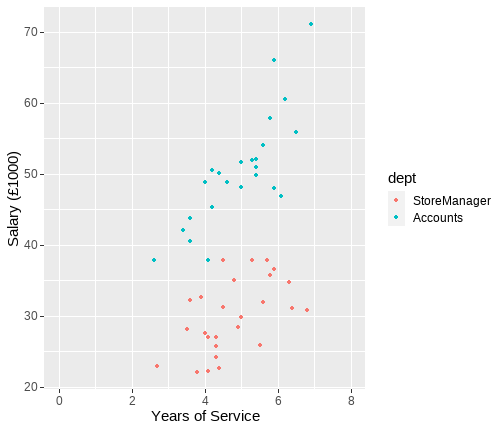<!-- --> ] --- # Example: Full results ```r int <- lm(salary ~ service + dept + service*dept, data = salary1) *summary(int) ``` --- # Example: Full results ``` ## ## Call: ## lm(formula = salary ~ service + dept + service * dept, data = salary1) ## ## Residuals: ## Min 1Q Median 3Q Max ## -10.196 -2.812 -0.316 2.927 10.052 ## ## Coefficients: ## Estimate Std. Error t value Pr(>|t|) ## (Intercept) 16.8937 4.4638 3.785 0.000444 *** ## service 2.7364 0.9166 2.986 0.004524 ** ## deptAccounts 4.4887 6.3111 0.711 0.480523 ## service:deptAccounts 3.1174 1.2698 2.455 0.017928 * ## --- ## Signif. codes: 0 '***' 0.001 '**' 0.01 '*' 0.05 '.' 0.1 ' ' 1 ## ## Residual standard error: 4.61 on 46 degrees of freedom ## Multiple R-squared: 0.867, Adjusted R-squared: 0.8583 ## F-statistic: 99.93 on 3 and 46 DF, p-value: < 2.2e-16 ``` --- # Example: Categorical*Continuous .pull-left[ + **Intercept** ( `\(\beta_0\)` ): Predicted salary for a store manager (`dept`=0) with 0 years of service is £16,894. + **Service** ( `\(\beta_1\)` ): For each additional year of service for a store manager (`dept` = 0), salary increases by £2,736. + **Dept** ( `\(\beta_2\)` ): Difference in salary between store managers (`dept` = 0) and accounts (`dept` = 1) with 0 years of service is £4,489. + **Service:dept** ( `\(\beta_3\)` ): The difference in slope. For each year of service, those in accounts (`dept` = 1) increase by an additional £3,117. ] .pull-right[ 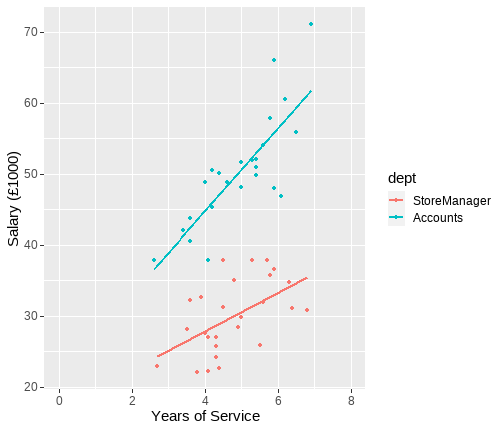<!-- --> ] --- # Centering predictors **Why centre?** + Meaningful interpretation. + Interpretation of models with interactions involves evaluation when other variables = 0. + This makes it quite important that 0 is meaningful in some way. + Note this is simple with categorical variables. + We code our reference group as 0 in all dummy variables. + For continuous variables, we need a meaningful 0 point. --- # Example of age + Suppose I have age as a variable in my study with a range of 30 to 85. + Age = 0 is not that meaningful. + Essentially means all my parameters are evaluated at point of birth. + So what might be meaningful? + Average age? (mean centering) + A fixed point? (e.g. 66 if studying retirement) --- class: inverse, center, middle <h2 style="text-align: left;opacity:0.3;">Part 1: What is an interaction and why are we talking about it? </h2> <h2 style="text-align: left;opacity:0.3;">Part 2: Continuous*binary interactions </h2> <h2>Part 3: Continuous*Continuous interactions </h2> <h2 style="text-align: left;opacity:0.3;">Part 4: Categorical*categorical interactions </h2> --- # Interpretation: Continuous*Continuous `$$y_i = \beta_0 + \beta_1 x_{i} + \beta_2 z_{i} + \beta_3 xz_{i} + \epsilon_i$$` + Lecture notation: + `\(\beta_0\)` = Value of `\(y\)` when `\(x\)` and `\(z\)` are 0 + `\(\beta_1\)` = Effect of `\(x\)` (slope) when `\(z\)` = 0 + `\(\beta_2\)` = Effect of `\(z\)` (slope) when `\(x\)` = 0 + `\(\beta_3\)` = Change in slope of `\(x\)` on `\(y\)` across values of `\(z\)` (and vice versa). + Or how the effect of `\(x\)` depends on `\(z\)` (and vice versa) --- # Example: Continuous*Continuous + Conducting a study on how years of service and employee performance ratings predicts salary in a sample of managers. `$$y_i = \beta_0 + \beta_1 x_{i} + \beta_2 z_{i} + \beta_3 xz_{i} + \epsilon_i$$` + `\(y\)` = Salary (unit = thousands of pounds ). + `\(x\)` = Years of service. + `\(z\)` = Average performance ratings. --- # Example: Continuous*Continuous ``` ## ## Call: ## lm(formula = salary ~ serv * perf, data = salary2) ## ## Residuals: ## Min 1Q Median 3Q Max ## -43.008 -9.710 -1.068 8.674 48.494 ## ## Coefficients: ## Estimate Std. Error t value Pr(>|t|) ## (Intercept) 87.920 16.376 5.369 5.51e-07 *** ## serv -10.944 4.538 -2.412 0.01779 * ## perf 3.154 4.311 0.732 0.46614 ## serv:perf 3.255 1.193 2.728 0.00758 ** ## --- ## Signif. codes: 0 '***' 0.001 '**' 0.01 '*' 0.05 '.' 0.1 ' ' 1 ## ## Residual standard error: 17.55 on 96 degrees of freedom ## Multiple R-squared: 0.5404, Adjusted R-squared: 0.5261 ## F-statistic: 37.63 on 3 and 96 DF, p-value: 3.631e-16 ``` --- # Example: Continuous*Continuous .pull-left[ + **Intercept**: a manager with 0 years of service and 0 performance rating earns £87,920 + **Service**: for a manager with 0 performance rating, for each year of service, salary decreases by £10,940 + slope when performance = 0 + **Performance**: for a manager with 0 years service, for each point of performance rating, salary increases by £3,150. + slope when service = 0 + **Interaction**: for every year of service, the relationship between performance and salary increases by £3250. ] .pull-right[ ``` ## Estimate Std. Error t value Pr(>|t|) ## (Intercept) 87.92 16.38 5.37 0.00 ## serv -10.94 4.54 -2.41 0.02 ## perf 3.15 4.31 0.73 0.47 ## serv:perf 3.25 1.19 2.73 0.01 ``` ] ??? + What do you notice here? + 0 performance and 0 service are odd values + lets mean centre both, so 0 = average, and look at this again. --- # Mean centering ```r salary2 <- salary2 %>% mutate( * perfM = c(scale(perf, scale = F)), * servM = c(scale(serv, scale = F)) ) int3 <- lm(salary ~ servM*perfM, data = salary2) ``` --- # Mean centering ``` ## ## Call: ## lm(formula = salary ~ servM * perfM, data = salary2) ## ## Residuals: ## Min 1Q Median 3Q Max ## -43.008 -9.710 -1.068 8.674 48.494 ## ## Coefficients: ## Estimate Std. Error t value Pr(>|t|) ## (Intercept) 104.848 1.757 59.686 < 2e-16 *** ## servM 1.425 1.364 1.044 0.29890 ## perfM 14.445 1.399 10.328 < 2e-16 *** ## servM:perfM 3.255 1.193 2.728 0.00758 ** ## --- ## Signif. codes: 0 '***' 0.001 '**' 0.01 '*' 0.05 '.' 0.1 ' ' 1 ## ## Residual standard error: 17.55 on 96 degrees of freedom ## Multiple R-squared: 0.5404, Adjusted R-squared: 0.5261 ## F-statistic: 37.63 on 3 and 96 DF, p-value: 3.631e-16 ``` --- # Example: Continuous*Continuous .pull-left[ + **Intercept**: a manager with average years of service and average performance rating earns £104,850 + **Service**: a manager with average performance rating, for every year of service, salary increases by £1,420 + slope when performance = 0 (mean centered) + **Performance**: a manager with average years service, for each point of performance rating, salary increases by £14,450. + slope when service = 0 (mean centered) + **Interaction**: for every year of service, the relationship between performance and salary increases by £3,250. ] .pull-right[ ``` ## Estimate Std. Error t value Pr(>|t|) ## (Intercept) 104.85 1.76 59.69 0.00 ## servM 1.42 1.36 1.04 0.30 ## perfM 14.45 1.40 10.33 0.00 ## servM:perfM 3.25 1.19 2.73 0.01 ``` ] --- # Plotting interactions + In our last block we saw we could produce a line for each group of a binary (extends to categorical) variable. + These are called simple slopes: + **Regression of the outcome Y on a predictor X at specific values of an interacting variable Z.** + For a continuous variable, we could choose any values of Z. + Typically we plot at the mean and +/- 1SD --- # `sjPlot`: Simple Slopes .pull-left[ ```r library(sjPlot) plot_model(int3, type = "int") ``` ] .pull-right[ 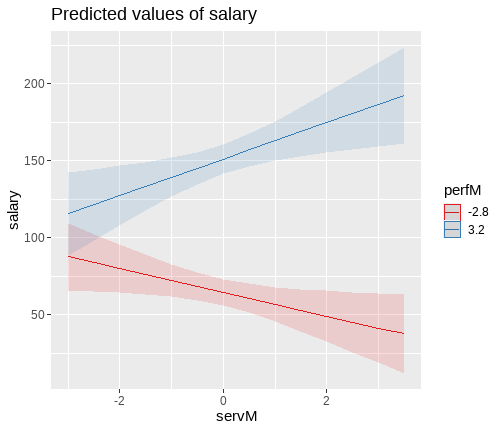<!-- --> ] --- class: inverse, center, middle <h2 style="text-align: left;opacity:0.3;">Part 1: What is an interaction and why are we talking about it? </h2> <h2 style="text-align: left;opacity:0.3;">Part 2: Continuous*binary interactions </h2> <h2 style="text-align: left;opacity:0.3;">Part 3: Continuous*Continuous interactions </h2> <h2>Part 4: Categorical*categorical interactions </h2> --- # General definition + When the effects of one predictor on the outcome differ across levels of another predictor. + Categorical*categorical interaction: + There is a difference in the differences between groups across levels of a second factor. + This idea of a difference in differences can be quite tricky to think about. + So we will start with some visualization, and then look at two examples. --- # Difference in differences (1) .pull-left[ <table> <thead> <tr> <th style="text-align:left;"> </th> <th style="text-align:right;"> London </th> <th style="text-align:right;"> Birmingham </th> </tr> </thead> <tbody> <tr> <td style="text-align:left;"> Accounts </td> <td style="text-align:right;"> 50 </td> <td style="text-align:right;"> 40 </td> </tr> <tr> <td style="text-align:left;"> Manager </td> <td style="text-align:right;"> 30 </td> <td style="text-align:right;"> 20 </td> </tr> </tbody> </table> + In each plot we look at, think about subtracting the average store managers salary (blue triangle) from the average accounts salary (red circle) + In both cases, it is £20,000. + Note, the lines are parallel + Remember what we have said about parallel lines...no interaction ] .pull-right[ 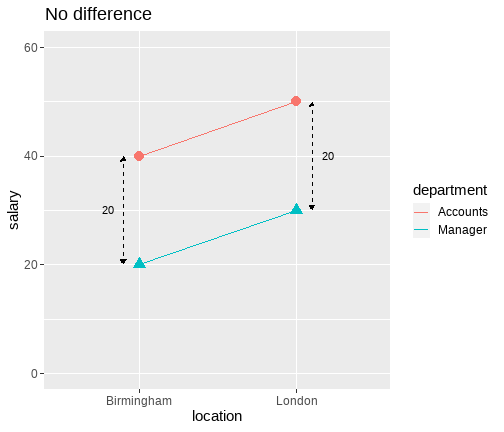<!-- --> ] --- # Difference in differences (2) .pull-left[ <table> <thead> <tr> <th style="text-align:left;"> </th> <th style="text-align:right;"> London </th> <th style="text-align:right;"> Birmingham </th> </tr> </thead> <tbody> <tr> <td style="text-align:left;"> Accounts </td> <td style="text-align:right;"> 50 </td> <td style="text-align:right;"> 40 </td> </tr> <tr> <td style="text-align:left;"> Manager </td> <td style="text-align:right;"> 40 </td> <td style="text-align:right;"> 20 </td> </tr> </tbody> </table> + This time we can see the difference differs. + £20,000 in Birmingham + £10,000 in London. + Note the lines are no longer parallel. + Suggests interaction. + But not crossing (so ordinal interaction) ] .pull-right[ 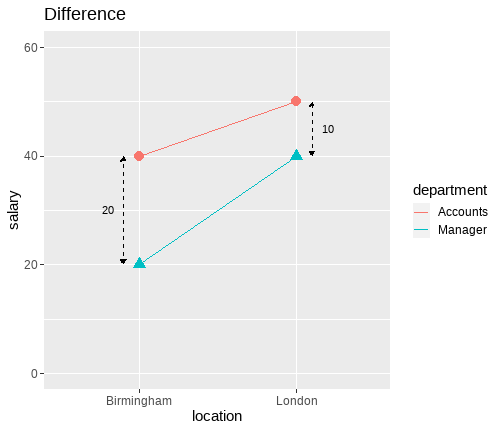<!-- --> ] --- # Difference in differences (3) .pull-left[ <table> <thead> <tr> <th style="text-align:left;"> </th> <th style="text-align:right;"> London </th> <th style="text-align:right;"> Birmingham </th> </tr> </thead> <tbody> <tr> <td style="text-align:left;"> Accounts </td> <td style="text-align:right;"> 40 </td> <td style="text-align:right;"> 40 </td> </tr> <tr> <td style="text-align:left;"> Manager </td> <td style="text-align:right;"> 60 </td> <td style="text-align:right;"> 20 </td> </tr> </tbody> </table> + This time we can see the difference differs. + £20,000 in Birmingham + -£20,000 in London + Note the lines are no longer parallel. + Suggests interaction. + Now crossing (so disordinal interaction) ] .pull-right[ 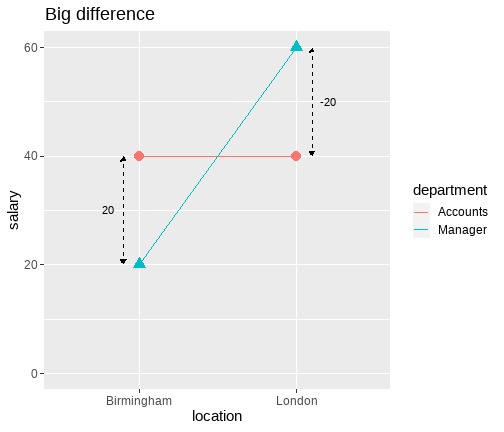<!-- --> ] --- # Interpretation: Categorical*categorical interaction (dummy codes) `$$y_i = \beta_0 + \beta_1 x_{i} + \beta_2 z_{i} + \beta_3 xz_{i} + \epsilon_i$$` + `\(\beta_0\)` = Value of `\(y\)` when `\(x\)` and `\(z\)` are 0 + Expected salary for Accounts in London. + `\(\beta_1\)` = Difference between levels of `\(x\)` when `\(z\)` = 0 + The difference in salary between Accounts in London and Birmingham + `\(\beta_2\)` = Difference between levels of `\(z\)` when `\(x\)` = 0. + The difference in salary between Accounts and Store managers in London. + `\(\beta_3\)` = Difference between levels of `\(x\)` across levels of `\(z\)` + The difference between salary in Accounts and Store managers between London and Birmingham --- # Example: Categorical*categorical ```r int4 <- lm(salary ~ location*department, salary3) ``` ``` ## ## Call: ## lm(formula = salary ~ location * department, data = salary3) ## ## Residuals: ## Min 1Q Median 3Q Max ## -10.660 -3.733 0.520 3.267 14.340 ## ## Coefficients: ## Estimate Std. Error t value Pr(>|t|) ## (Intercept) 50.6600 0.7155 70.804 < 2e-16 *** ## locationBirmingham -1.9267 1.4894 -1.294 0.198920 ## departmentManager -3.3600 1.3386 -2.510 0.013741 * ## locationBirmingham:departmentManager -8.6400 2.2814 -3.787 0.000266 *** ## --- ## Signif. codes: 0 '***' 0.001 '**' 0.01 '*' 0.05 '.' 0.1 ' ' 1 ## ## Residual standard error: 5.059 on 96 degrees of freedom ## Multiple R-squared: 0.4791, Adjusted R-squared: 0.4629 ## F-statistic: 29.44 on 3 and 96 DF, p-value: 1.393e-13 ``` --- # Example: Categorical*categorical .pull-left[ ```r plot_model(int4, type = "int") ``` ] .pull-right[ 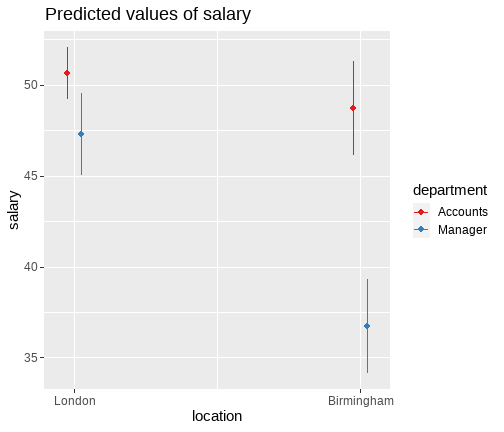<!-- --> ] --- # Example: Categorical*categorical ``` ## Estimate Std. Error t value Pr(>|t|) ## (Intercept) 50.660 0.715 70.804 0.000 ## locationBirmingham -1.927 1.489 -1.294 0.199 ## departmentManager -3.360 1.339 -2.510 0.014 ## locationBirmingham:departmentManager -8.640 2.281 -3.787 0.000 ``` .pull-left[ + `\(\beta_0\)` = Value of `\(y\)` when `\(x\)` and `\(z\)` are 0 + Expected salary for Accounts in London is £50,660. ] .pull-right[ <table> <thead> <tr> <th style="text-align:left;"> location </th> <th style="text-align:left;"> department </th> <th style="text-align:right;"> Salary </th> </tr> </thead> <tbody> <tr> <td style="text-align:left;"> London </td> <td style="text-align:left;"> Accounts </td> <td style="text-align:right;"> 50.660 </td> </tr> <tr> <td style="text-align:left;"> London </td> <td style="text-align:left;"> Manager </td> <td style="text-align:right;"> 47.300 </td> </tr> <tr> <td style="text-align:left;"> Birmingham </td> <td style="text-align:left;"> Accounts </td> <td style="text-align:right;"> 48.733 </td> </tr> <tr> <td style="text-align:left;"> Birmingham </td> <td style="text-align:left;"> Manager </td> <td style="text-align:right;"> 36.733 </td> </tr> </tbody> </table> ] --- # Example: Categorical*categorical ``` ## Estimate Std. Error t value Pr(>|t|) ## (Intercept) 50.660 0.715 70.804 0.000 ## locationBirmingham -1.927 1.489 -1.294 0.199 ## departmentManager -3.360 1.339 -2.510 0.014 ## locationBirmingham:departmentManager -8.640 2.281 -3.787 0.000 ``` .pull-left[ + `\(\beta_1\)` = Difference between levels of `\(x\)` when `\(z\)` = 0 + The difference in salary between Accounts in London and Birmingham is £1,927. The salary is lower in Birmingham. ] .pull-right[ <table> <thead> <tr> <th style="text-align:left;"> location </th> <th style="text-align:left;"> department </th> <th style="text-align:right;"> Salary </th> </tr> </thead> <tbody> <tr> <td style="text-align:left;"> London </td> <td style="text-align:left;"> Accounts </td> <td style="text-align:right;"> 50.660 </td> </tr> <tr> <td style="text-align:left;"> London </td> <td style="text-align:left;"> Manager </td> <td style="text-align:right;"> 47.300 </td> </tr> <tr> <td style="text-align:left;"> Birmingham </td> <td style="text-align:left;"> Accounts </td> <td style="text-align:right;"> 48.733 </td> </tr> <tr> <td style="text-align:left;"> Birmingham </td> <td style="text-align:left;"> Manager </td> <td style="text-align:right;"> 36.733 </td> </tr> </tbody> </table> ] --- # Example: Categorical*categorical ``` ## Estimate Std. Error t value Pr(>|t|) ## (Intercept) 50.660 0.715 70.804 0.000 ## locationBirmingham -1.927 1.489 -1.294 0.199 ## departmentManager -3.360 1.339 -2.510 0.014 ## locationBirmingham:departmentManager -8.640 2.281 -3.787 0.000 ``` .pull-left[ + `\(\beta_2\)` = Difference between levels of `\(z\)` when `\(x\)` = 0. + The difference in salary between Accounts and Store managers in London is £3,360. The salary is lower for Store Managers. ] .pull-right[ <table> <thead> <tr> <th style="text-align:left;"> location </th> <th style="text-align:left;"> department </th> <th style="text-align:right;"> Salary </th> </tr> </thead> <tbody> <tr> <td style="text-align:left;"> London </td> <td style="text-align:left;"> Accounts </td> <td style="text-align:right;"> 50.660 </td> </tr> <tr> <td style="text-align:left;"> London </td> <td style="text-align:left;"> Manager </td> <td style="text-align:right;"> 47.300 </td> </tr> <tr> <td style="text-align:left;"> Birmingham </td> <td style="text-align:left;"> Accounts </td> <td style="text-align:right;"> 48.733 </td> </tr> <tr> <td style="text-align:left;"> Birmingham </td> <td style="text-align:left;"> Manager </td> <td style="text-align:right;"> 36.733 </td> </tr> </tbody> </table> ] --- # Example: Categorical*categorical ``` ## Estimate Std. Error t value Pr(>|t|) ## (Intercept) 50.660 0.715 70.804 0.000 ## locationBirmingham -1.927 1.489 -1.294 0.199 ## departmentManager -3.360 1.339 -2.510 0.014 ## locationBirmingham:departmentManager -8.640 2.281 -3.787 0.000 ``` .pull-left[ + `\(\beta_3\)` = Difference between levels of `\(x\)` across levels of `\(z\)` + The difference between salary for Accounts and Store managers between London and Birmingham, differs by £8,640. The difference is greater in Birmingham than in London. ] .pull-right[ <table> <thead> <tr> <th style="text-align:left;"> location </th> <th style="text-align:left;"> department </th> <th style="text-align:right;"> Salary </th> </tr> </thead> <tbody> <tr> <td style="text-align:left;"> London </td> <td style="text-align:left;"> Accounts </td> <td style="text-align:right;"> 50.660 </td> </tr> <tr> <td style="text-align:left;"> London </td> <td style="text-align:left;"> Manager </td> <td style="text-align:right;"> 47.300 </td> </tr> <tr> <td style="text-align:left;"> Birmingham </td> <td style="text-align:left;"> Accounts </td> <td style="text-align:right;"> 48.733 </td> </tr> <tr> <td style="text-align:left;"> Birmingham </td> <td style="text-align:left;"> Manager </td> <td style="text-align:right;"> 36.733 </td> </tr> </tbody> </table> ] --- class: center, middle # Thanks all! --- class: center, middle # Day 4 **Is my model any good?** --- class: inverse, center, middle <h2>Part 1: Key model assumptions </h2> <h2 style="text-align: left;opacity:0.3;">Part 2: Basic model diagnostics </h2> <h2 style="text-align: left;opacity:0.3;">Part 3: What we have not covered? </h2> --- # Linear model assumptions + So far, we have discussed evaluating linear models with respect to: + Overall model fit ( `\(F\)` -ratio, `\(R^2\)`) + Individual predictors + However, the linear model is also built on a set of assumptions. + If these assumptions are violated, the model will not be very accurate. + Thus, we also need to assess the extent to which these assumptions are met. --- # Some data for today .pull-left[ + Let's look again at our data predicting salary from years or service and performance ratings (no interaction). `$$y_i = \beta_0 + \beta_1 x_{1} + \beta_2 x_{2} + \epsilon_i$$` + `\(y\)` = Salary (unit = thousands of pounds ). + `\(x_1\)` = Years of service. + `\(x_2\)` = Average performance ratings. ] .pull-right[ <table class="table" style="width: auto !important; margin-left: auto; margin-right: auto;"> <thead> <tr> <th style="text-align:left;"> id </th> <th style="text-align:right;"> salary </th> <th style="text-align:right;"> serv </th> <th style="text-align:right;"> perf </th> <th style="text-align:right;"> perfM </th> <th style="text-align:right;"> servM </th> </tr> </thead> <tbody> <tr> <td style="text-align:left;"> ID101 </td> <td style="text-align:right;"> 80.18 </td> <td style="text-align:right;"> 2.2 </td> <td style="text-align:right;"> 3 </td> <td style="text-align:right;"> -0.8 </td> <td style="text-align:right;"> -1.269 </td> </tr> <tr> <td style="text-align:left;"> ID102 </td> <td style="text-align:right;"> 123.98 </td> <td style="text-align:right;"> 4.5 </td> <td style="text-align:right;"> 5 </td> <td style="text-align:right;"> 1.2 </td> <td style="text-align:right;"> 1.031 </td> </tr> <tr> <td style="text-align:left;"> ID103 </td> <td style="text-align:right;"> 80.55 </td> <td style="text-align:right;"> 2.4 </td> <td style="text-align:right;"> 3 </td> <td style="text-align:right;"> -0.8 </td> <td style="text-align:right;"> -1.069 </td> </tr> <tr> <td style="text-align:left;"> ID104 </td> <td style="text-align:right;"> 84.35 </td> <td style="text-align:right;"> 4.6 </td> <td style="text-align:right;"> 4 </td> <td style="text-align:right;"> 0.2 </td> <td style="text-align:right;"> 1.131 </td> </tr> <tr> <td style="text-align:left;"> ID105 </td> <td style="text-align:right;"> 83.76 </td> <td style="text-align:right;"> 4.8 </td> <td style="text-align:right;"> 3 </td> <td style="text-align:right;"> -0.8 </td> <td style="text-align:right;"> 1.331 </td> </tr> <tr> <td style="text-align:left;"> ID106 </td> <td style="text-align:right;"> 117.61 </td> <td style="text-align:right;"> 4.4 </td> <td style="text-align:right;"> 4 </td> <td style="text-align:right;"> 0.2 </td> <td style="text-align:right;"> 0.931 </td> </tr> <tr> <td style="text-align:left;"> ID107 </td> <td style="text-align:right;"> 96.38 </td> <td style="text-align:right;"> 4.3 </td> <td style="text-align:right;"> 5 </td> <td style="text-align:right;"> 1.2 </td> <td style="text-align:right;"> 0.831 </td> </tr> <tr> <td style="text-align:left;"> ID108 </td> <td style="text-align:right;"> 96.49 </td> <td style="text-align:right;"> 5.0 </td> <td style="text-align:right;"> 5 </td> <td style="text-align:right;"> 1.2 </td> <td style="text-align:right;"> 1.531 </td> </tr> <tr> <td style="text-align:left;"> ID109 </td> <td style="text-align:right;"> 88.23 </td> <td style="text-align:right;"> 2.4 </td> <td style="text-align:right;"> 3 </td> <td style="text-align:right;"> -0.8 </td> <td style="text-align:right;"> -1.069 </td> </tr> <tr> <td style="text-align:left;"> ID110 </td> <td style="text-align:right;"> 143.69 </td> <td style="text-align:right;"> 4.6 </td> <td style="text-align:right;"> 6 </td> <td style="text-align:right;"> 2.2 </td> <td style="text-align:right;"> 1.131 </td> </tr> </tbody> </table> ] --- # Our model ```r m1 <- lm(salary ~ perf + serv, data = salary2) ``` + We will run all our assumptions based on the object `m1` --- # Visualizations vs tests + There exist a variety of ways to assess assumptions, which broadly split into statistical tests and visualizations. + We will focus on visualization: + Easier to see the nature and magnitude of the assumption violation + There is also a very useful function for producing them all. + Statistical tests often suggest assumptions are violated when problem is small. + This is to do with the statistical power of the tests. + Give no information on what the actual problem is. + A summary table of tests will be given at the end of the lecture. --- # Visualizations made easy + For a majority of assumption and diagnostic plots, we will make use of the `plot()` function. + If we give `plot()` a linear model object (e.g. `m1` or `m2`), we can automatically generate assumption plots. + We will also make use of some individual functions for specific visualizations. + Alternatively, we can also use `check_model()` from the `performance` package. + This provides `ggplot` figures as well as some notes to aid interpretation. + Caution that these plots are **not in a format to use directly in reports** --- # Linearity + **Assumption**: The relationship between `\(y\)` and `\(x\)` is linear. + Assuming a linear relation when the true relation is non-linear can result in under-estimating that relation + **Investigated with**: + Scatterplots with loess lines (single variables) + Component-residual plots (when we have multiple predictors) --- # Linear vs non-linear .pull-left[ 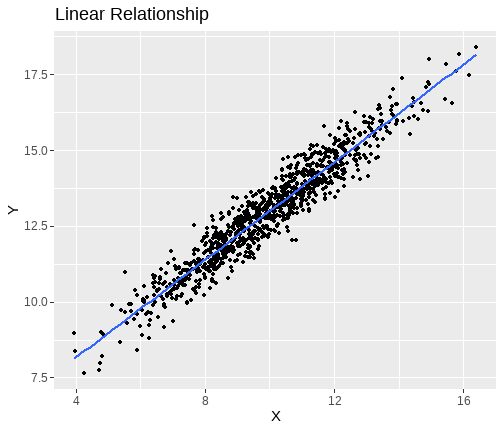<!-- --> ] .pull-right[ 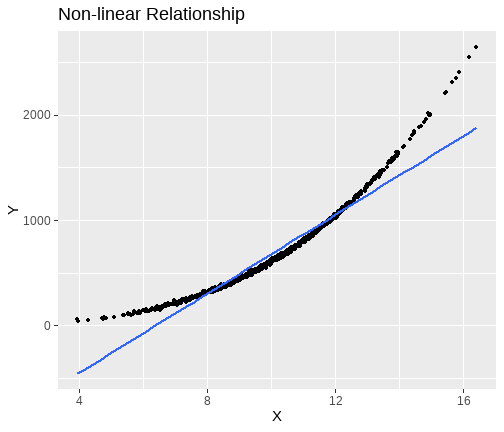<!-- --> ] --- # What is a loess line? + Method for helping visualize the shape of relationships: + Stands for... + **LO**cally + **E**stimated + **S**catterplot + **S**moothing + Essentially produces a line with follows the data. + Useful for single predictors. --- # Visualization .pull-left[ ```r lin_m1 <- salary2 %>% ggplot(., aes(x=serv, y=perf)) + geom_point()+ geom_smooth(method = "lm", se=F) + # << * geom_smooth(method = "loess", se=F, col = "red") + labs(x= "Years of Service", y="Performance", title = "Scatterplot with linear (blue) and loess (red) lines") ``` ] .pull-right[ 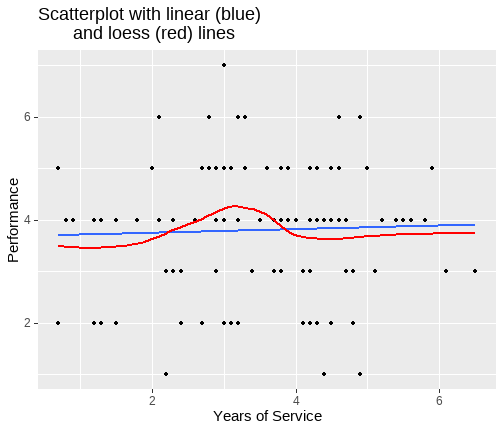<!-- --> ] --- # Non-linearity + With multiple predictors, we need to know whether the relations are linear between each predictor and outcome, controlling for the other predictors + This can be done using **component-residual plots** + Also known as partial-residual plots + Component-residual plots have the `\(x\)` values on the X-axis and partial residuals on the Y-axis + *Partial residuals* for each X variable are: `$$\epsilon_i + B_jX_{ij}$$` + Where : + `\(\epsilon_i\)` is the residual from the linear model including all the predictors + `\(B_jX_{ij}\)` is the partial (linear) relation between `\(x_j\)` and `\(y\)` --- # `crPlots()` + Component-residual plots can be obtained using the `crPlots()` function from `car` package ```r m1 <- lm(salary ~ perf + serv, data = salary2) crPlots(m1) ``` + The plots for continuous predictors show a linear (dashed) and loess (solid) line + The loess line should follow the linear line closely, with deviations suggesting non-linearity --- # `crPlots()` 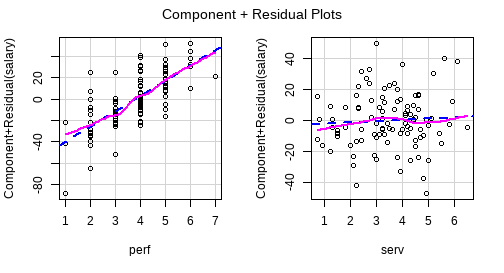<!-- --> ??? + Here the relations look pretty good. + Deviations of the line are minor --- # Normally distributed errors + **Assumption**: The errors ( `\(\epsilon_i\)` ) are normally distributed around each predicted value. + **Investigated with**: + QQ-plots + Histograms --- # Visualizations + **Histograms**: Plot the frequency distribution of the residuals. ```r hist(m1$residuals) ``` -- + **Q-Q Plots**: Quantile comparison plots. + Plot the standardized residuals from the model against their theoretically expected values. + If the residuals are normally distributed, the points should fall neatly on the diagonal of the plot. + Non-normally distributed residuals cause deviations of points from the diagonal. + The specific shape of these deviations are characteristic of the distribution of the residuals. ```r *plot(m1, which = 2) ``` --- # Visualizations .pull-left[ 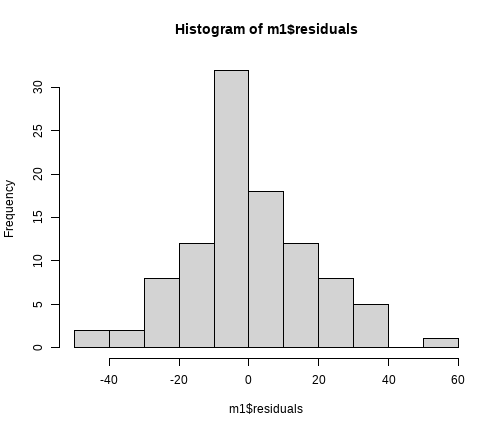<!-- --> ] .pull-right[ 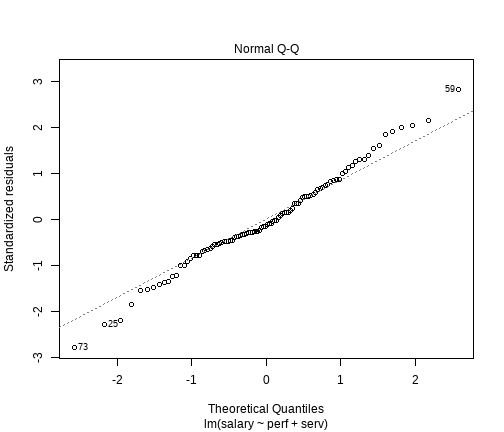<!-- --> ] --- # Equal variance (Homoscedasticity) + **Assumption**: The equal variances assumption is constant across values of the predictors `\(x_1\)`, ... `\(x_k\)`, and across values of the fitted values `\(\hat{y}\)` + Heteroscedasticity refers to when this assumption is violated (non-constant variance) + **Investigated with**: + Plot residual values against the predicted values ( `\(\hat{y}\)` ). --- # Residual-vs-predicted values plot + In R, we can plot the residuals vs predicted values using `residualPlot()` function in the `car` package. + Categorical predictors should show a similar spread of residual values across their levels + The plots for continuous predictors should look like a random array of dots + The solid line should follow the dashed line closely ```r residualPlot(m1) ``` + We can also get this plot using: ```r plot(m1, which = 1) ``` --- # Residual-vs-predicted values plot .pull-left[ 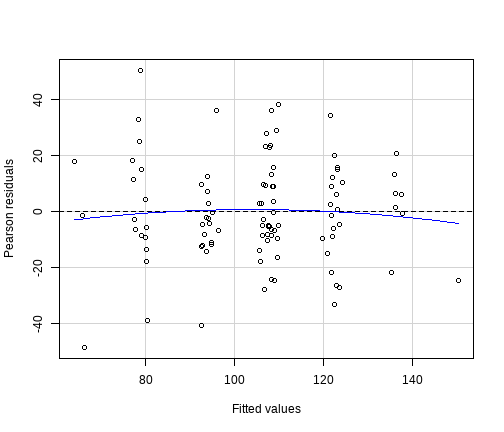<!-- --> ] .pull-right[ 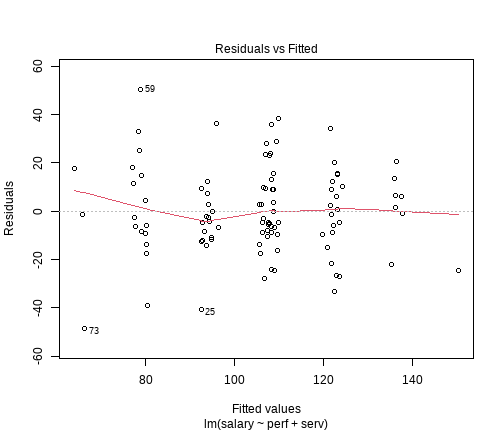<!-- --> ] --- # Independence of errors + **Assumption**: The errors are not correlated with one another + Difficult to test unless we know the potential source of correlation between cases. + Essentially, if a design is between person, we will assume the errors to be independent. --- # Multi-collinearity + This is **not an assumption of linear model**, but it is something we need to consider. + It sits between assumptions and case diagnostics. + Multi-collinearity refers to the correlation between predictors + We saw this in the formula for the standard error of model slopes for an `lm` with multiple predictors. + When there are large correlations between predictors, the standard errors are increased + Therefore, we don't want our predictors to be too correlated --- # Variance Inflation Factor + The **Variance Inflation Factor** or VIF quantifies the extent to which standard errors are increased by predictor inter-correlations + It can be obtained in R using the `vif()` function: ```r vif(m1) ``` ``` ## perf serv ## 1.001337 1.001337 ``` + The function gives a VIF value for each predictor + Ideally, we want values to be close to 1 + VIFs> 10 indicate a problem --- # What to do about multi-collinearity + In practice, multi-collinearity is not often a major problem + When issues arise, consider: + Combining highly correlated predictors into a single composite + E.g. create a sum or average of the two predictors + Dropping an IV that is obviously statistically and conceptually redundant with another from the model --- class: inverse, center, middle <h2 style="text-align: left;opacity:0.3;">Part 1: Key model assumptions </h2> <h2>Part 2: Basic model diagnostics </h2> <h2 style="text-align: left;opacity:0.3;">Part 3: What we have not covered? </h2> --- # Three important features + Model outliers + Cases for which there is a large discrepancy between their predicted value ( `\(\hat{y_i}\)` ) and their observed value ( `\(y_i\)` ) -- + High leverage cases + Cases with an unusual value of the predictor ( `\(x_i\)` ) -- + High influence cases + Cases who are having a large impact on the estimation of model --- # Influence + High leverage cases, when they are also linear model outliers, will have high **influence** + Cases with high influence, have a strong effect on the coefficients + If we deleted such a case, the linear model coefficients would change substantially --- # Influence + If a handful of influential cases are responsible for the linear model results, the conclusions might not generalise very well + Multiple ways to consider influence. + Here we will discuss Cook's distance. + Cook's Distance of a data point `\(i\)` (can be written many ways): `$$D_i = \frac{(\text{StandardizedResidual}_i)^2}{k+1} \times \frac{h_i}{1-h_i}$$` --- # Cooks Distance `$$\frac{(\text{StandardizedResidual}_i)^2}{k+1} = \text{Outlyingness}$$` `$$\frac{h_i}{1-h_i} = \text{Leverage}$$` + So `\(D_i = \text{Outlyingness} \times \text{Leverage}\)` + Cook's distance refers to **the average distance the `\(\hat{y}\)` values will move if a given case is removed.** + If removing one case changes the predicted values a lot (moves the regression line), then that case is influencing our results. --- # Cooks Distance + Many different suggestions for cut-off's: + `\(D_i > 1\)` + `\(D_i > \frac{4}{n-k-1}\)` + Or size relative all values in data set --- # Cook's distance in R .pull-left[ ```r salary2 %>% mutate( * cook = cooks.distance(m1) ) %>% * filter(., cook > 4/(100-3-1)) %>% kable(.) %>% kable_styling(., full_width = F) ``` <table class="table" style="width: auto !important; margin-left: auto; margin-right: auto;"> <thead> <tr> <th style="text-align:left;"> id </th> <th style="text-align:right;"> salary </th> <th style="text-align:right;"> serv </th> <th style="text-align:right;"> perf </th> <th style="text-align:right;"> perfM </th> <th style="text-align:right;"> servM </th> <th style="text-align:right;"> cook </th> </tr> </thead> <tbody> <tr> <td style="text-align:left;"> ID114 </td> <td style="text-align:right;"> 132.12 </td> <td style="text-align:right;"> 6.1 </td> <td style="text-align:right;"> 3 </td> <td style="text-align:right;"> -0.8 </td> <td style="text-align:right;"> 2.631 </td> <td style="text-align:right;"> 0.0833774 </td> </tr> <tr> <td style="text-align:left;"> ID133 </td> <td style="text-align:right;"> 41.60 </td> <td style="text-align:right;"> 4.8 </td> <td style="text-align:right;"> 2 </td> <td style="text-align:right;"> -1.8 </td> <td style="text-align:right;"> 1.331 </td> <td style="text-align:right;"> 0.0704271 </td> </tr> <tr> <td style="text-align:left;"> ID134 </td> <td style="text-align:right;"> 125.90 </td> <td style="text-align:right;"> 3.0 </td> <td style="text-align:right;"> 7 </td> <td style="text-align:right;"> 3.2 </td> <td style="text-align:right;"> -0.469 </td> <td style="text-align:right;"> 0.0545706 </td> </tr> <tr> <td style="text-align:left;"> ID159 </td> <td style="text-align:right;"> 129.42 </td> <td style="text-align:right;"> 3.0 </td> <td style="text-align:right;"> 2 </td> <td style="text-align:right;"> -1.8 </td> <td style="text-align:right;"> -0.469 </td> <td style="text-align:right;"> 0.0867202 </td> </tr> <tr> <td style="text-align:left;"> ID161 </td> <td style="text-align:right;"> 148.05 </td> <td style="text-align:right;"> 5.6 </td> <td style="text-align:right;"> 4 </td> <td style="text-align:right;"> 0.2 </td> <td style="text-align:right;"> 2.131 </td> <td style="text-align:right;"> 0.0591664 </td> </tr> <tr> <td style="text-align:left;"> ID173 </td> <td style="text-align:right;"> 17.86 </td> <td style="text-align:right;"> 4.9 </td> <td style="text-align:right;"> 1 </td> <td style="text-align:right;"> -2.8 </td> <td style="text-align:right;"> 1.431 </td> <td style="text-align:right;"> 0.2042640 </td> </tr> <tr> <td style="text-align:left;"> ID180 </td> <td style="text-align:right;"> 111.36 </td> <td style="text-align:right;"> 2.4 </td> <td style="text-align:right;"> 2 </td> <td style="text-align:right;"> -1.8 </td> <td style="text-align:right;"> -1.069 </td> <td style="text-align:right;"> 0.0432211 </td> </tr> </tbody> </table> ] .pull-right[ 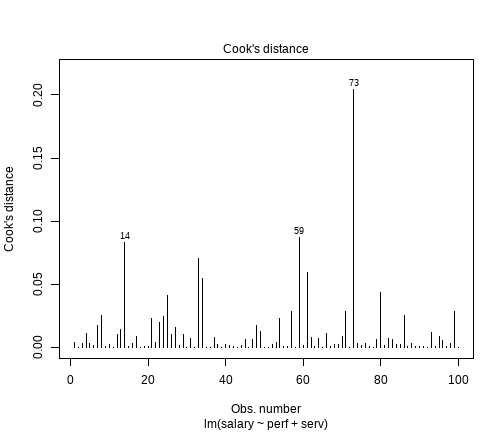<!-- --> ] --- # Influence of coefficients + Cook's distance is a single value summarizing the total influence of a case + In the context of a lm with 2+ predictors, we may want to look in a little more detail. + **DFFit**: The difference between the predicted outcome value for a case with versus without a case included + **DFbeta**: The difference between the value for a coefficient with and without a case included + **DFbetas**: A standardised version of DFbeta + Obtained by dividing by an estimate of the standard error of the regression coefficient with the case removed --- # COVRATIO + Influence on standard errors can be measured using the **COVRATIO** statistic + COVRATIO value <1 show that precision is decreased (SE increased) by a case + COVRATIO value >1 show that precision is increased (SE decreased) by a case + Cases with COVRATIOS `\(> 1+[3(k +1)/n]\)` or `\(< 1-[3( k +1)/ n ]\)` can be considered to have a strong influence on the standard errors --- # COVRATIO in R + COVRATIO values can be extracted using the `covratio()` function: + We can extract these measures using the `influence.measures()` function --- class: inverse, center, middle <h2 style="text-align: left;opacity:0.3;">Part 1: Key model assumptions </h2> <h2 style="text-align: left;opacity:0.3;">Part 2: Basic model diagnostics </h2> <h2>Part 3: What we have not covered? </h2> --- # In short, quite a lot! + Coding schemes for categorical data + Coding specific comparisons + Interactions with categorical variables and 2+ levels + Detailed probing of interactions + Statistical tests for assumptions + Assumption corrections for assumption violations + Bootstrapping + Extended model diagnostics + Non-continuous outcome variables + .... --- # Material links + All our lecture materials can be found [here](https://uoepsy.github.io/) --- class: center, middle # Thanks all!