df_nonlin |>
  ggplot(aes(x=x1, y=y)) +
  geom_point(size = 5) +
  geom_smooth(method = 'lm',
              colour = 'blue', se = FALSE, linewidth = 3) +
  geom_smooth(method = 'loess',
              colour = 'red', se = FALSE, linewidth = 3)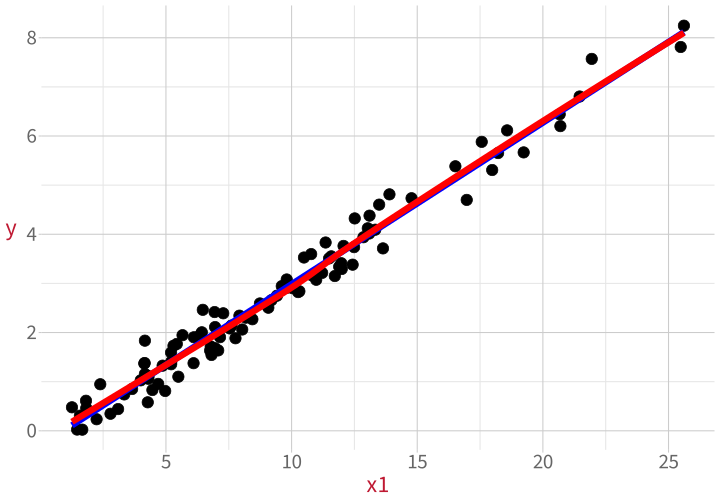
Data Analysis for Psychology in R 2

When we use any statistical model, we are saying “This model is the process that I think the world used to generate my data.”
Linear models are constrained in certain ways: for example, associations between predictors and outcomes can only be linear.
These constraints are the assumptions that the linear model makes about how the data was generated.
| Assumption | Looks fine | Suspicious | |
| L | |||
| I | |||
| N | |||
| E |
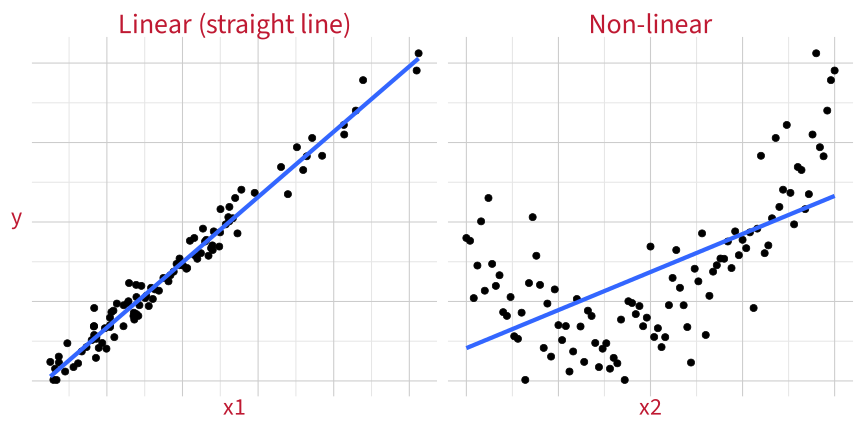
Make a scatterplot with a straight line and a “LOESS” line (LOcally Estimated Scatterplot Smoothing).
The linear variable:
df_nonlin |>
ggplot(aes(x=x1, y=y)) +
geom_point(size = 5) +
geom_smooth(method = 'lm',
colour = 'blue', se = FALSE, linewidth = 3) +
geom_smooth(method = 'loess',
colour = 'red', se = FALSE, linewidth = 3)
The non-linear variable:
df_nonlin |>
  ggplot(aes(x=x2, y=y)) +
  geom_point(size = 5) +
  geom_smooth(method = 'lm',
              colour = 'blue', se = FALSE, linewidth = 3) +
  geom_smooth(method = 'loess',
              colour = 'red', se = FALSE, linewidth = 3)
You want the LOESS line (method = 'loess', red) to stick close to the straight line (method = 'lm', blue). Deviations suggest non-linearity.
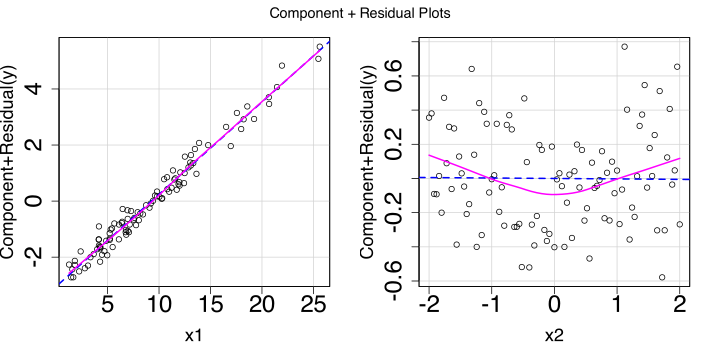
A component-residual plot shows:
m1 <- lm(y ~ x1 + x2, data = df_nonlin)
car::crPlots(m1)
Again, we want the LOESS line to match the straight line as closely as possible. Deviations suggest non-linearity.
How much of a deviation is a problem? This is kind of a judgement call. Some deviation is normal.
In order of increasing spiciness:

Keep the variable as-is and report the non-linearity in your write-up. A good solution if the deviation isn’t huge.
Transform the variable until it looks more linear (e.g., what if you take the exponential with exp()? the logarithm with log()?)
Beyond DAPR3: You can use so-called “higher-order” regression terms, which let you model particular kinds of curves (quadratic functions, cubic functions, etc.).
Beyond DAPR3: You can capture basically any non-linear relationship using “generalised additive models” (GAMs).

| Assumption | Looks fine | Suspicious | |
| L | Linearity: The association between predictor and outcome is a straight line. |
 |
 |
| I | |||
| N | |||
| E |
In order of increasing spiciness:
Keep the variable as-is and report the non-independence in your write-up.
In DAPR3, you’ll learn how to tell a model that some data points probably behave more like one another than they behave like others by including so-called “random effects”.
| Assumption | Looks fine | Suspicious | |
| L | Linearity: The association between predictor and outcome is a straight line. | |
|
| I | Independence: Every data point's error is independent of every other data point's error. (Until DAPR3, assume this is true as long as you have between-participant data.) | ||
| N | |||
| E |
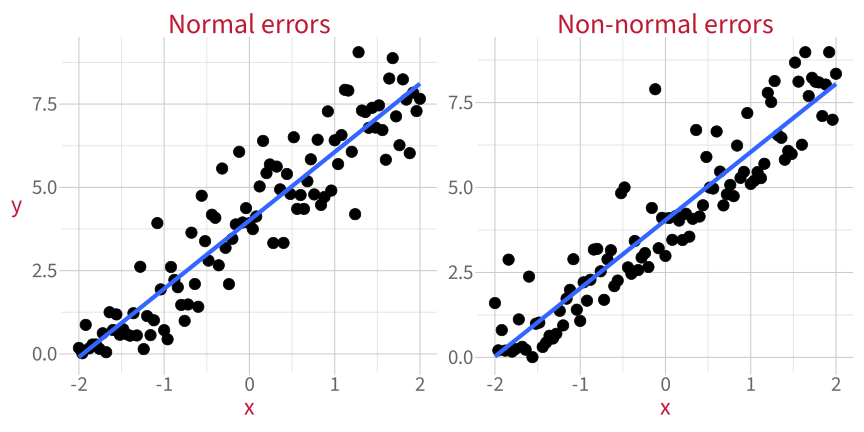
The differences between the fitted line and each data point (aka the residuals) should be normally-distributed.
With a histogram of the residuals, we can eyeball how normally-distributed they appear.
Normally-distributed errors:
tibble(residuals = m_norm$residuals) |>
  ggplot(aes(x = residuals)) +
  geom_histogram()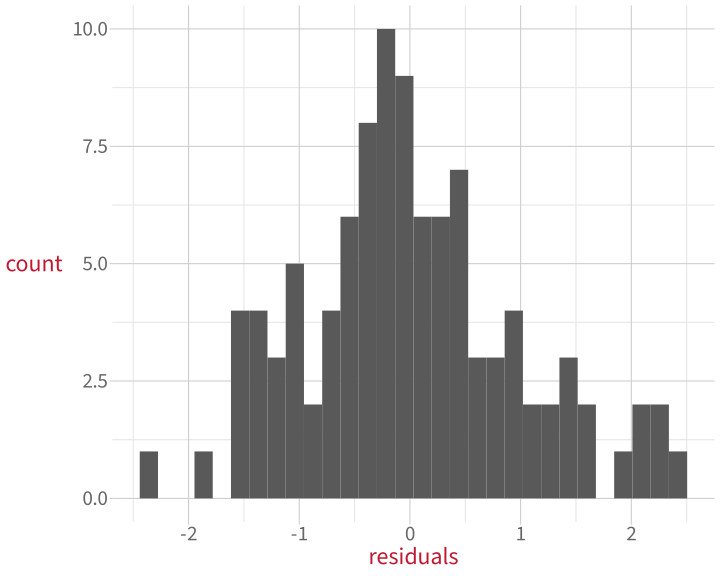
Matches the bell curve shape pretty well.
Non-normally-distributed errors:
tibble(residuals=m_nonnorm$residuals) |>
  ggplot(aes(x = residuals)) +
  geom_histogram()
Very right-skewed! This is not a normal distribution.
We can compare the model’s residuals to what the residuals WOULD look like in a world where they were perfectly normally-distributed.
This is what a “quantile-quantile plot”, a Q-Q plot, does. The dots should follow the diagonal line.
Normally-distributed errors:
plot(m_norm, which = 2)
A few small divergences at the extremes.
Non-normally-distributed errors:
plot(m_nonnorm, which = 2)
Bottom left and top right diverge a lot!
A perfect match to the diagonal is rare. Ask: How big is the mismatch?

If errors aren’t normally distributed, then a model which assumes they are will produce weird (aka biased) estimates:

Next week: we’ll learn how to get around this problem using a method called bootstrapping.
| Assumption | Looks fine | Suspicious | |
| L | Linearity: The association between predictor and outcome is a straight line. | |
|
| I | Independence: Every data point's error is independent of every other data point's error. (Until DAPR3, assume this is true as long as you have between-participant data.) | ||
| N | Normally-distributed errors: The differences between fitted line and each data point (i.e., the residuals) follow a normal distribution. | |
 |
| E |
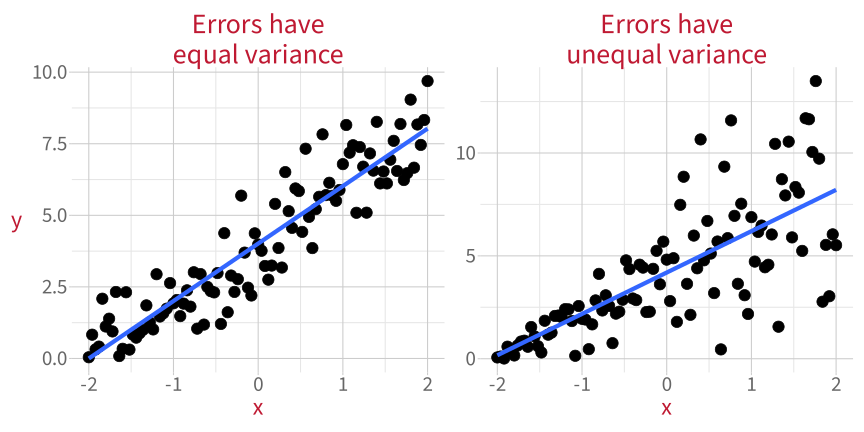
When variance if errors is not equal, the model is not equally good at estimating the outcome for all values of the predictor.
A plot of residuals vs. predicted values shows:
Errors with equal variance
plot(m_equal, which = 1)
Errors with unequal variance
plot(m_unequal, which = 1)
What we want to see:
In order of increasing spiciness:
Keep the variable as-is and report the non-equal variance in your write-up.
Include additional predictors or interaction terms (more on interactions next semester). These may help account for some of that extra variance.
Use weighted least squares regression (WLS) instead of ordinary least squares (OLS). More details in this week’s flash cards.
| Assumption | Looks fine | Suspicious | |
| L | Linearity: The association between predictor and outcome is a straight line. | |
|
| I | Independence: Every data point's error is independent of every other data point's error. (Until DAPR3, assume this is true as long as you have between-participant data.) | ||
| N | Normally-distributed errors: The differences between fitted line and each data point (i.e., the residuals) follow a normal distribution. | |
|
| E | Equal variance of errors: The differences between fitted line and each data point (i.e., the residuals) are dispersed by a similar amount across the whole range of the predictor. | |
 |
Checking assumptions is not an absolute science. It relies on intuitions and vibes (sorry!!)
\(\rightarrow\) Look at the plots, motivate your reasoning, and you’ll be fine.
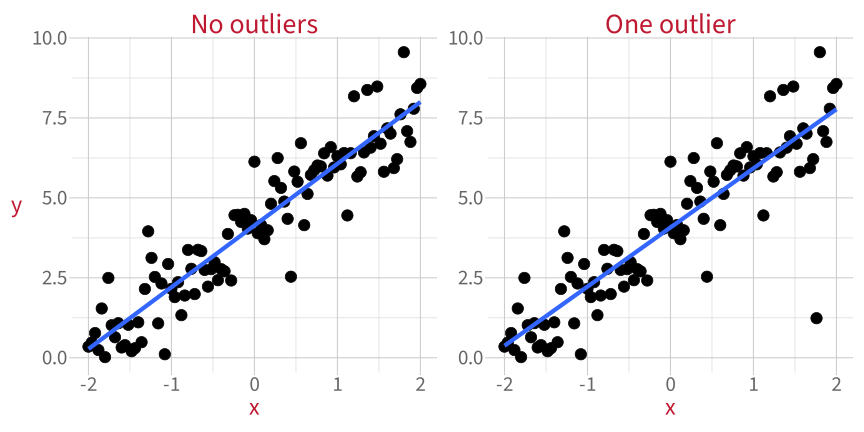
An outlier is a data point whose value for the outcome variable is unusually extreme.
The outcome is usually plotted on the y axis, so outliers are usually weird in the vertical direction (↕).
“Unusually extreme” for the model, not necessarily for the overall distribution of data!
You might recognise “Student” from “Student’s t-test”.
Studentised residuals are a kind of residual that follows a t-distribution.
If you see data points with studentised residuals less than –2 or more than 2:
A value less than –2 or more than 2 is a necessary but not sufficient condition.
\(\rightarrow\) The more extreme the studentised residual, the more likely it is that the data point is an outlier.
Once we’ve fit a model, we can use the rstudent() function to get all the studentised residuals.
m_outl <- lm(y_outl ~ x, data = df_outl)
rstudent(m_outl) |> head()
1 2 3 4 5 6
-0.0255 0.0261 0.2353 -0.3360 0.8212 -0.6834 To plot the studentised residuals:
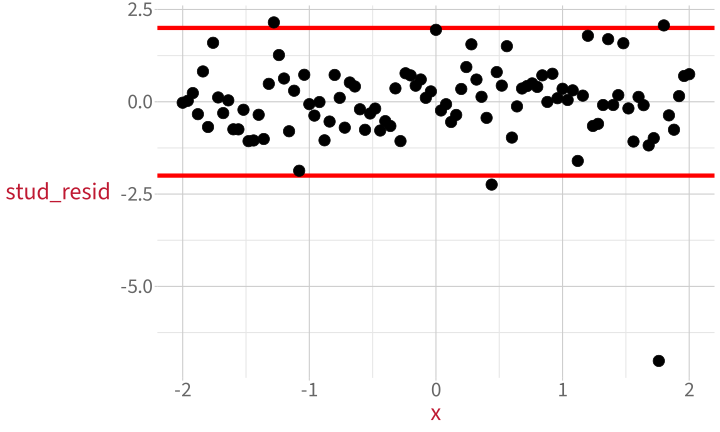
df_outl$stud_resid <- rstudent(m_outl)

df_outl |>
  ggplot(aes(x = x, y = stud_resid)) +
  geom_hline(yintercept =  2, colour = 'red', linewidth = 2) +
  geom_hline(yintercept = -2, colour = 'red', linewidth = 2) +
  geom_point(size = 5)
\(\leftarrow\) There’s our outlier!
Studentised residuals for the data without outliers:

Studentised residuals for the data with one outlier:
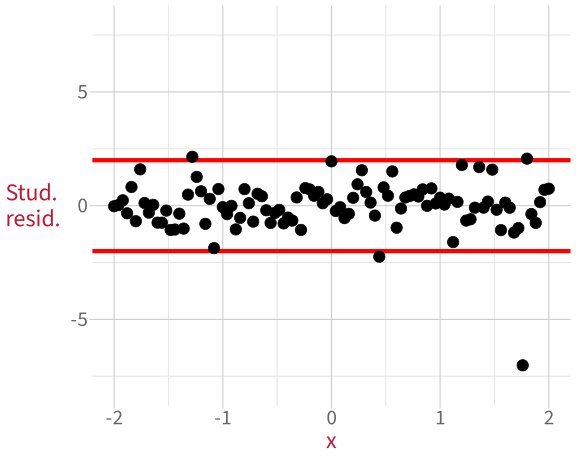
A value more extreme than \(\pm\) 2 does not necessarily mean the data point is an outlier.
We would expect extreme values 5% of the time.
\(\rightarrow\) The more extreme the studentised residual, the more likely it is that the data point is an outlier.
We’ll talk in detail about how to deal with unusual data points after we’ve looked at all three kinds.
Preview:
More on that in a bit!
| Unusual property of a data point | Looks fine | Suspicious |
| 1. Outlyingness: Unusual value of the outcome (↕), when compared to the model. |  |
 |
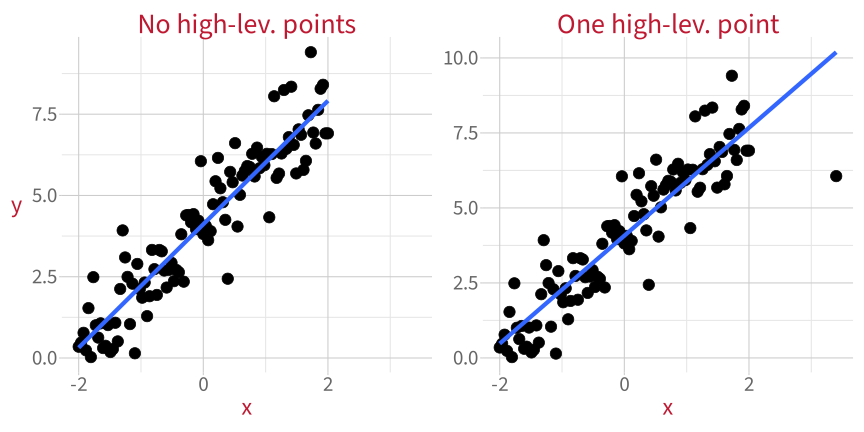
A data point with high leverage has an unusually extreme value for a predictor variable.
Predictors are usually plotted on the x axis, so high-leverage cases are usually weird in the horizontal direction (↔︎).
Can’t use residuals for high-leverage values, because residuals represent vertical (↕) distance.
Instead, for measuring horizontal (↔︎) distance: hat values.
p_hat <- df_levg |>
  ggplot(aes(x = x, y = hat)) +
  geom_hline(yintercept = 2*mean_hat, colour = 'red') +
  geom_point(size = 3)
p_hatBut not this time! :)
Hat values for the data without high-leverage cases:

Hat values for the data with one high-leverage case:
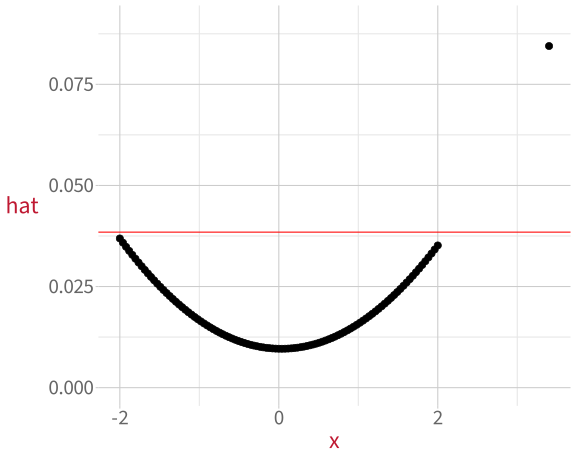
Why are the dots curved?
The curved shape happens because hat values measure distance from the mean of x.
The mean of x is 0, so all the data points on either side of 0 get bigger as they get farther away.
| Unusual property of a data point | Looks fine | Suspicious |
| 1. Outlyingness: Unusual value of the outcome (↕), when compared to the model. | |
|
| 2. High leverage: Unusual value of the predictor (↔︎), when compared to other predictor values. | |
 |
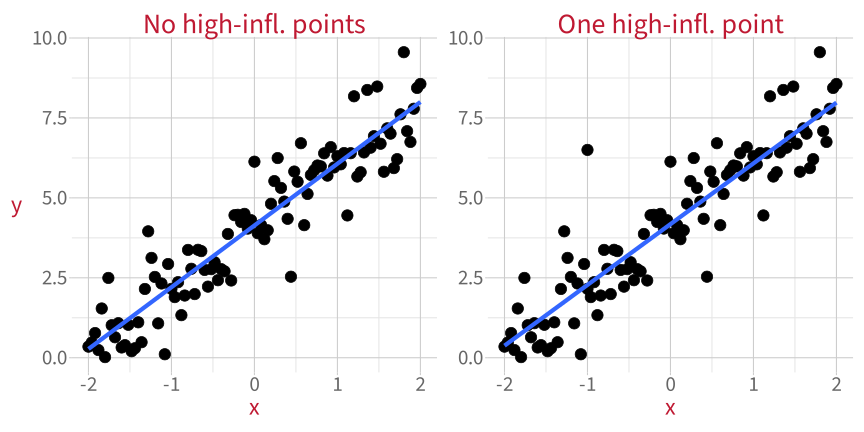
A data point with high influence has an unusually extreme value for the outcome variable and/or for a predictor variable. High influence points have the most potential to influence a linear model’s estimates.
High-influence cases can be weird (relative to the model) in both the vertical direction (↕) and/or the horizontal direction (↔︎).
Two measures to diagnose high influence:
\(D\) for the data with no extreme high-influence values:

\(D\) for the data with one extreme high-influence value:

\(\rightarrow\) The more extreme the Cook’s distance, the higher the influence of that data point.
Cook’s distance looks at how each data point influences the model predictions overall.
The next measure, COVRATIO, looks at how each data point influences the regression coefficients (the slopes and intercepts).
For the data with no extreme high-influence values:

For the data with one extreme high-influence value:

\(\rightarrow\) The more extreme the COVRATIO, the higher the influence of that data point.
| Unusual property of a data point | Looks fine | Suspicious |
| 1. Outlyingness: Unusual value of the outcome (↕), when compared to the model. | |
|
| 2. High leverage: Unusual value of the predictor (↔︎), when compared to other predictor values. | |
|
| 3. High influence: High outlyingness and/or high leverage. | |
 |

 Ignore them and pretend they don’t exist?
Check if they could be a mistake?
Delete them?
Mention them in your write-up?
Replace them with less extreme values?
Check how much they influence your conclusions?
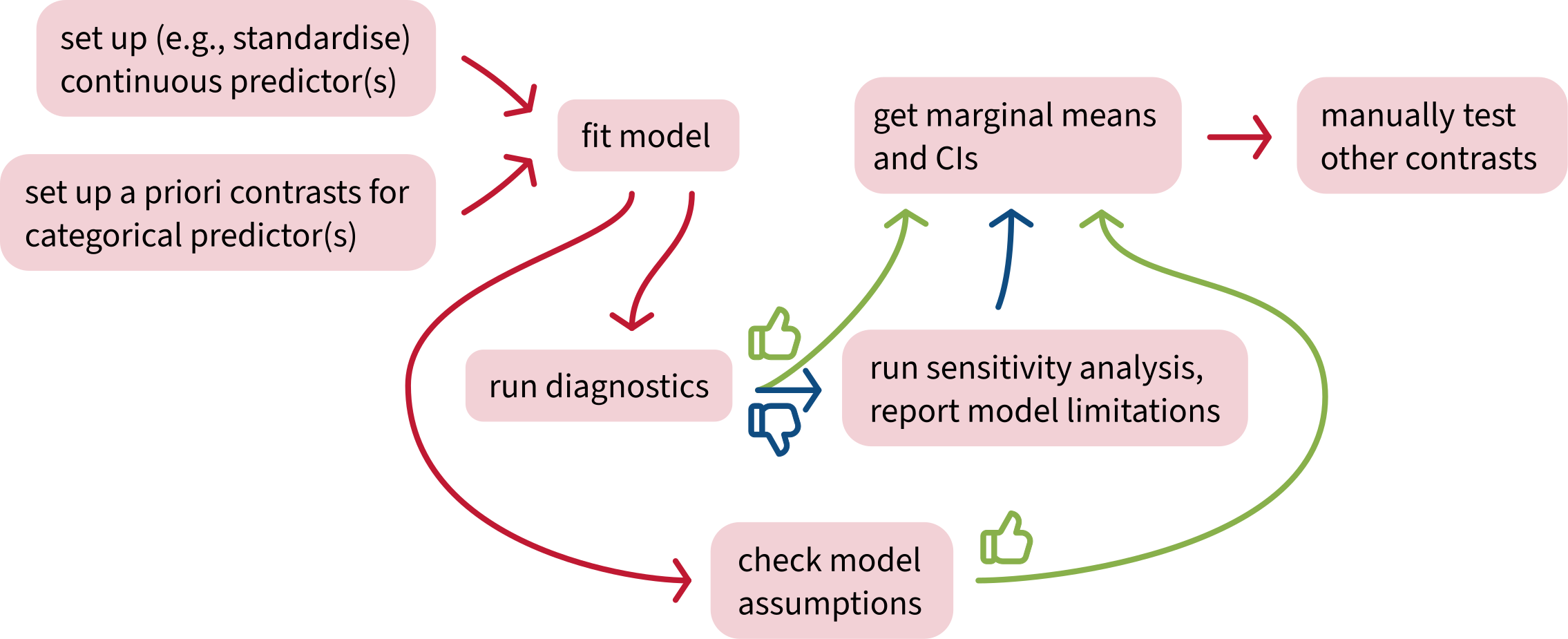
A sensitivity analysis asks: Do our conclusions change if we leave out the unusual data point(s)?
Example 1:
Imagine we want to know whether there’s a significant positive association between x and y, but there’s a data point that we suspect might have high influence on our model.
One high-influence data point?

We try removing that data point to see what happens.

Again, imagine we want to know whether there’s a significant positive association between x and y.

Coefficients:
             Estimate Std. Error t value Pr(>|t|)
 (Intercept)    0.395      0.259    1.53    0.130
 x              0.448      0.211    2.12    0.036 *
Coefficients:
             Estimate Std. Error t value Pr(>|t|)
 (Intercept)   0.2189     0.1804    1.21     0.23
 x            -0.0703     0.1547   -0.45     0.65
\(\rightarrow\) The high-influence point DOES affect our conclusions, so it IS a major problem for our analysis.
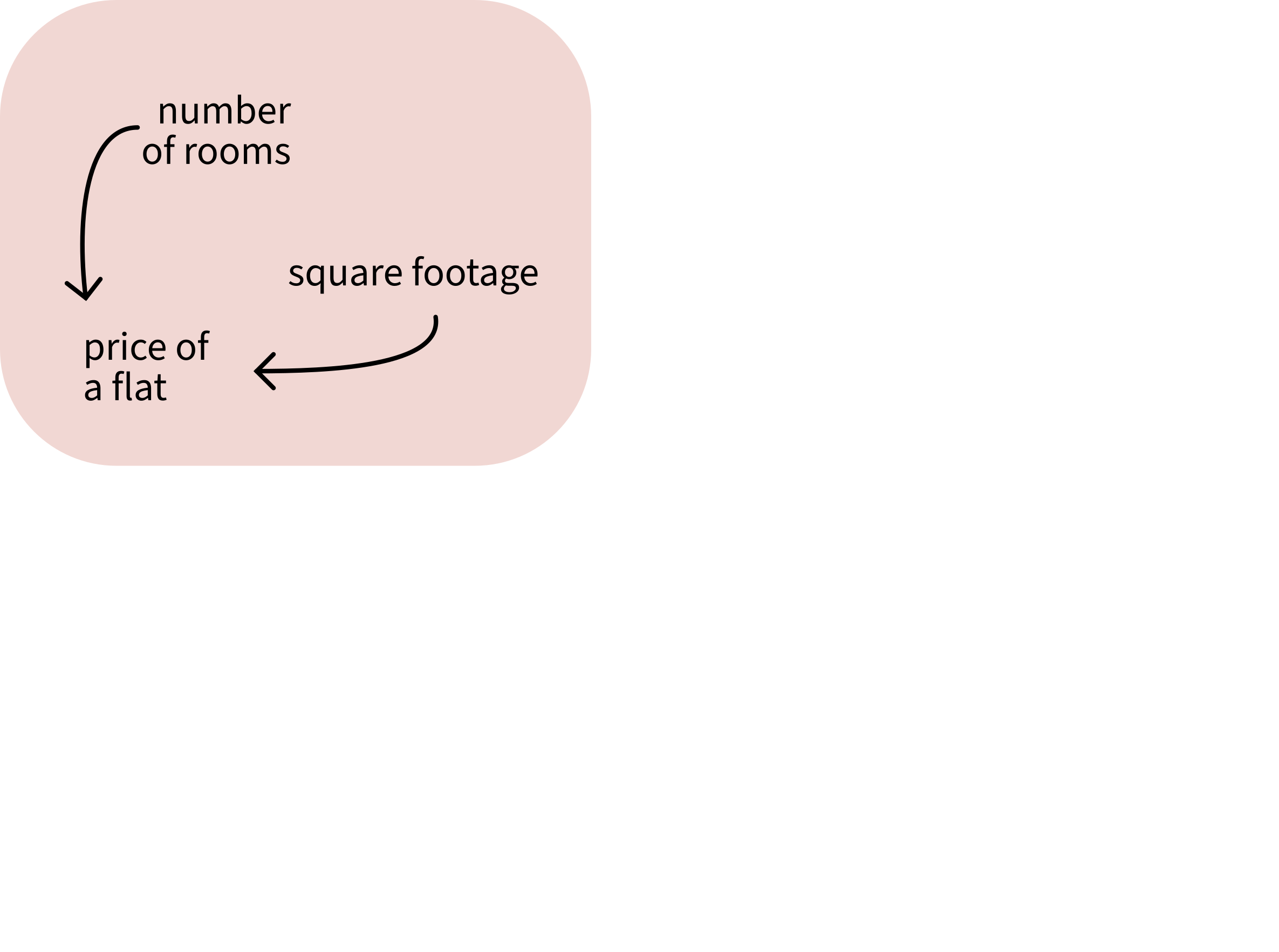
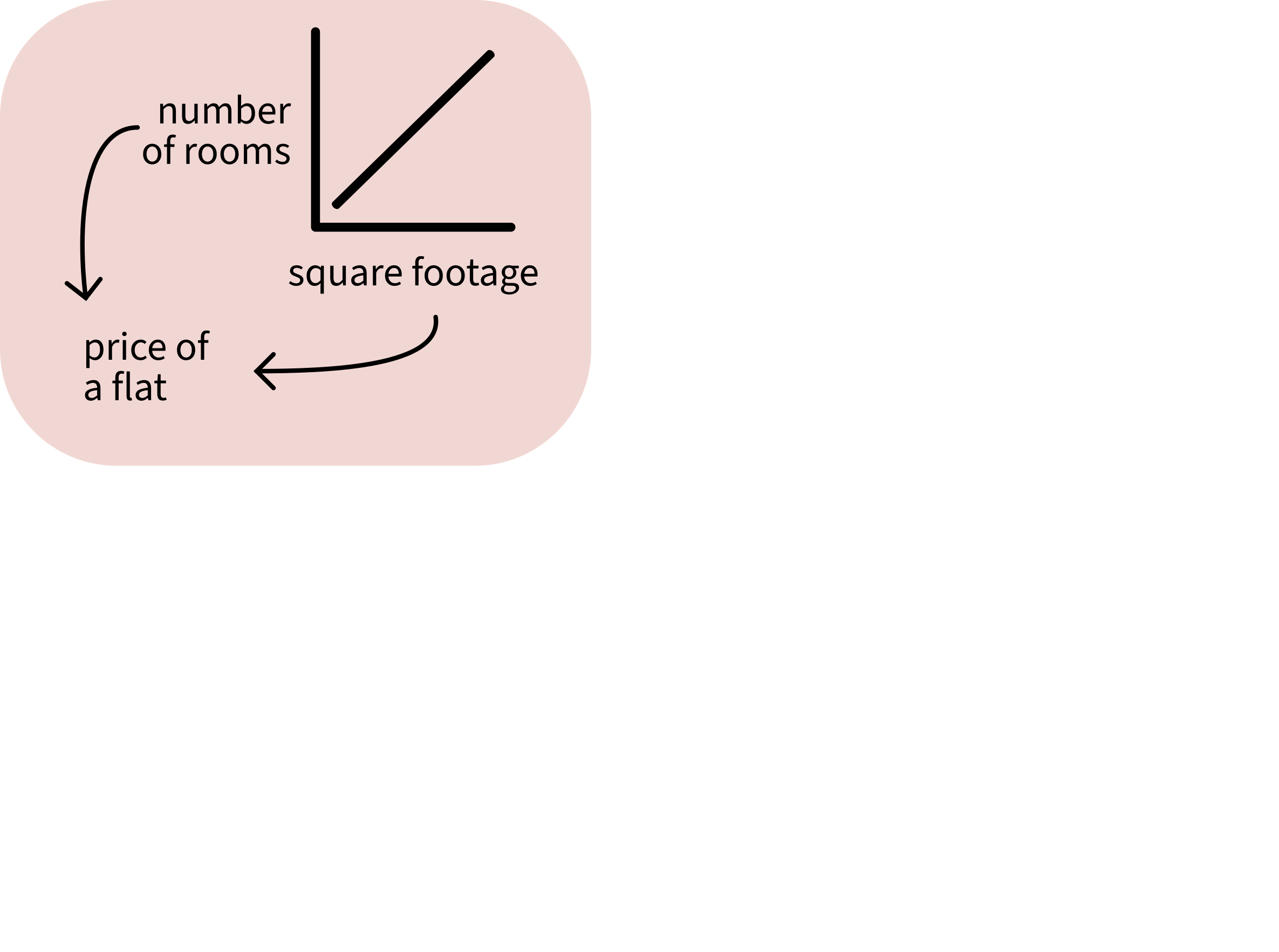
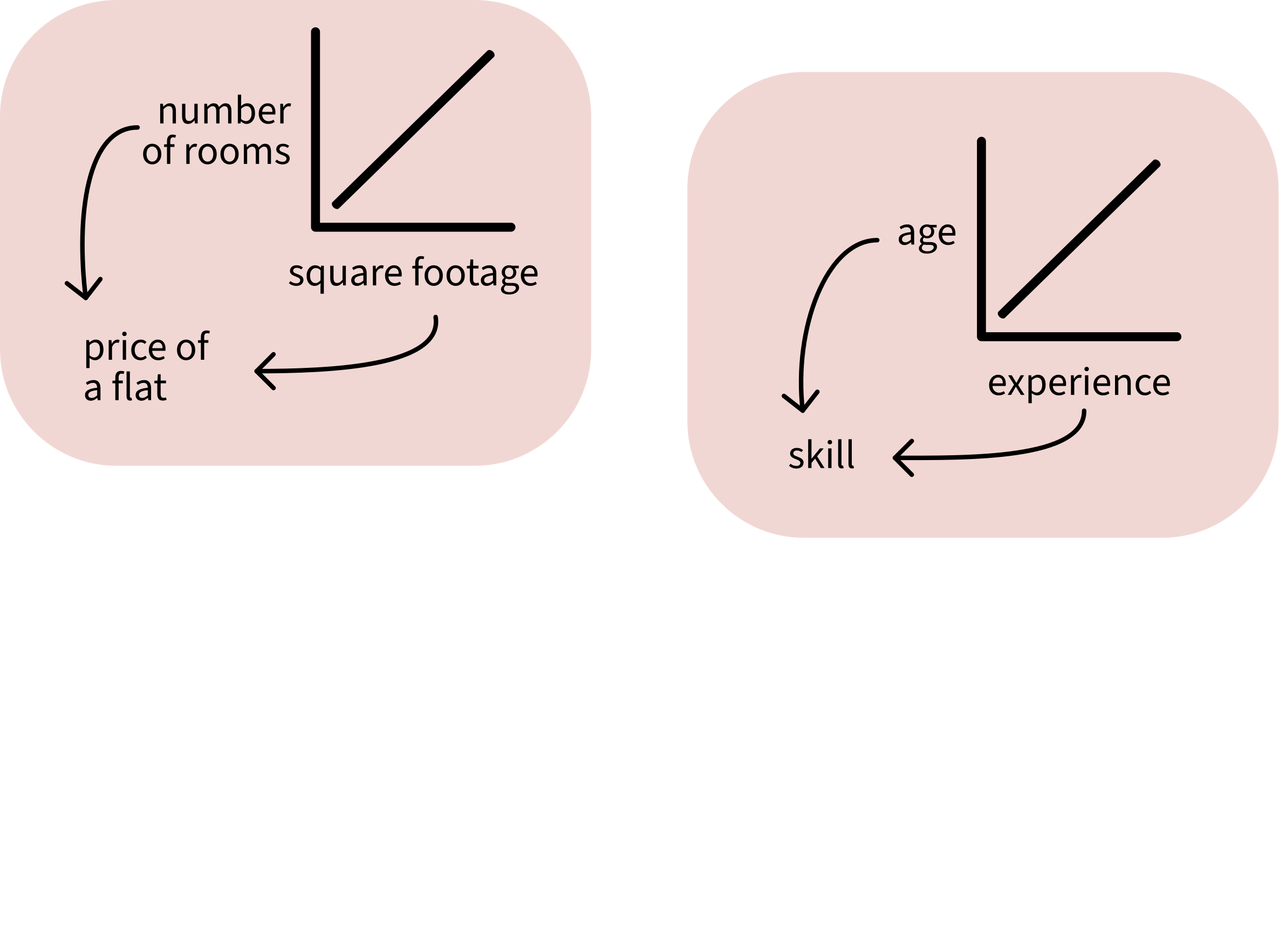
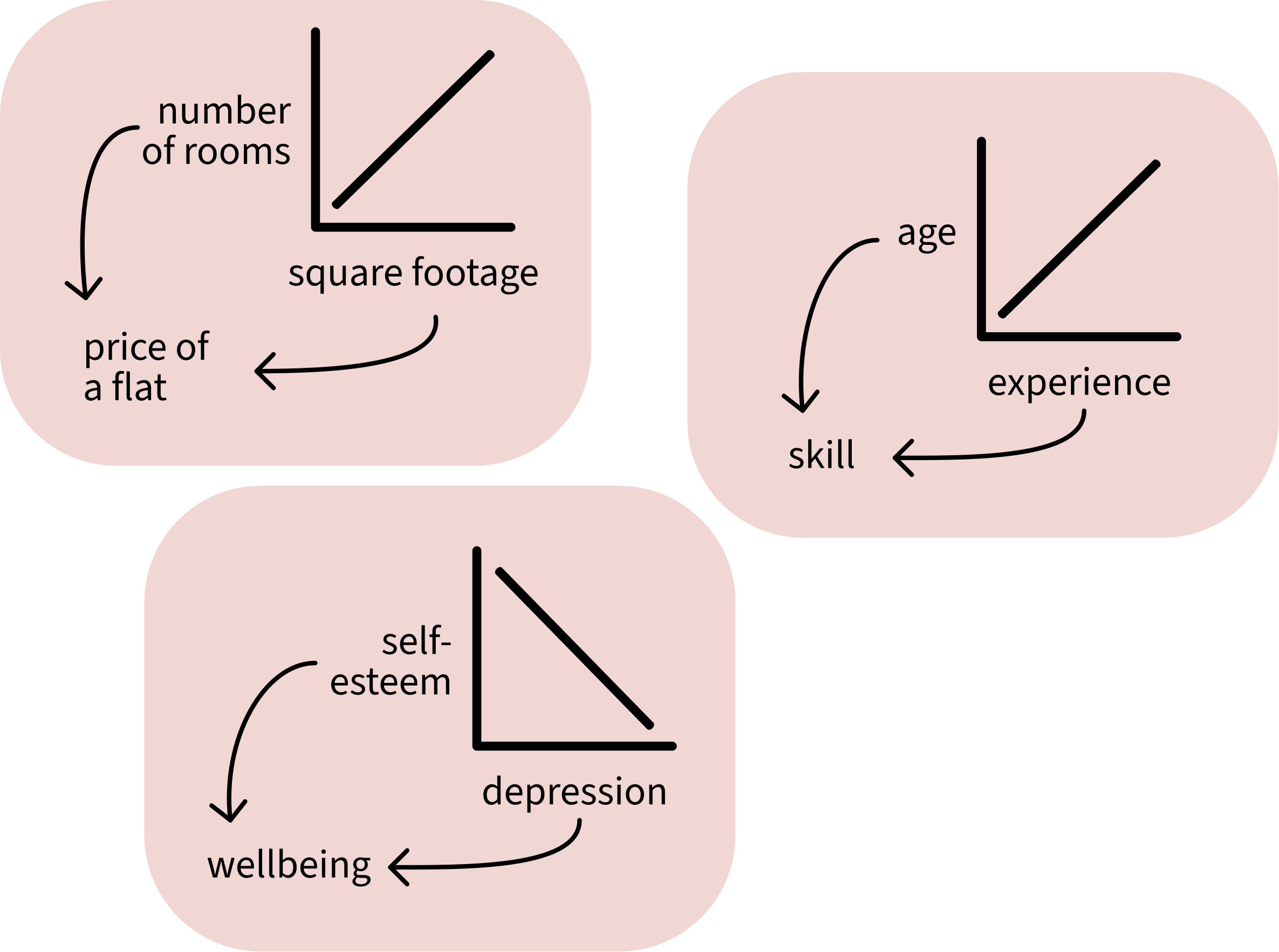
When two predictors are correlated, they contain similar information.
If you know one, you can guess the other.
The model cannot tell which predictor is contributing what information, so its estimates are less precise. In other words, the variance of its estimates increases.
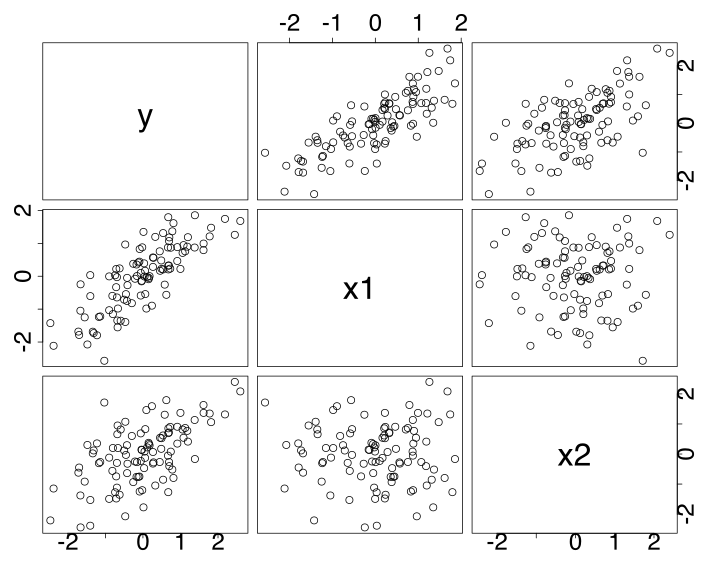
We have a data set called corr_df with an outcome variable y and two predictors x1 and x2.
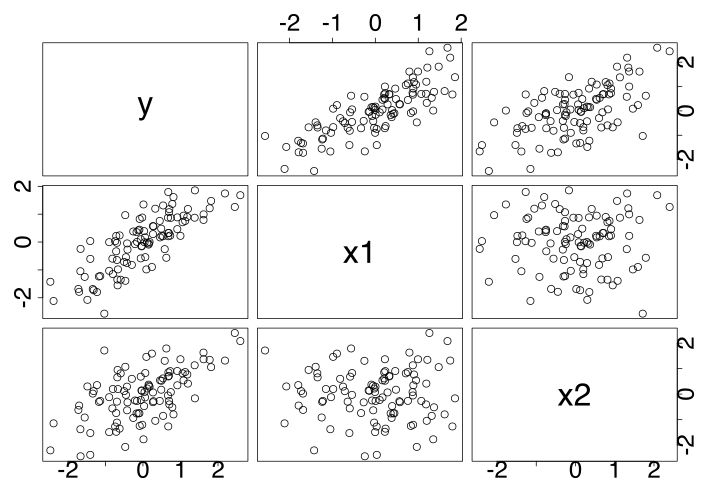
pairs(corr_df)In corr_df, x1 and x2 are highly correlated.
The correlation appears as a strong diagonal line.
We have another data set called uncorr_df:
pairs(uncorr_df)In uncorr_df, x1 and x2 are not very correlated.
The lack of correlation appears as a cloud of data points.
We calculate the Variance Inflation Factor in R using vif() from the package car.
Correlated predictors:

m_corr <- lm(y ~ x1 + x2, data = corr_df)
car::vif(m_corr)
x1 x2
7.4 7.4 The SE of each predictor is \(\sqrt{7.4} = 2.72\) times bigger than it would be without the other predictors.
Slightly worrisome!
Uncorrelated predictors:
m_uncorr <- lm(y ~ x1 + x2, data = uncorr_df)
car::vif(m_uncorr)
x1 x2
1 1 The SE of each predictor is \(\sqrt{1} = 1\) times bigger—so no different at all.
In order of increasing spiciness:
If the correlation isn’t too worrying, then leave the model as-is and report the VIFs.
If the correlations are large, remove one of the correlated predictors from the model—it’s not adding any new information anyway.
In DAPR3: Make a composite predictor that combines the correlated predictors. For example: a sum, an average, or a cleverer technique like Principal Component Analysis.
check_model()A few assumption/diagnostic checks are packaged together by check_model(model) from the performance package.
You’ll play with check_model() in the lab.
Note: check_model() is only a partial shortcut.
It leaves out a lot of important checks too.
performance::check_model(m_corr)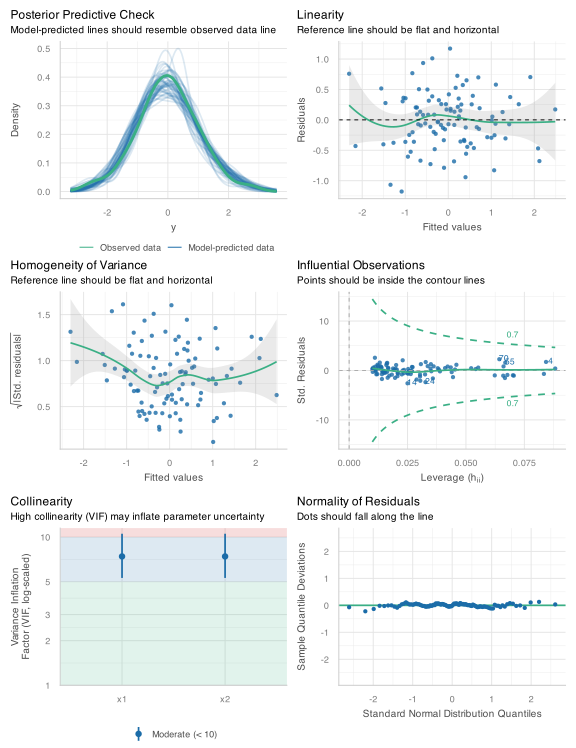
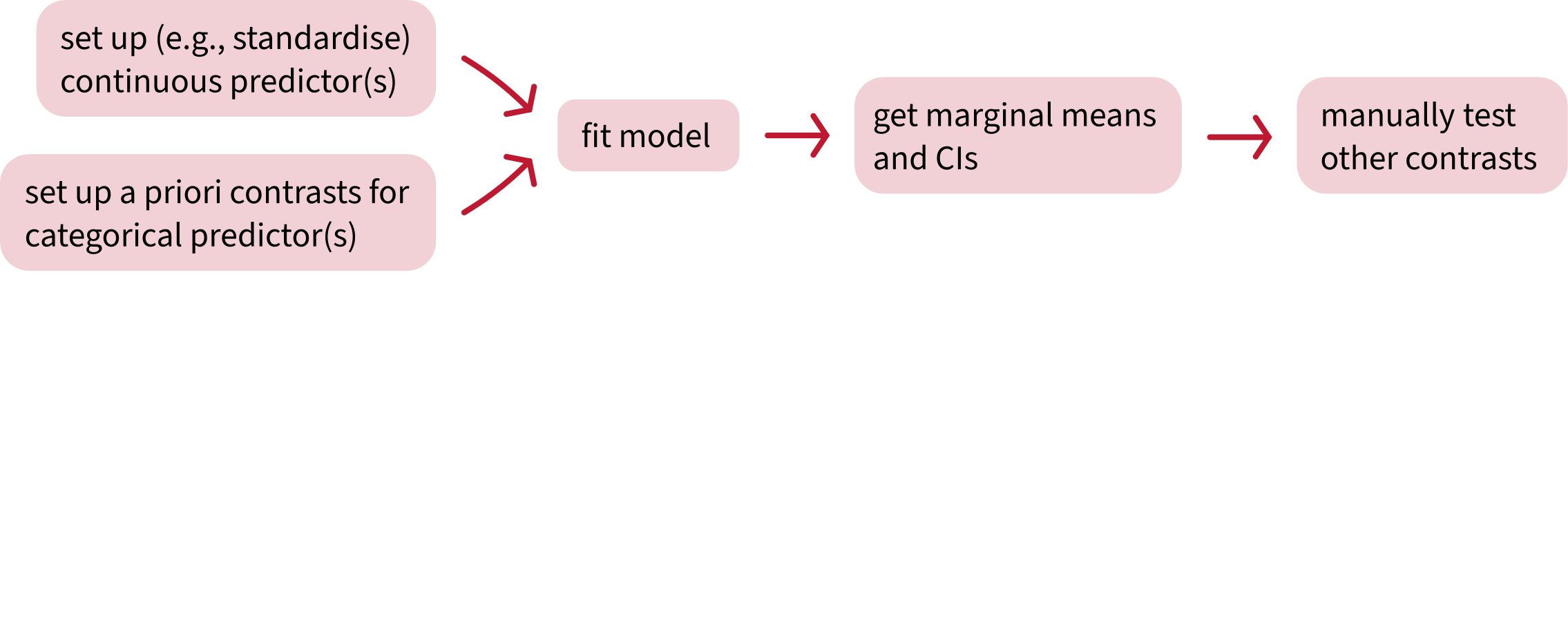

Attend your lab and work together on the exercises

Help each other on the Piazza forum

Complete the weekly quiz

Attend office hours (see Learn page for details)